40
TASCAM DR-60D
3 – Preparation
Connecting monitors and headphones
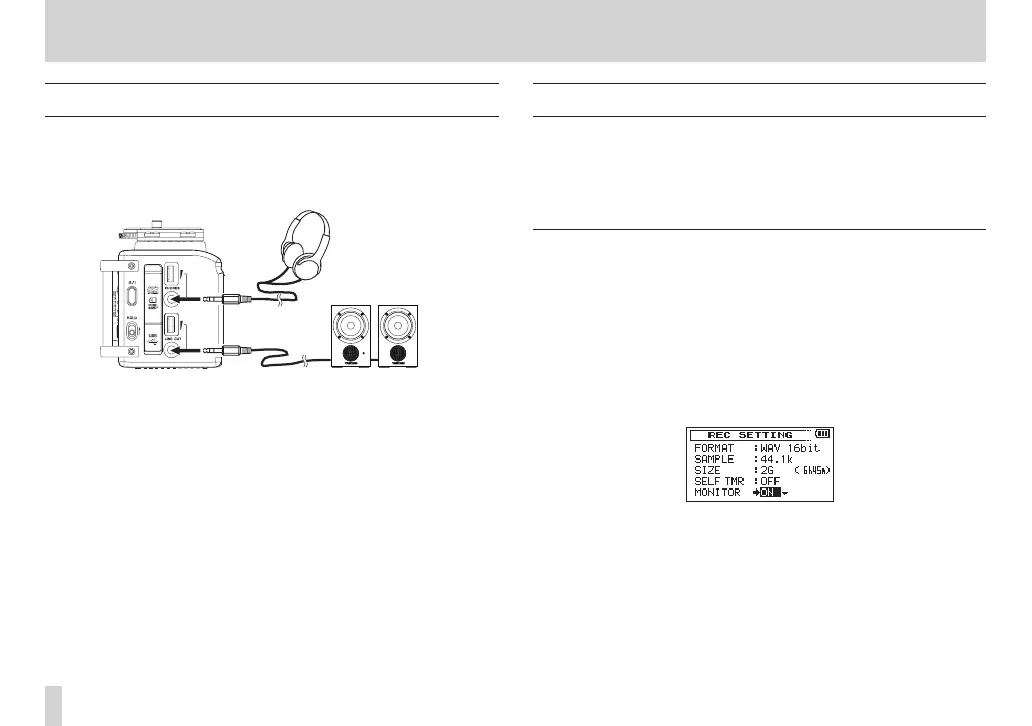
To listen with headphones, connect them to the PHONES jack.
To listen with an external monitoring system (powered monitor
speakers or an amplifier and speakers), connect it to the LINE OUT
jack.
Headphones
Powered monitor speakers or
amplifer and speakers
Monitoring
By enabling the monitoring function, you can monitor the input
signals when the unit is stopped using headphones, for example.
Moreover, by connecting this unit’s CAMERA IN jack with the
camera line output, you can check the sound being recorded by the
camera.
Enabling monitoring
1. Press the MENU button to open the
MENU
screen.
2. Turn the DATA dial to select
REC SETTING
, and press the DATA
dial or / button to open the
REC SETTING
screen.
3. Turn the DATA dial to select
MONITOR
, and press the DATA dial
or / button.
4. Turn the DATA dial to turn monitoring of the input signal on or
off.
Options:
OFF
,
ON
(default value)
5. When finished, press the stop (8) [HOME] button to return to
the Home Screen.



 To Next Page