Setting up radio for CRSF
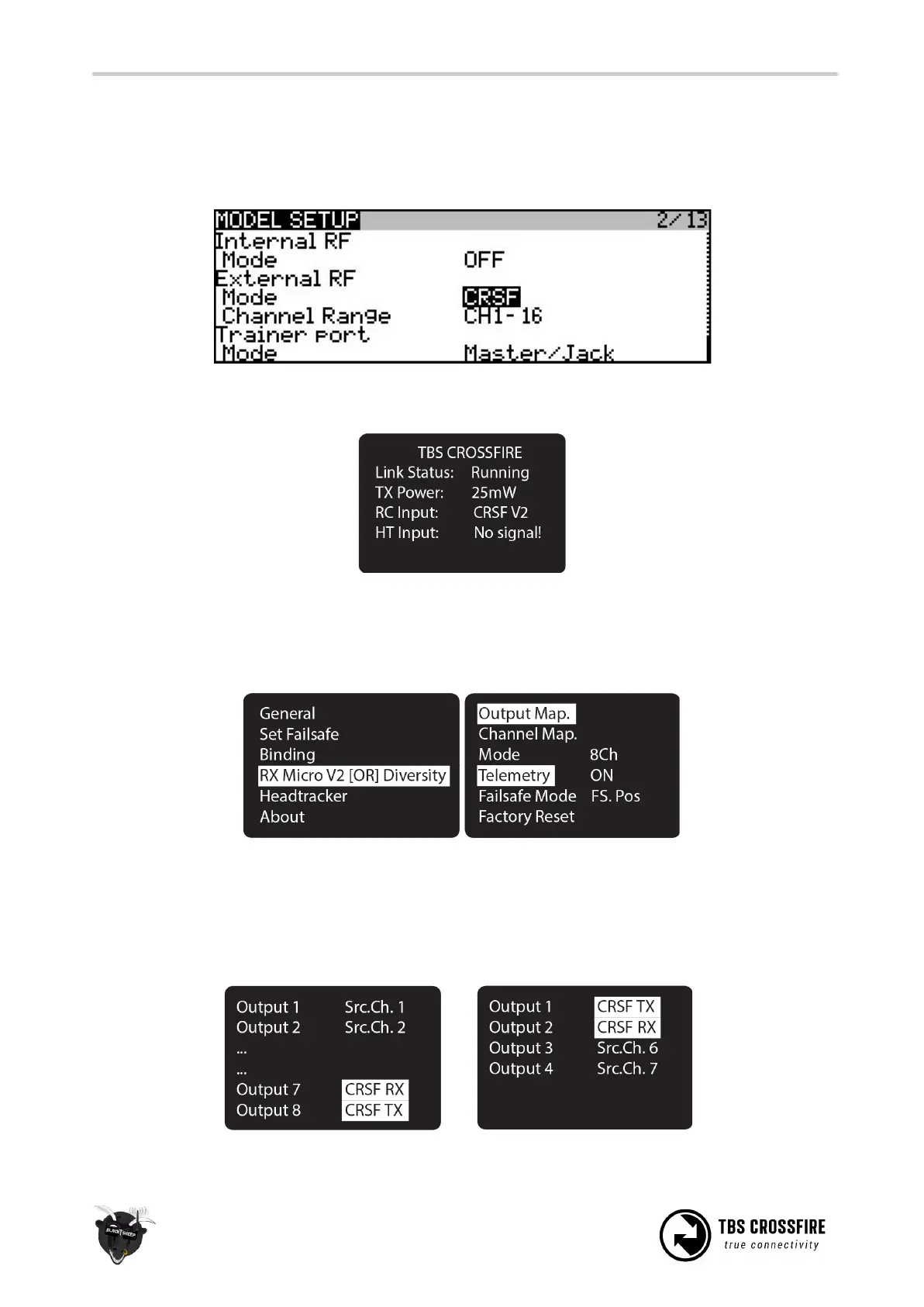
With the CROSSFIRE transmitter in place on the radio, you have to change, or make sure, that the internal
radio is OFF and the external radio protocol (between the radio and transmitter module) is set to CRSF.
On the CROSSFIRE transmitter OLED display, you should now see “RC Input: CRSF V2”, meaning you have
CRSF enabled and running.
Setting up receiver for CRSF
With the CROSSFIRE receiver powered and connected, go into the settings menu, turn “Telemetry” to “On”,
then open the “Output mapping” screen. On the CROSSFIRE MICRO V1, only CRSF TX will be available.
For the CROSSFIRE DIVERSITY RX, change “Output 8” to “CRSF TX” and “Output 7” to “CRSF RX”. While on the
CROSSFIRE MICRO V2 RX, change “Output 1” to “CRSF TX” and “Output 2” to “CRSF RX”.
This will output CRSF on the respective ports on the receiver pin header. 5V compatible.



 To Next Page