9 BRICKWALLHD User Manual
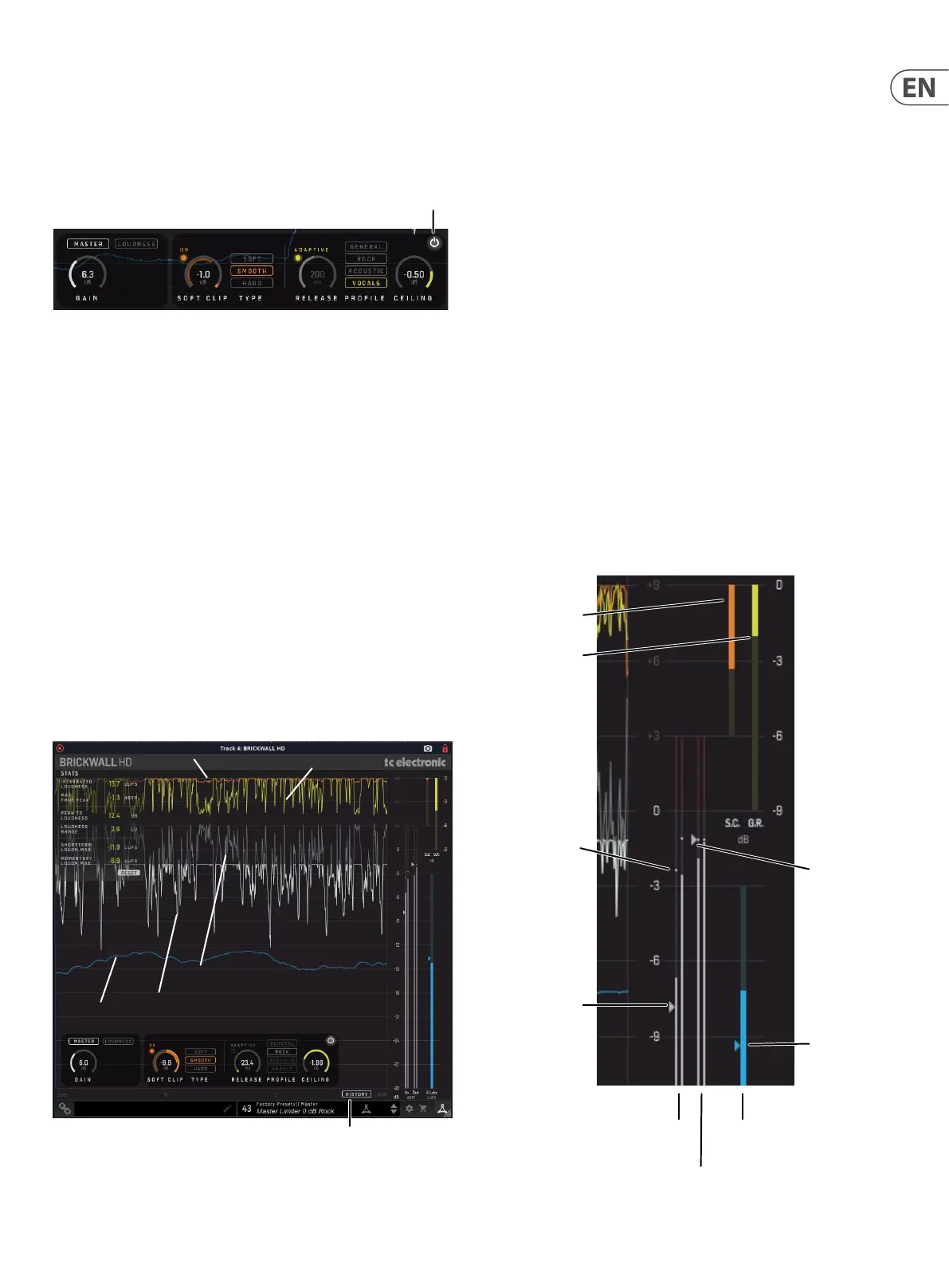
The controls and features are described in more detail below:
5.1 Bypass On/O
Press this very important button to bypass or engage the BRICKWALL HD. This
makes it easy for you to listen and compare the overall eect of your work.
Bypass On/O
5.2 Main Display
When the HISTORY button is engaged, the display will show the currently-playing
program levels and gain reduction varying with time. The meters at the right
show the level and gain reduction at the DAW playhead position (the "Now").
When HISTORY is o, the scrolling display is not shown, and the information at
the DAW playhead position is shown in the meters.
• • This display has a linear vertical dB scale and a horizontal time scale
• • The display is a 15 second scrolling view, with "Now" at the right, and
-15 seconds at the left. It can be restarted by pressing the RESET button
in the STATS menu at top left
• • Limiter Input/Output (-30 to +9 dBTP)
• • Input Level, before the Gain has been applied, is shown in grey
• • Output Level is shown in white
• • Soft Clip Gain Reduction (-39 to 0 dB). Soft Clip is orange
• • Limiter Gain Reduction (-39 to 0 dB). Limiter is yellow
• • Short-Term (3 sec) Loudness (-30 to -3 LUFS). Loudness is blue
Loudness
Output
History
Input
Limiter
Soft Clip
5.3 Meters
The meters at the far right indicate the levels and gain reduction at the DAW
playhead (Now) position. (If the History switch is engaged, then the scrolling
graphs show the meter readings vs time.)
• • Use the Master Gain control in the controls area to adjust the input level
if required
• • Limiter Input/Output (-30 to +3 dBTP, with indication of Threshold and
Ceiling)
• • Input Level, before the Gain has been applied, is shown in grey
• • Output Level is shown in white
• • Soft Clip Gain Reduction (-6 to 0 dB) in orange
• • Limiter Gain Reduction (-9 to 0 dB) in yellow
• • Short-Term (3 sec) Loudness (-30 to -3 LUFS) and Integrated Loudness
indication, in blue
• • When in the Master Limiter mode, the small triangle on the input meter
represents the Limiter threshold, and is the opposite of the Master
Limiter gain. For example, if Gain = 5dB, then Threshold = -5dB
• • When in the Loudness Limiter mode, the triangle on the input meter is
again the Limiter threshold, but how it is set is determined after the Set
Gain procedure.
• • The triangle on the output meter represent the Ceiling setting
Soft Clip
Gain Reduction
Limiter
Gain Reduction
Loudness LUFS
Loudness
Input Levels L/R dBTP
(before Gain applied)
Limiter Threshold
(the inverse of
the Gain setting)
Output Levels L/R dBTP
Ceiling
Peaks



 To Next Page