10 BRICKWALL HD User Manual
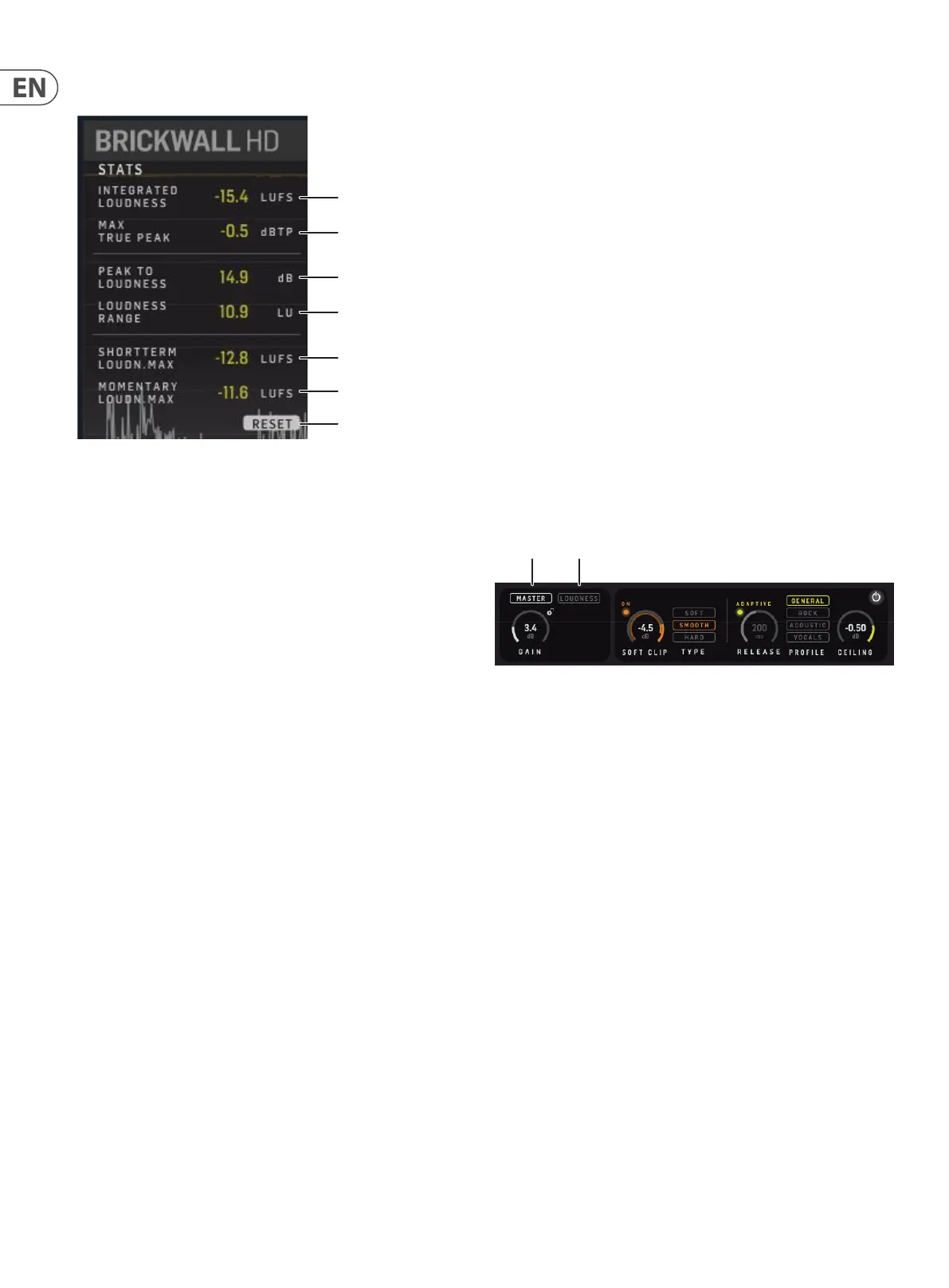
5.4 Statistics
Maximum True Peak
Integrated Loudness
Peak to Loudness
Loudness Range
Short Term Loudness
Maximum
Momentary Loudness
Maximum
RESET
Stats View:
• • These are the measurements since the last plug-in insert, last Reset or
the DAW project load. Press Reset to clear the measurements
• • Integrated Loudness (I), LUFS. This is the measured Integrated Loudness
since the last Reset
• • Max True-Peak, dB True-Peak. This is the measured maximum True-Peak
level
• • Peak-to-Loudness (PLR), dB. This is the distance from the measured
maximum True-Peak level to the Integrated Loudness
• • Loudness Range (LRA), LU. This is the Loudness Range
• • Short term Loudness Max (3 sec), LUFS. This is the measured maximum
short term Loudness level
• • Momentary Loudness Max (400 ms), LUFS. This is the measured
maximum Momentary Loudness level
• • Note: Bypassing the BRICKWALL HD, or cycling or moving the DAW
playhead will make the Stats invalid for your track. Press Reset and
play the part (maybe all) of the track you want to be measured in one
continuous go
6. Precision in Level and Time
In music track mastering, it is common practice to allow level to digital Full
Scale on a sample by sample basis. This has the consequence that down-stream
elements such as audio le codecs like MP3 and AAC or play back systems like CD
players will behave unpredictably, and in many cases add distortion you don’t
hear in the studio. The distortion is not harmonic, can be quite severe (more than
10 %) and cause early listening fatigue.
The key to remove this problem that we call 0 dBFS+ peaks, is to use a True-Peak
Limiter like BRICKWALL HD. The threshold can now be set safely at 0.0 dBFS,
while BRICKWALL HD still takes care of peaks that would otherwise cause
distortion.
The BRICKWALL HD limiter operates with highly-extended precision in both
level (True Innite headroom) and time (5 times oversampling). Its processing
engine, PPM level meters, History and Stats are all upsampled in order to identify
intersample and 0 dBFS+ peaks in the precious Mix or Master track. Therefore,
the meter scales are extended to +3 dBFS because excessive level normally
falls between 0 and +3 dBFS, and most consumer equipment already exhibits
distortion at +0.5 dBFS.
6.1 Two Limiter Approaches
The two alternative types of Limiter are provided in BRICKWALL HD: The
conventional Master Limiter, and the new Loudness Limiter.
Master Loudness
• • The Master Limiter is a typical approach with input gain to set the
amount of limiting, and Ceiling to set the amount of headroom in the
exported le.
• • The Loudness Limiter is an all-new approach, enabling a workow
suitable for modern streaming services like Spotify, Tidal, and Apple
Music. Here you set a desired, resulting, loudness level, which the
BRICKWALL HD, after listening to your track, will automatically aim for
by setting the Gain under the hood.
For both types, when the input level exceeds the Threshold, the signal will be
attenuated and the Gain Reduction meters at upper right of the main view and
the History curves will display the max amount of reduction applied to either of
the audio channels.



 To Next Page