12 BRICKWALL HD User Manual
6.2 Adaptive Release Time
Many dierent objectives exist when it comes to peak-limiting audio. From
taking care of a few peaks in a gentle way, to signicantly pushing up the
average/peak ratio in order to raise the apparent loudness, for voice cut-through,
or a dozen other reasons. BRICKWALL HD extends the adaptive release time
control of earlier incarnations to include numerous new internal variables, to
make the algorithm respond intelligently for a number of applications.
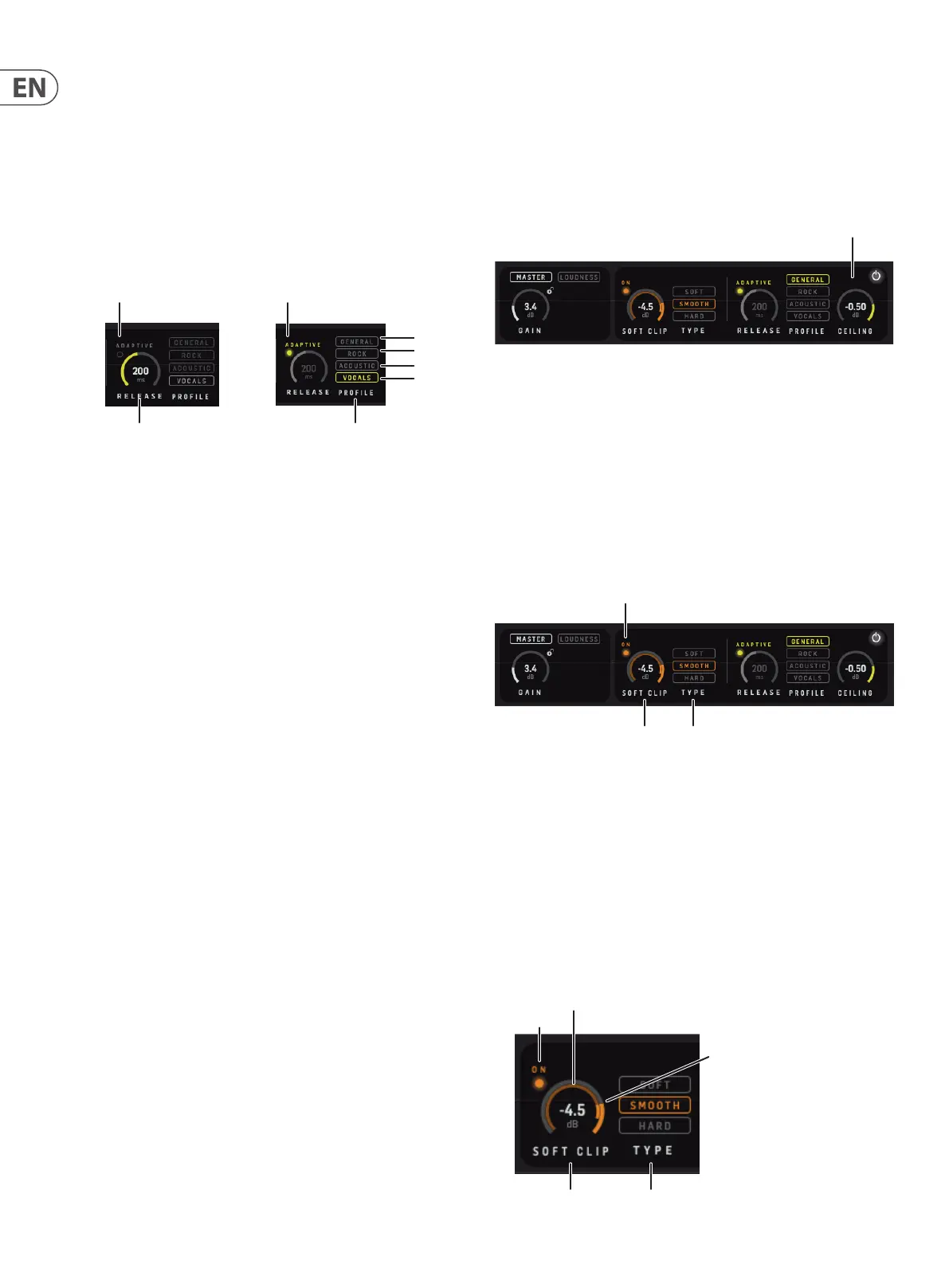
Click the Adaptive LED to enable Adaptive Release Time and take advantage of
the dierent Proles.
Adaptive O Adaptive On
General
Rock
Acoustic
Vocals
Release
Time
Prole for
“Adaptive”
6.2.1 Prole
The adaptive Proles allow you to tell BRICKWALL HD what your intentions are.
The selected Prole is only active when Adaptive is enabled.
Several internal variables are dynamically updated based on the Prole chosen,
so distortion is perceived (and measured) to be as low as possible for a given
loudness, and reduction in average/peak ratio. Maximum perceived distortion
tolerated is dierent from Prole to Prole. The multi-dimensional parameter-
space is fully continuous to avoid situations where distortion could occur.
• • The General Prole has a higher tolerance for perceived distortion than
Acoustic. It is still magnitudes better than analog designs, but may be
on the aggressive side for sensitive music. It is a good choice for many
types of music, and in live production where you don’t know what to
expect.
• • The Rock Prole again has a higher tolerance for perceived distortion,
and is therefore better suited for typical Rock/Electric mix and
mastering projects, rather than live applications.
• • The Acoustic Prole oers gentle processing with minimum static and
dynamic distortion. It’s a rst choice for audiophile limiting, for instance
with classical music, choir etc.
• • The Vocals Prole is targeted human voice, and adapts well to
asymmetrical signals. Used on composite material, perceivable
distortion is to be expected with large ratios of limiting.
6.3 Ceiling
The Ceiling is intended for reserving headroom in your master le against 0 dBFS
True Peak. Often, downstream processors like Digital-to-Analog converters in
consumer playback systems or lossy audio le Codecs like MP3 and AAC used in
Streaming Services are not safely handling peaks that cross 0 dBFS and this may
result in unpredictable distortion, even if the master le sounds perfect in the
studio. To ensure extra margin against this problem Ceiling can be left a bit lower
than 0 dBFS, say at -0.5 dBFS.
Ceiling
6.4 Soft Clip
Soft Clip is a bandwidth-limited distortion eect, not unlike analog tape
saturation. Soft Clipping can assist the Limiter in increasing loudness for a signal
at the price of distortion. While the Limiter has a release time, the Soft Clipper
acts instantly to transients so their audible artefacts are dierent.
When the Limiter and Soft Clipper are used in combination, it is possible
to relieve the dynamic Limiter by applying the Soft Clipper. When used in
combination with the dynamic Limiter, Soft Clip can produce a louder and denser
impression than the dynamic limiter by itself.
Note: If misused, excessive Soft Clip may lead to an ear-fatiguing sound.
Soft Clip On/O
Soft Clip
Threshold
Soft Clip
Type
6.4.1 Soft Clip Threshold
The Soft Clipper sits on the plug-in input before the gain applied by the Limiter.
Therefore the Soft Clip threshold setting relates to the plug-in input level shown
on the Input PPM meter.
Adjust the Threshold by dragging the control or by clicking and entering the
value.
Note: The Threshold can be easily set by viewing the inner-ring level meter
inside the Threshold parameter outer-ring. A highlighted overlap between the
signal level and threshold rings will indicate that the Soft Clipper is in action and
limiting the signal.
On/O
(inner ring)
Soft Clip
Threshold
(outer ring)
Soft Clip
Threshold
Soft Clip
Type



 To Next Page