32
83-530-000 Rev J
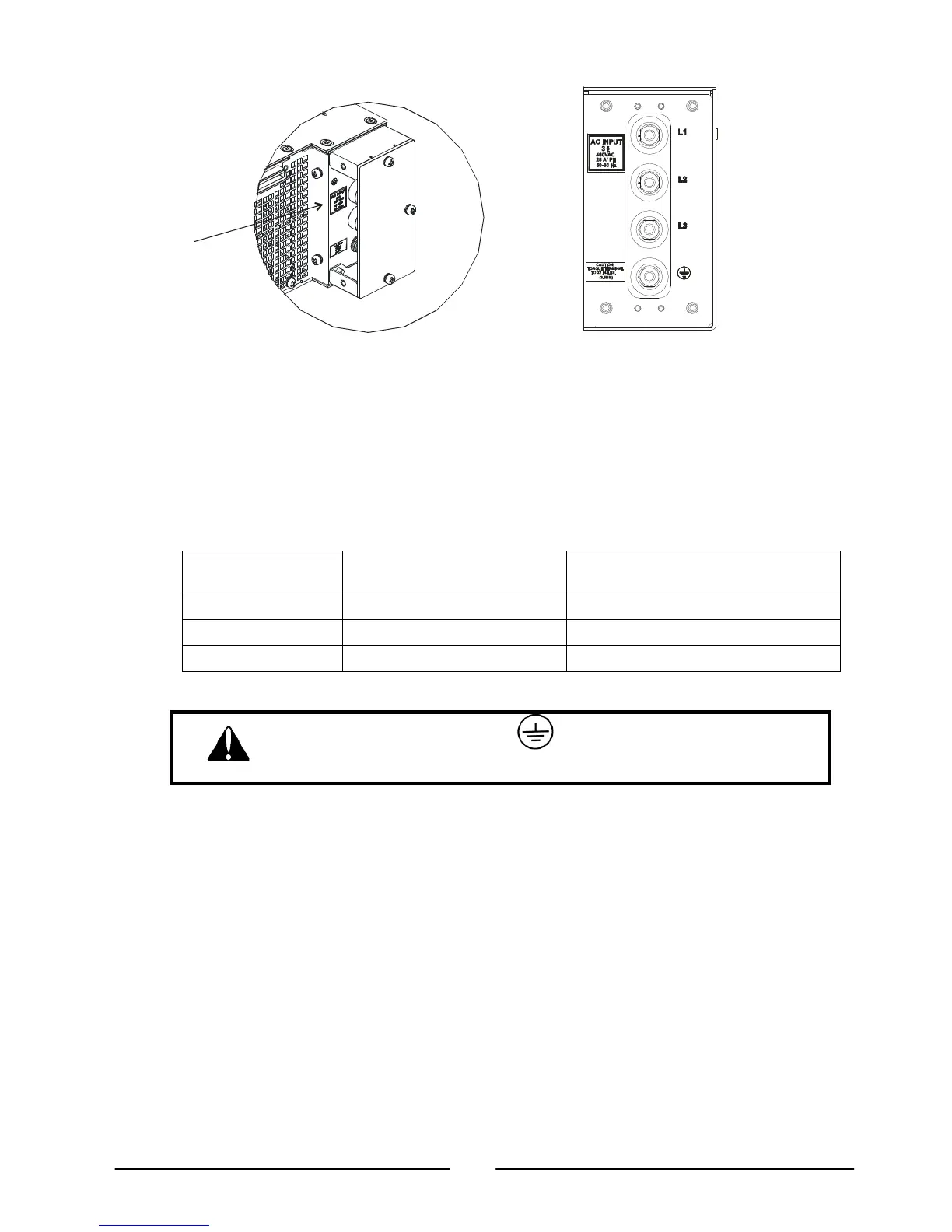
Input Terminal Block
with cover.
Input Terminal Block
Input Rating
Label
NOTE: The figure shows input
connection from left side.
For connection from right side
reverse the input cover.
Figure 3-1. AC Input Connections
3.7.1. Recommended Cable Size for Input Connection
INPUT VOLTAGE CURRENT RMS AMPS
PER PHASE
RECOMMENDED
COPPER WIRE SIZE
208 75 4 AWG
400 45 6 AWG
480 35 7 AWG
The AC input current and voltage rating is marked on the rear terminal of the power supply.
The Protective Earth Ground must be connected before applying
AC Line Power to the power supply.
3.8. Turn-On Checkout Procedure
3.8.1. General
The following procedure ensures that the power supply is operational and may be used
as a basic incoming inspection check. Refer to Fig. 4-1 and Fig. 4-2 for the location of the
controls indicated in the procedure.
3.8.2. Prior to Operation
a) Ensure that the power supply is configured to the default setting:
On/Off switch at off position.
Dip switch: all positions at Down (“Off”) position.
Sense connector: configured to Local Sense as shown in Fig.3-2.



 To Next Page