EasyManua.ls Logo

Teac A-5500 - Phones Output

Teac A-5500
109 pages
Print Icon
To Next Page IconTo Next Page
To Previous Page IconTo Previous Page
Loading...
PHONES
OUTPUT
CHECK
Es
be
3.
MINIMUM
INPUT
LEVEL
SETTING
ds
2.
3.
4,
Place
OUTPUT
control
at
the
Specified
level
setting
(400
Hz
signal
at
-8
dB).
Connect
an
82
non-inductive
resistor
across
the
headphone
jacks.
Connect
Test-Set
across
the
resistor.
Test-Set
should
indicate
-24
dB
+1
dB.
Connect
an
AF
oscillator
to
the
LINE
IN
jacks.
Place
MONITOR
switch
in
SOURCE,
RECORD
EQ
and
BIAS
switches
in
HIGH
position,
and
MODE
L,
R
in
ON
position.
Apply
a
400
Hz
signal
-18
dB
to
the
LINE
IN
jacks.
Turn
LINE
control
fully
clockwise
(MAX).
Adjust
VR-451/452
on
the
MIC
MIXING
PC
BOARD
for
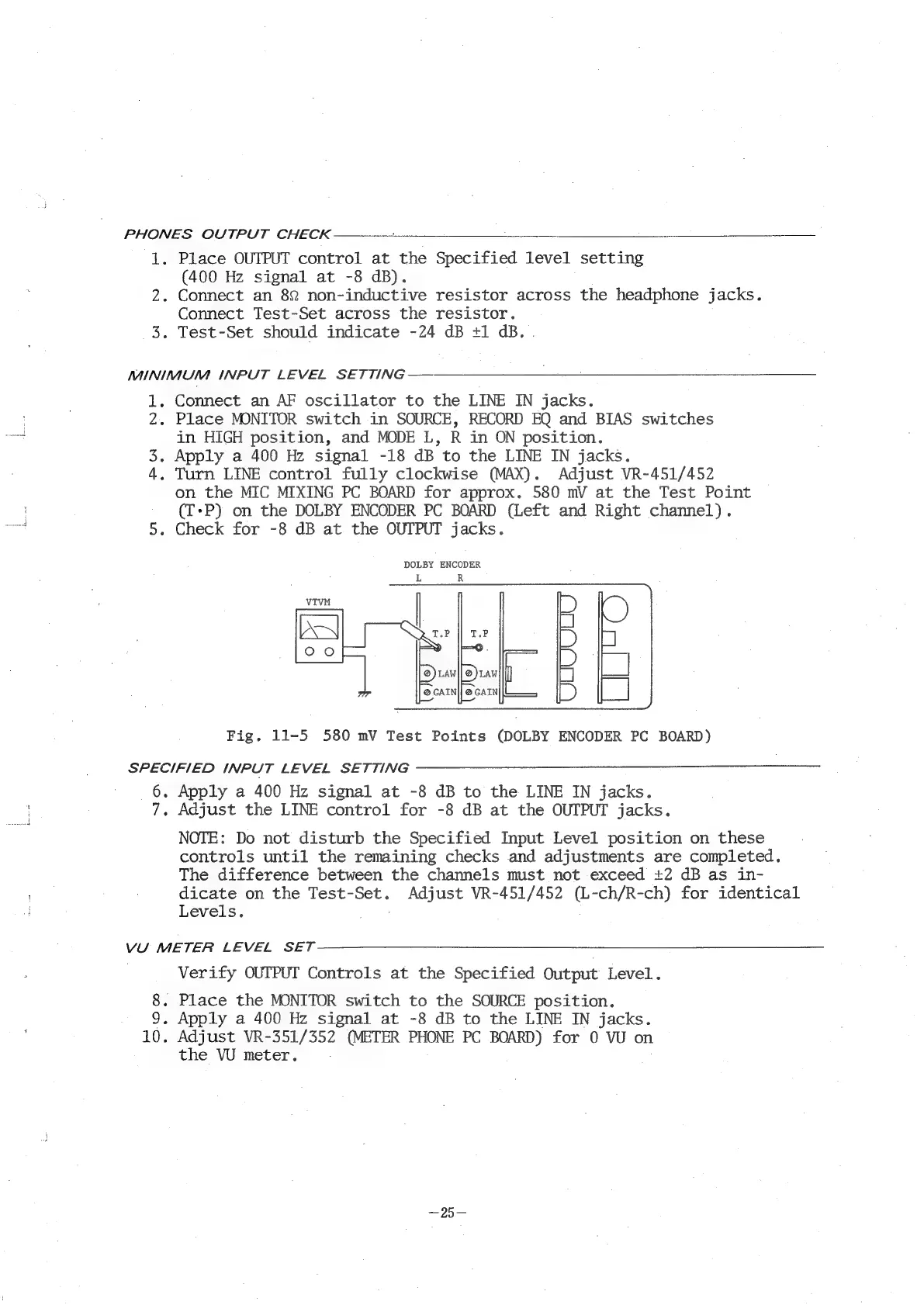
approx.
580
mV
at
the
Test
Point
(T-P)
on
the
DOLBY
ENCODER
PC
BOARD
(Left
and
Right
channel).
.
Check
for
-8
dB
at
the
OUTPUT
jacks.
DOLBY
ENCODER
Fig.
11-5
580
mV
Test
Points
(DOLBY
ENCODER
PC
BOARD)
SPECIFIED
INPUT
LEVEL
SETTING
6.
Apply
a
400
Hz
signal
at
-8
dB
to
the
LINE
IN
jacks.
Fs
Mie
METER
LEVEL
SET
Adjust
the
LINE
control
for
-8
dB
at
the
OUTPUT
jacks.
NOTE:
Do
not
disturb
the
Specified
Input
Level
position
on
these
controls
until
the
remaining
checks
and
adjustments
are
completed.
The
difference
between
the
channels
must
not
exceed
+2
dB
as
in-
dicate
on
the
Test-Set.
Adjust
VR-451/452
(L-ch/R-ch)
for
identical
Levels.
Verify
OUTPUT
Controls
at
the
Specified
Output
Level.
.
Place
the
MONITOR
switch
to
the
SOURCE
position.
.
Apply
a
400
Hz
signal
at
-8
dB
to
the
LINE
IN
jacks.
.
Adjust
VR-351/352
(METER
PHONE
PC
BOARD)
for
0
VU
on
the
VU
meter.

Related product manuals