EasyManua.ls Logo

Teac A-5500 - Record Head Azimuth Adjustment

Teac A-5500
109 pages
Print Icon
To Next Page IconTo Next Page
To Previous Page IconTo Previous Page
Loading...
BIAS
ADJUSTMENT
WIPWNNMEF
RECORD
HEAD
AZIMUTH
ADJUSTMENT
NOTE:
Adjust
bias
traps
(above)
before
proceeding.
The
following
adjustments
are
made
only
at
9.5
cm-3-3/4
Tape
speed.
.
Thread
record
Test
Tape
YIT-8003
or
equivalent
tape
on
the
unit.
.
Place
RECORD
BIAS
switch
HIGH,
EQ
switch
HIGH
position.
.
Place
MONITOR
switch
in
the
TAPE
position.
.
Apply
7
kHz
signals
at
-18
dB
to
the
LINE
IN
jacks.
.
Adjust
capacitor
VC-551/552
for
a
peak
on
the
Test-Set,
then
turn
the
capacitor
clockwise
until
a
decrease
of
2.5
dB
from
the
peak
is
obtained.
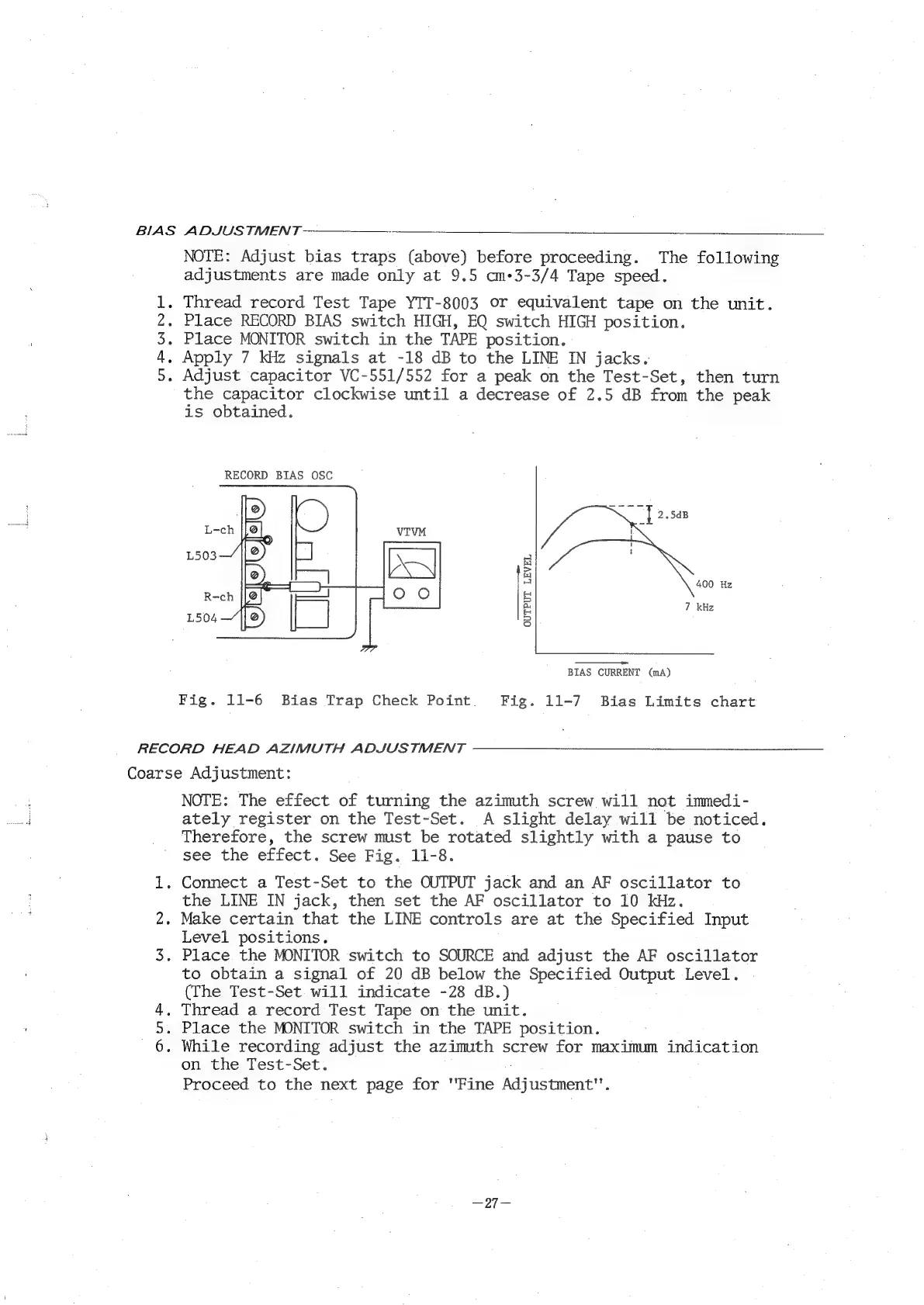
RECORD
BIAS
OSC
400
Hz
7
kHz
OUTPUT
LEVEL
a
BIAS
CURRENT
(mA)
Fig.
11-6
Bias
Trap
Check
Point
Fig.
11-7
Bias
Limits
chart
Coarse
Adjustment:
Ow
NOTE:
The
effect
of
turning
the
azimuth
screw
will
not
immedi-
ately
register
on
the
Test-Set.
A
slight
delay
will
be
noticed.
Therefore,
the
screw
must
be
rotated
slightly
with
a
pause
to
see
the
effect.
See
Fig.
11-8.
.
Connect
a
Test-Set
to
the
OUTPUT
jack
and
an
AF
oscillator
to
the
LINE
IN
jack,
then
set
the
AF
oscillator
to
10
kHz.
.
Make
certain
that
the
LINE
controls
are
at
the
Specified
Input
Level
positions.
.
Place
the
MONITOR
switch
to
SOURCE
and
adjust
the
AF
oscillator
to
obtain
a
signal
of
20
dB
below
the
Specified
OUSPUE
Level.
(The
Test-Set
will
indicate
-28
dB.)
.
Thread
a
record
Test
Tape
on
the
unit.
.
Place
the
MONITOR
switch
in
the
TAPE
position.
.
While
recording
adjust
the
azimuth
screw
for
maximm
indication
on
the
Test-Set.
Proceed
to
the
next
page
for
"Fine
Aasacmene”

Related product manuals