7
Stand and wall-mounting instructions (optional)
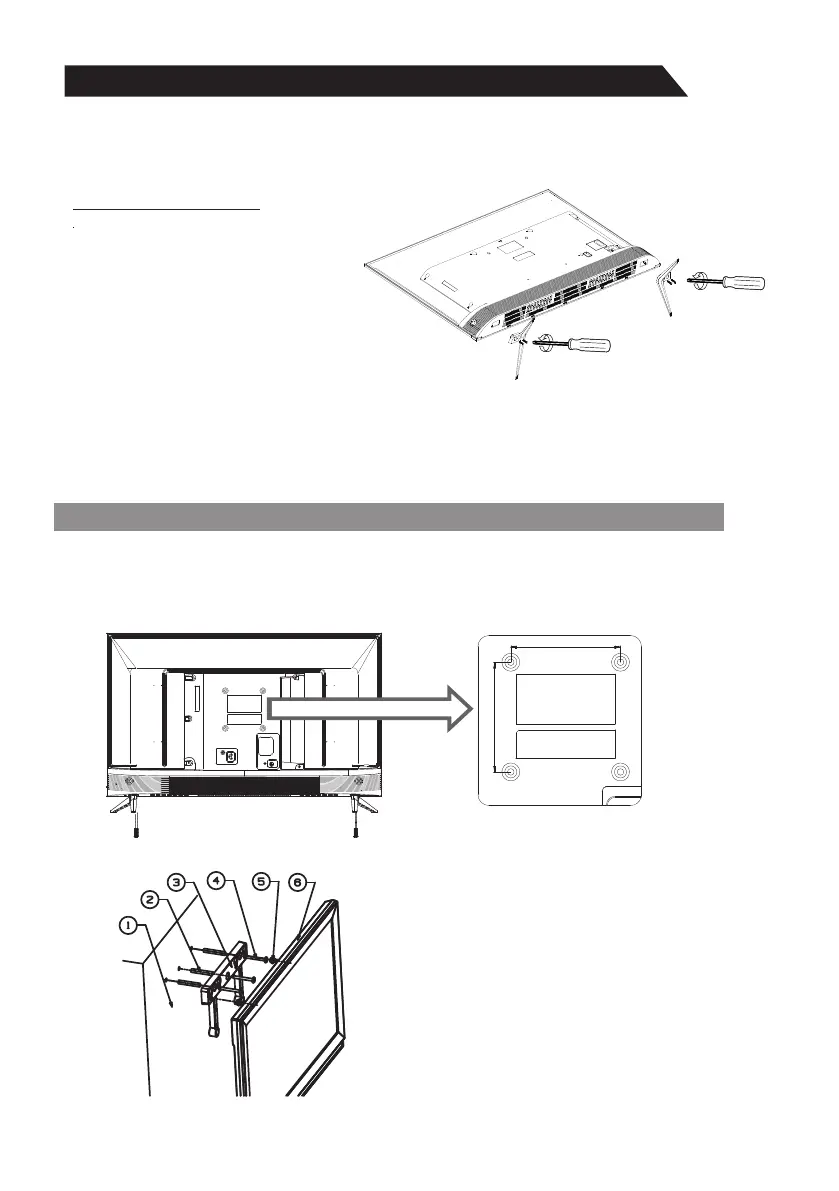
How to assemble the stand
If you need to remove or assemble the stand please read the following instructions.
- Before attaching/detaching the stand, make sure to turn off the TV.
- Before performing work, spread cushioning over the base area to lay the LED TV on.
This will prevent it from being damaged.
Assembling instruction:
Step1: Take out two stands from package,
and insert them into bottom of TV;
Step2: Take out four screws provided with
TV set and tighten them into screw
holes;
- To disconnect the stand from the TV, perform the above steps in reverse order.
Your LED TV is able to accommodate wall mounting with the use of a wall mount bracket
(not supplied with LED TV, please contact your local hardware store) and the mounting
holes on the back of the unit. We recommend removing the TV stand prior to wall mounting
the TV. Please see previous page for instructions on removing the stand.
1. Wall
2. Nylon anchor(three)
3. Wall-mounting bracket(one)
4.Self-tapping screw(three)
5.Wall-mounting screw M4/M6
two for each(Only need to select two)
6. Rear cabinet
Wall mounting instructions:
Note: The illustrations and on-screen displays in this manual are for explanation purposes
and may vary slightly from actual product.
100mm
100mm


 To Next Page