17
External Connection
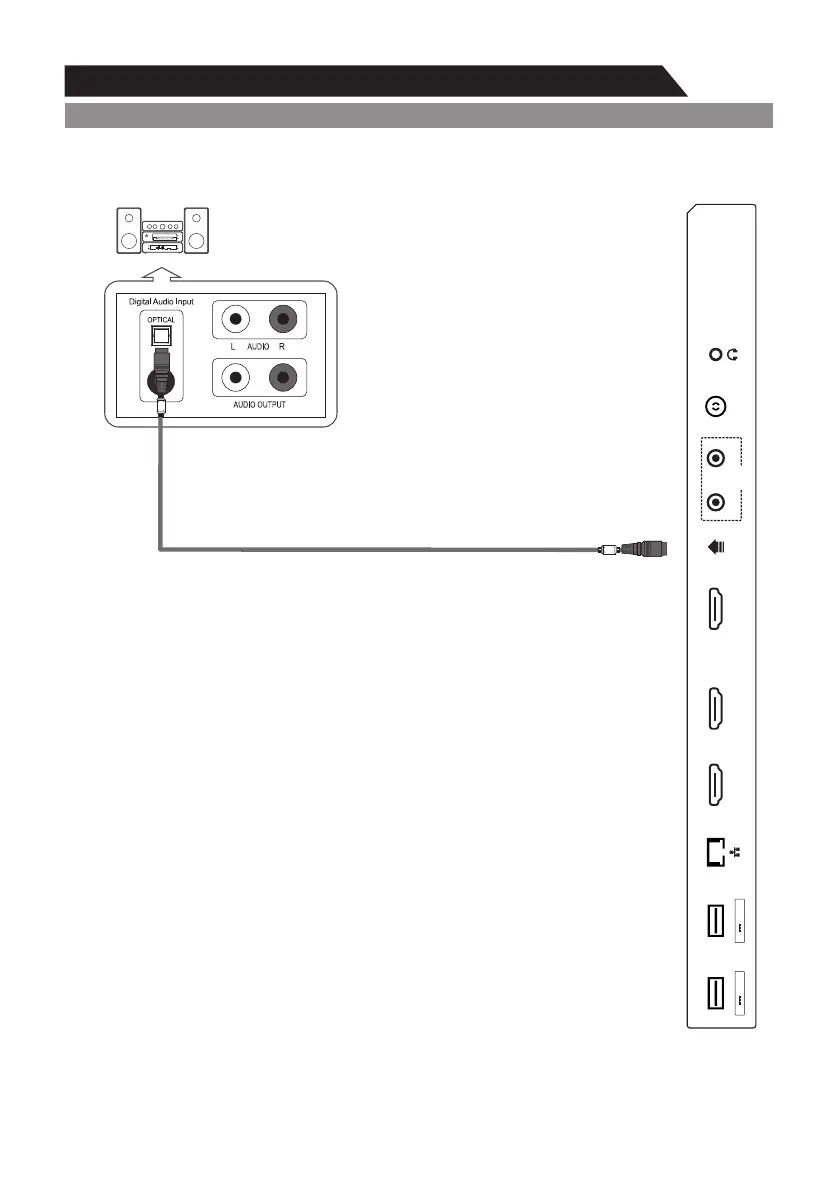
Connecting Digital Audio System
5.1 CH audio is possible when the TV is connected to an external device
supporting 5.1 CH.
Connect an OPTICAL Cable between the OPTICAL jacks on the TV and the
Digital Audio Input jacks on the Digital Audio System. When a Digital Audio
System is connected to the OPTICAL terminal:
Decrease the gain (volume) of the TV, and adjust the volume level with the
Digital Audio System's volume control.
The rear panel jacks on your TV make it easy to connect a Digital Audio System to your TV.
Digital Audio System
(Black)
TV Rear Panel
OPTICAL
SPDIF
AV IN
SPDIFUSB1
5V 500mA
RF
YPbPr/V
HDMI1(ARC)
AUDIO
HDMI2HDMI3
USB2
5V 500mA


 To Next Page