9
General Description
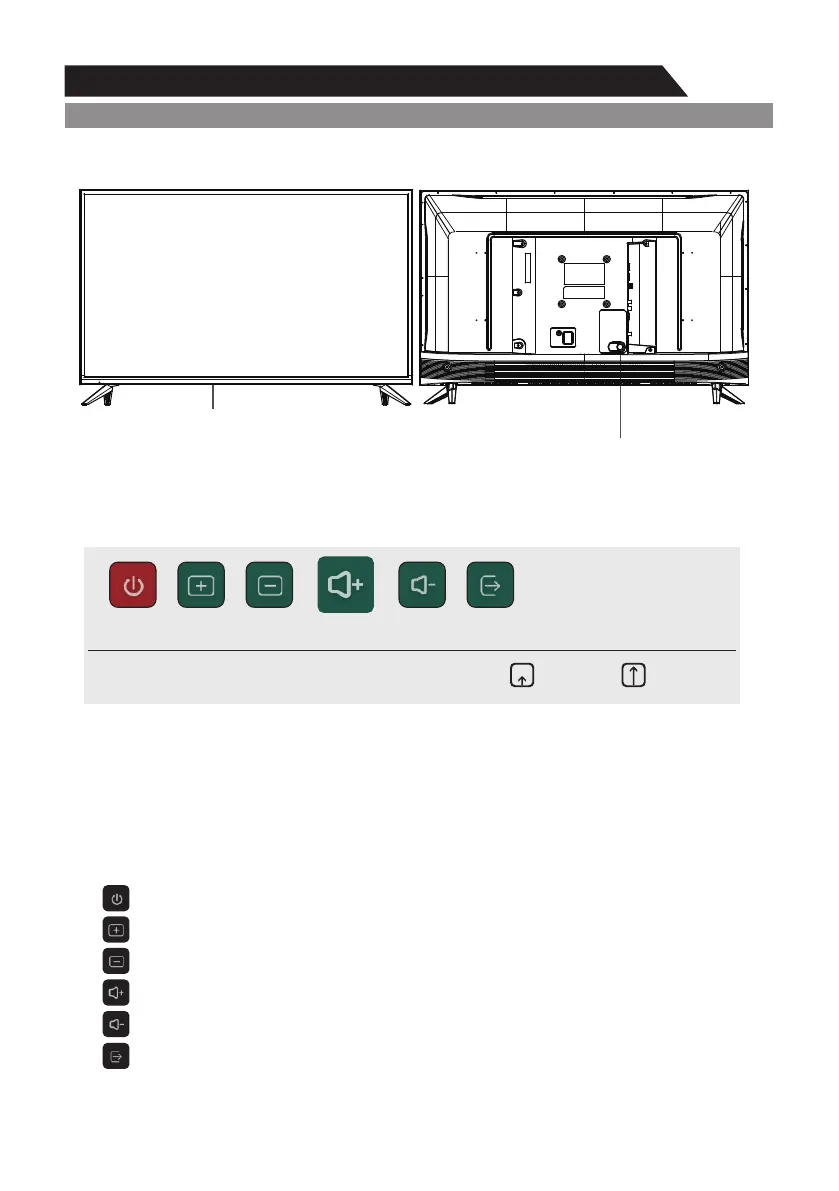
Overview of front panel
The buttons on the lower-right panel control your TV’s basic features, including the on-screen menu.
To use the more advanced features, you must use the remote control.
Remote Control Sensor
. Red light indicates the TV is in standby mode.
Green light indicates the TV is on..
POWER(power on / key function)
Key Function Description
Note: The key instructions are subject to below.
Display/Hide key icon: When there is no button icon popping up, press the key, the key icon will
pop up like the picture shows above, the key icon will automatically turn off after 5 seconds of
inactivity.
Short press the button, move the loop to the right, select the icon.Icon selection:
Long press the key to achieve the function of the selected icon.Icon function selection:
Icon Description:
Power off Icon: Corresponding to the “POWER” button of remote.
CH+ Icon: Corresponding to the “CH+” button of remote.
CH- Icon: Corresponding to the “CH-” button of remote.
Power Off Channel UP Channel Down Volume UP Volume Down Source
Press&Hold: SelectPress: Movie
Input Icon: Corresponding to the “Input” button of remote.
Volume+ Icon: Corresponding to the “VOL+” button of remote.
Volume- Icon: Corresponding to the “VOL-” button of remote.


 To Next Page