8
General Description
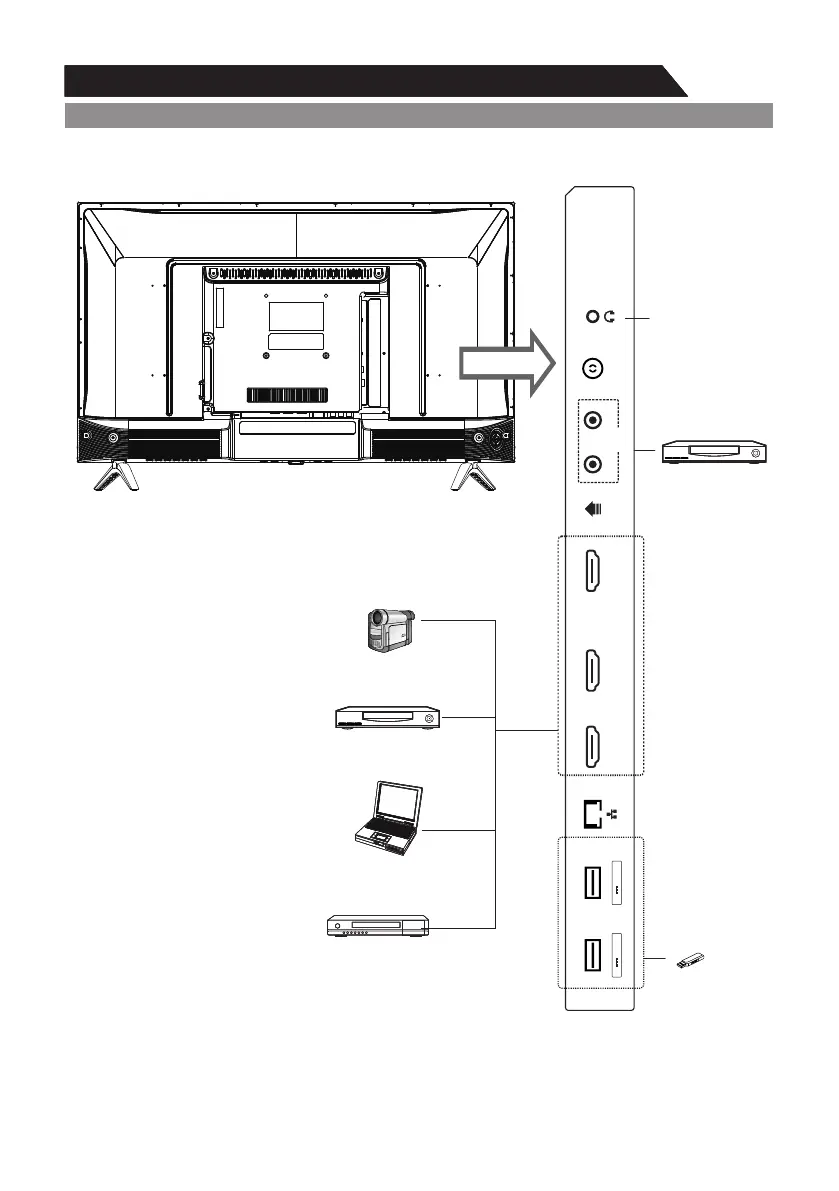
Overview of back panel
General Description
Overview of back panel
General Description
Overview of back panelOverview of back panelOverview of back panel
You can connect the TV with video devices such as DVD/VCD player, VCR and video camera to
enjoy the high quality picture.
Overview of back panel
Note:
The product and illustrations in this user's manual is only for explanation purposes and
may vary depending on model.
Headphone
DVD player
Camcorder
DVD player
PC (HDMI-output)
Blu-ray disc player
USB
AV IN
SPDIFUSB1
5V 500mA
RF
YPbPr/V
HDMI1(ARC)
AUDIO
HDMI2HDMI3
USB2
5V 500mA


 To Next Page