29
Menu system instruction
Program
Program
Picture
Sound
PVR Option
Network
About
Auto Tuning
DTV Manual Tuning
ATV Manual Tuning
Signal Information
Setting
Lock
Program
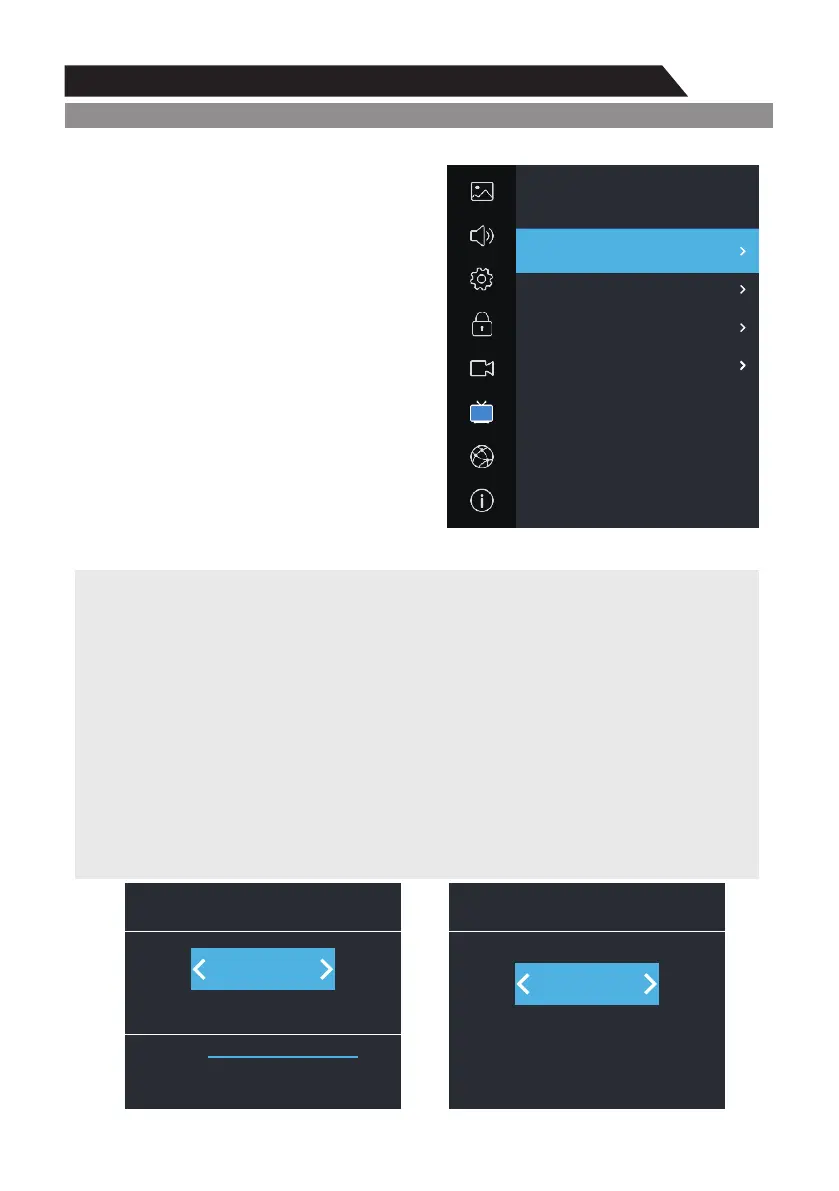
1. Press MENU key to display the main menu on the screen.
2. Press p/q key to select " rogram" option.P
3. Press u key to enter " rogram" submenu.P
Auto Tuning
Press ▲/▼ key to select "Auto Tuning" option. The
number of searched channels will be shown on the
screen.
Note: If you want to exit the whole searching,
you can press EXIT button.
DTV Manual Tuning
You can use ◄/► button or input number to
choose the channel. Then press ENTER button to
search, the TV will store the DTV channel if there
is a DTV signal present.
ATV Manual Tuning
In the ATV/DTV source, you can choose "ATV
Manual Tuning" to enter "ATV Manual Tuning" menu.
Current CH
You can see the current channel number and you can press ◄/►button to choose the channel
you want to modify. It will be searched and saved automatically.
Color System
Select the "Color System" option, press ◄/► on the remote control to change. The color system
will be changed repeatedly in the order: PAL-N, PAL-M, NTSC or AUTO.
Fine Tune
In case of unfavorable image or sound of TV program, you can use "Fine Tune".
Frequency
You can see the frequency of the searched channels.
Save
You can see the channel you chose.
37
Search
DTV
0
Data
0
Radio
0
Signal
DTV Manual Tuning
1
Search
Fine-Tune
Save
ATV Manual Tuning
867.875 MHz
Sound System
Color System
t BG u
t PAL u


 To Next Page