23
Menu system instruction
Menu system instruction
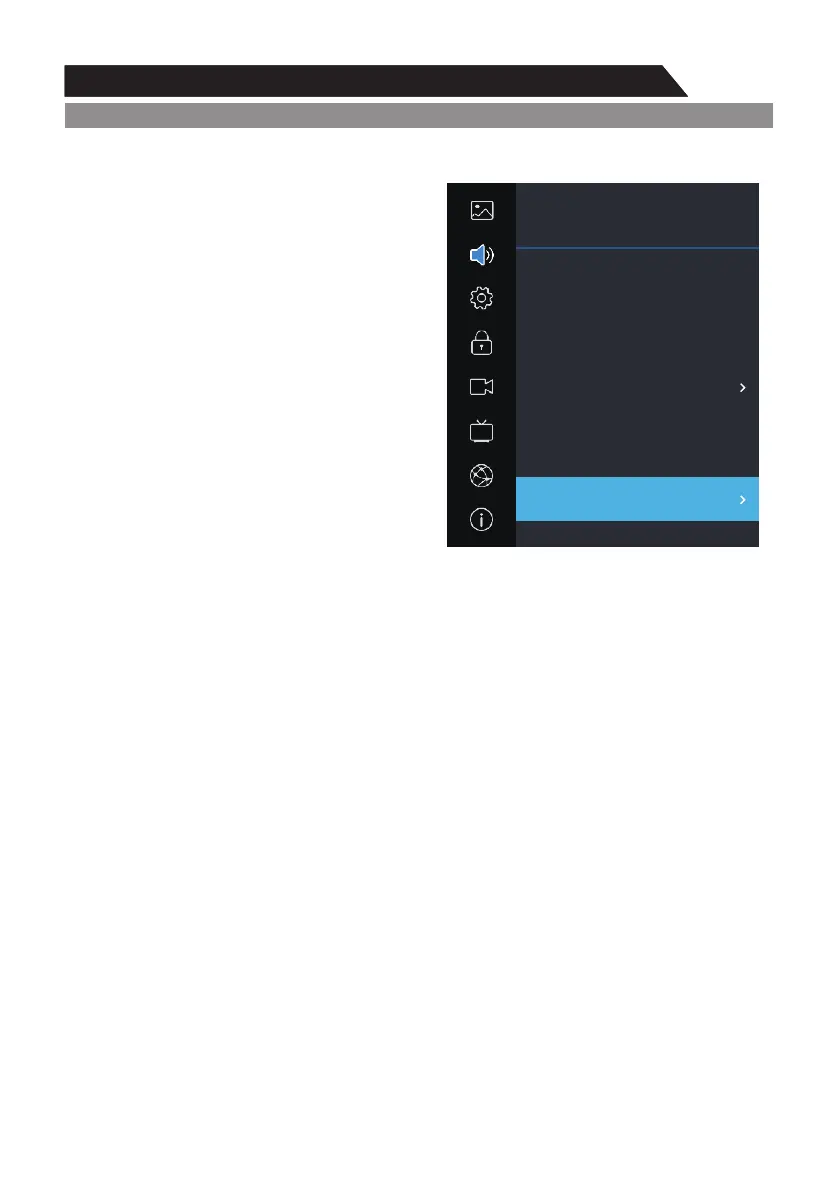
Sound
AD Switch
Press p q button to select AD Switch, then press /
or u button to enter sub-menu.ENTER
In it you can turn the AD Switch on or off and set
the volume ratio in DTV mode.
Digital Output Type
This is used to . set digital audio output
1. Press / key to select "Digital Output Type” p q
option.
2. Press / key to select a digital output type in t u
DTV or HDMI mode.
Audio Type
This is used to set audio type
1.Press / key to select "Audio Type" option.p q
2.Press / key to select audio type.t u
Audio Delay
This is used to set audio type
1.Press / key to select "Audio Delay", them press ENTER or button to enter sub-menu.p q u
2.Press / key to decrease or increase the value of the item.t u
Sound
Setting
Lock
PVR Option
Program
Network
About
Picture
Sound
Auto Volume Limit
Surround Sound
Dolby Audio Process
AD Switch
Digital Output Type
Audio Type
Audio Delay
t Off u
t Off u
t Off u
Normal
ut
Auto
ut


 To Next Page