INSTRUCTION MANUAL
10
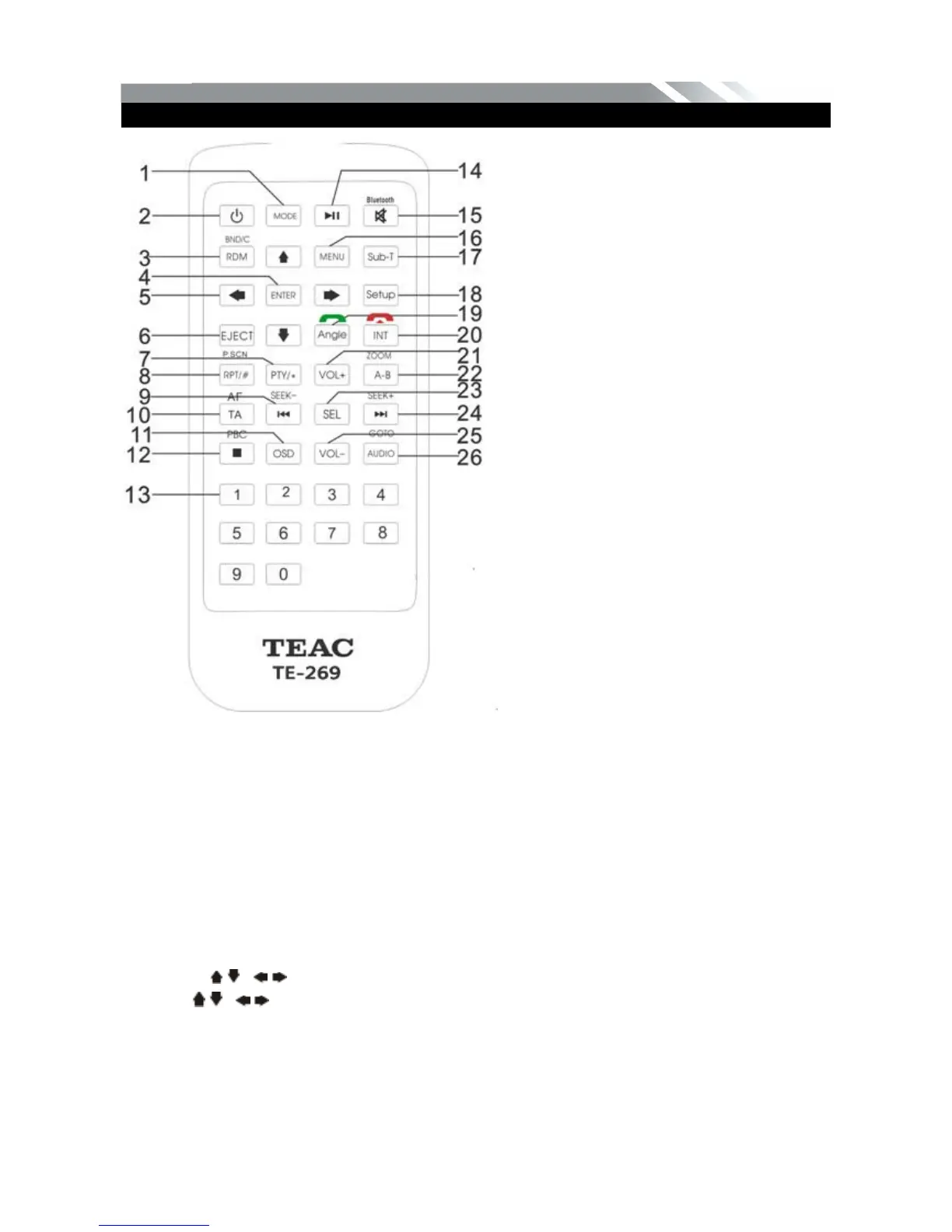
REMOTE CONTROL
1. MODE button
Press it to select the mode: Radio, DISC (if there is a disc in unit), USB (if there is a USB
device in the unit), SD (if there is a SD/MMC card in the unit), Bluetooth and AV IN.
2. POWER
Power on or off.
3. BAND/ RDM/C
In Radio mode, press to change radio band in sequence of FM1 FM2 FM3 MW1
MW2; In DVD mode, press to play randomly; In Bluetooth mode, short press it to clear the
single phone number; long press it to clear all the phone number.
4. ENTER button
When long press the GOTO and select the digit press it to confirm selection.
5: Cursor / / / buttons
Use the / / / buttons to select the DVD menu item.
6. EJECT button
Press it to eject the disc.
7. PTY/*
Press to select PTY type and input a digital key on the RC to confirm search. (only for FM
band)
In BLUETOOTH mode, press it to make a * symbol.
1: MODE
2: POWER
3: BAND/RANDOM/CLEAR
4: ENTER
5: UP/DOWN/LEFT/RIGHT
6: EJECT
7: PTY/*
8: P.SCN/RPT/#
9: BACKWARD/SEEK-
10: AF/TA
11: OSD
12: PBC/STOP
13: DIGIT NUMBERS
14: PLAY/PAUSE
15: MUTE/BLUETOOTH
16: MENU
17: SUBTITLE
18: SETUP
19: ANGLE/ACCEPT
20: INT/REJECT
21: VOLUME PLUS
22: A-B/ZOOM
23: SEL
24: FORWARD/SEEK+
25: VOLUME MINUS
26: AUDIO/GOTO



 To Next Page