INSTRUCTION MANUAL
15
◆
DVD PLAYER
To start DVD Player, tap on DISC icon from main menu screen.
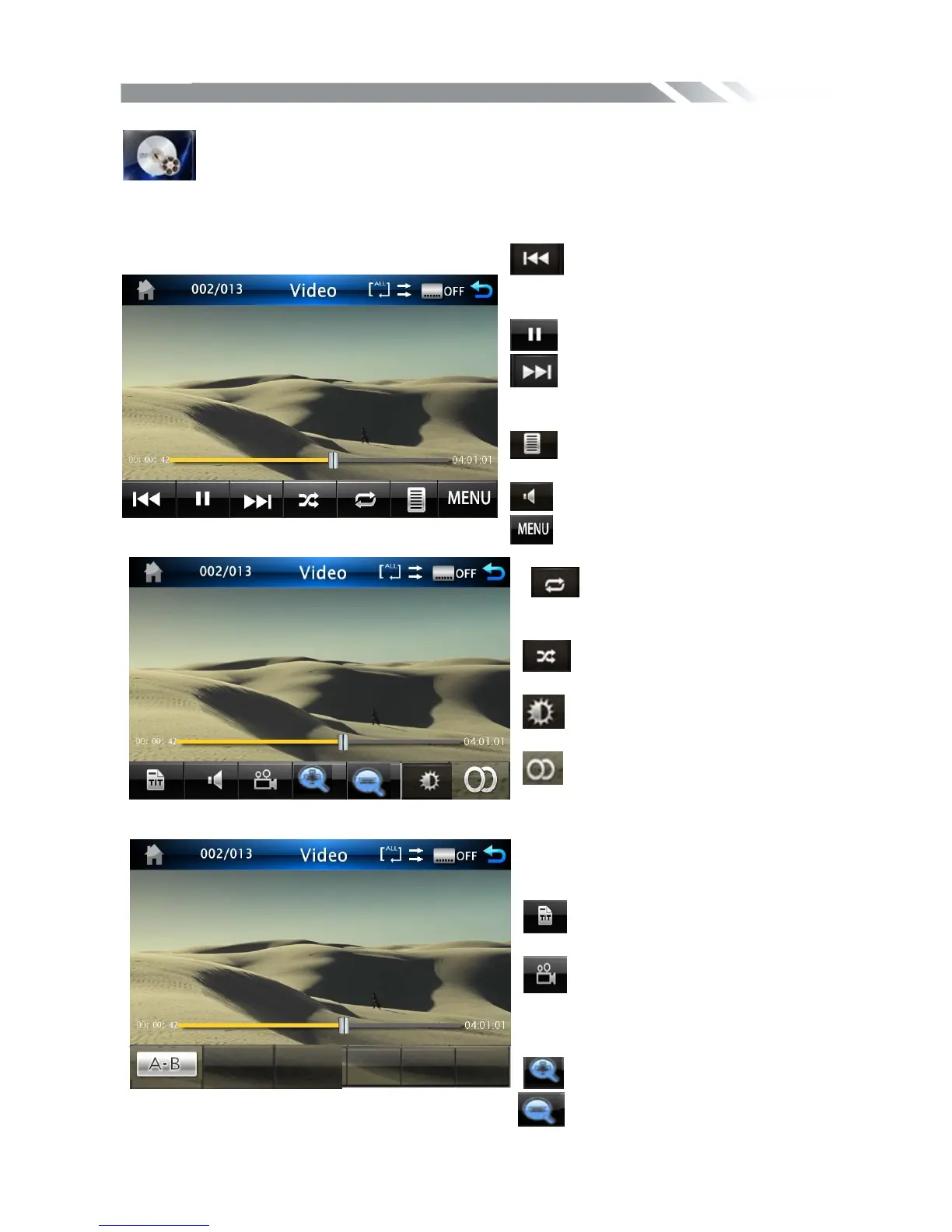
TOUCH SCREEN MENU
You will not see any buttons while DVD is played. Buttons will appear when you tap on TFT
screen. Tap the screen again to hide the buttons.
Touch it to skip to the previous
track. Touch and hold for 2 seconds to
retune to the beginning of the track.
Touch it to play/pause.
Touch it to skip to the next track.
Touch and hold for 2 seconds to activate
fast forward (FF) search in a track.
Touch it to select different
caption
Touch it to select Audio
Touch it to return to the menu title
Touch it to select: repeat track
=> repeat in folder=>repeat all=>
repeat off
Touch it to turn on / off
random/sequence playback.
Touch it to adjust the picture
texture
Touch this icon to select right or
stereo or left sound reception.
Touch it to select the section from A to
B for repeat.
Touch this button to return to the
title.
Touch it repeatedly to change
the viewing angle (Available only with a
recorded DVD file or DVD disc that has
this function).
Magnify the frame 2X 3X 4X
Reduce the frame 2X 3X 4X



 To Next Page