OFFON
DC IN
AUDIO OUT
VGA
HD-PORT
UP LINK
POE8 POE7 POE6 POE5
POE4 POE3 POE2 POE1 USB
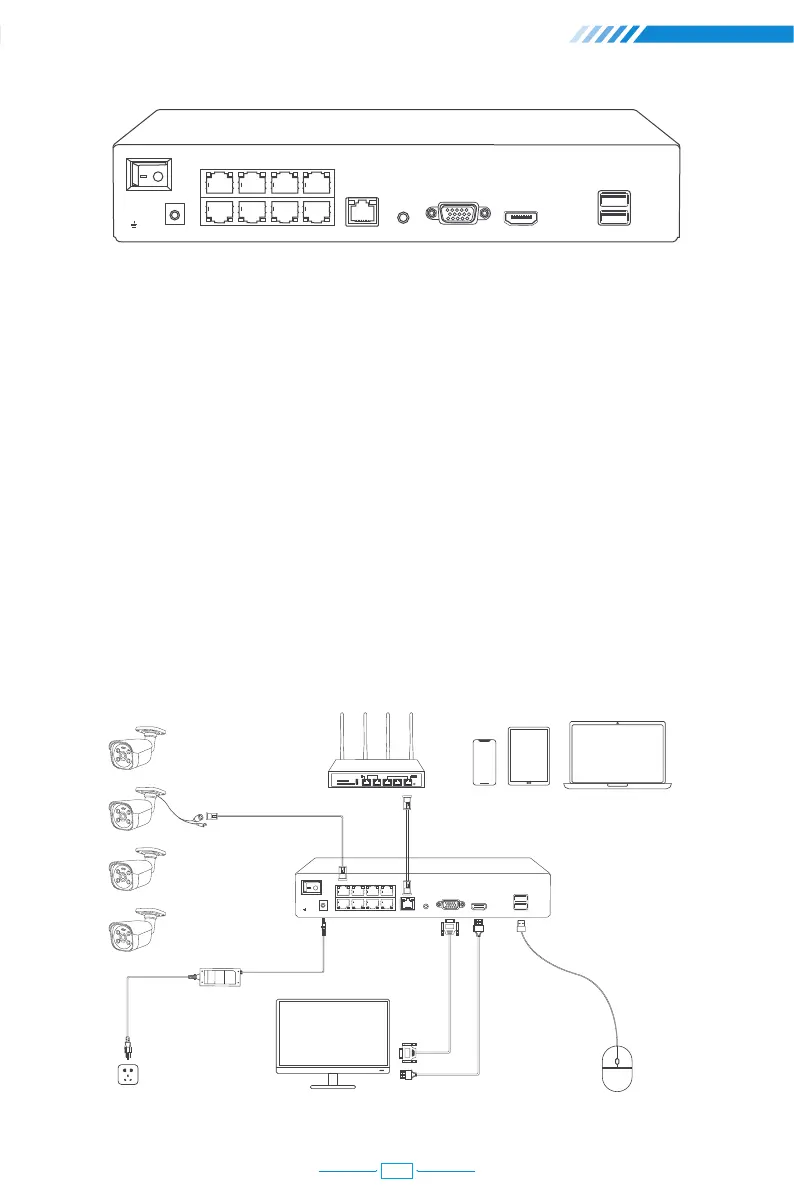
Back of the NVR
Switch: Turn on/off NVR.
DC IN: For power supply DC 48~52V, the size of the DC plug is 5.5*2.1mm.
PoE 1-8: Ethernet ports for connecting the PoE Cameras.
UP LINK: Ethernet port for connecting to the router.
AUDIO OUT: For connecting speakers to play the recorded audio.
VGA: For connecting the monitor or display with VGA cable.
HD-PORT: For connecting the monitor or display with HDMI cable.
USB: For connecting USB mouse to control NVR or USB disk to backup video.
Wiring and Connection Diagram
OFFON
DC IN
AUDIO OUT
VGA
HD Port
UP LINK
POE1 POE2 POE3 POE4
POE5 POE6 POE7 POE8 USB
Router Display Device for Remote View
PoE IP Camera
Display Device(TV/Monitor with VGA/HD Port)Power Supply
HDMI CableVGA Cable
PoE NVR
Mouse
02



 To Next Page