EasyManua.ls Logo

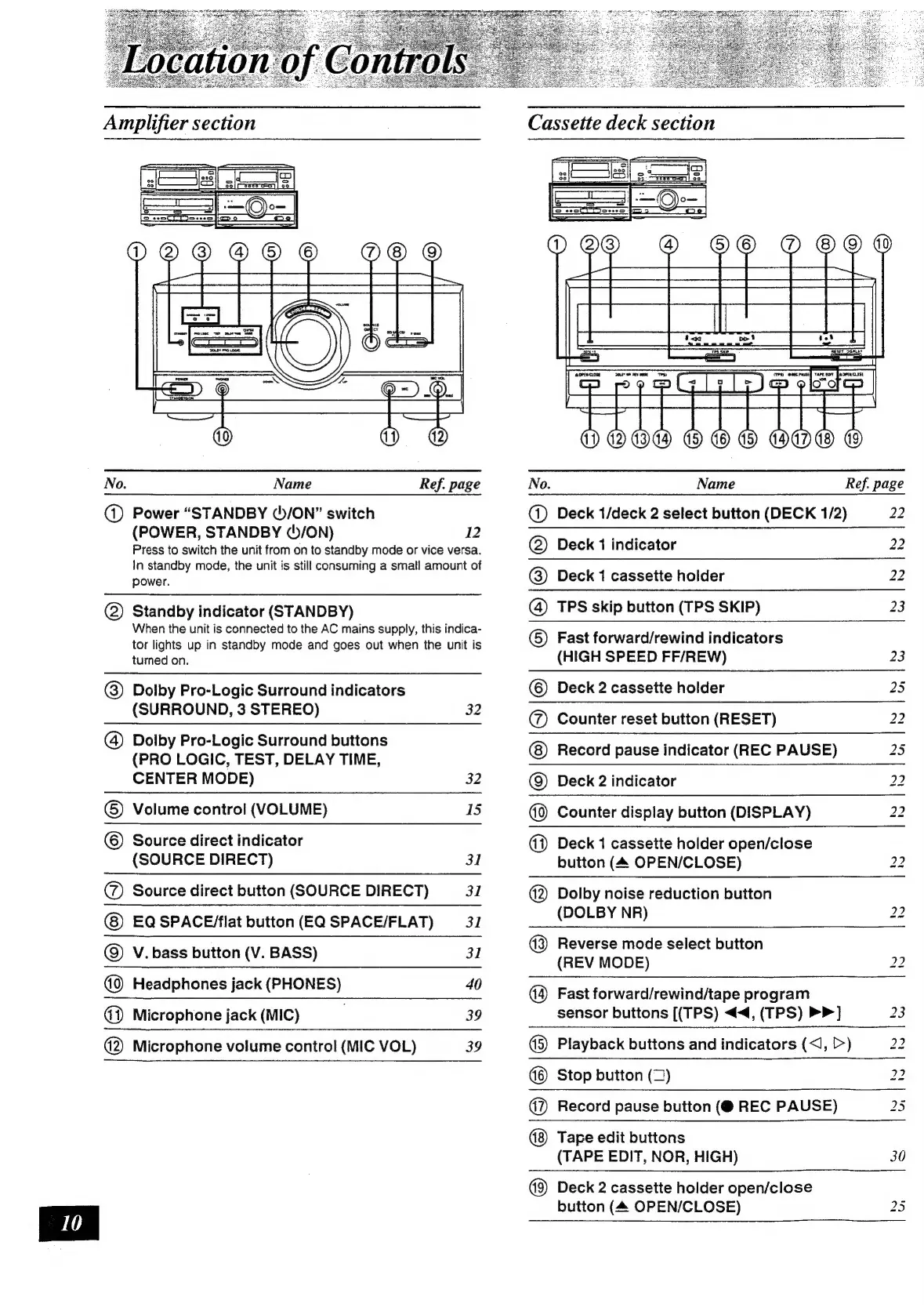
Technics SC-CH730 - Cassette Deck Section

Technics SC-CH730
52 pages
Print Icon
To Next Page IconTo Next Page
To Previous Page IconTo Previous Page
Loading...
No.
Name
Ref.
page
@)
Power
“STANDBY
(5/ON”
switch
(POWER,
STANDBY
(/ON)
12
Press
to
switch
the
unit
from
on
to
standby
mode
or
vice
versa.
In
standby
mode,
the
unit
is
still
consuming
a
small
amount
of
power.
@)
Standby
indicator
(STANDBY)
When
the
unit
is
connected
to
the
AC
mains
supply,
this
indica-
tor
lights
up
in
standby
mode
and
goes
out
when
the
unit
is
turned
on.
@)
Dolby
Pro-Logic
Surround
indicators
(SURROUND,
3
STEREO)
)
Dolby
Pro-Logic
Surround
buttons
(PRO
LOGIC,
TEST,
DELAY
TIME,
CENTER
MODE)
()
Volume
control
(VOLUME)
©
Source
direct
indicator
(SOURCE
DIRECT)
@
Source
direct
button
(SOURCE
DIRECT)
EQ
SPACE/flat
button
(EQ
SPACE/FLAT)
)
V.
bass
button
(V.
BASS)
Headphones
jack
(PHONES)
@)
Microphone
jack
(MIC)
.
(2)
Microphone
volume
control
(MIC
VOL)
32
32
IS
31
31
31
31
40
39
39
Cassette
deck
section
Name
Deck
1/deck
2
select
button
(DECK
1/2)
Deck
1
indicator
Deck
1
cassette
holder
TPS
skip
button
(TPS
SKIP)
Fast
forward/rewind
indicators
(HIGH
SPEED
FF/REW)
Deck
2
cassette
holder
Counter
reset
button
(RESET)
Record
pause
indicator
(REC
PAUSE)
Deck
2
indicator
Counter
display
button
(DISPLAY)
Deck
1
cassette
holder
open/close
button
(4
OPEN/CLOSE)
Dolby
noise
reduction
button
(DOLBY
NR)
Ref.
page
22
22
22
23
23
iS)
No
No
No
lo
ion
to
Ne
lo lo
No
w
©| ©]
GIO/O|@|A/©O|
O©OJ@|©|O|O
|F
Reverse
mode
select
button
(REV
MODE)
Fast
forward/rewind/tape
program
sensor
buttons
[(TPS)
<<,
(TPS)
>>]
(©)
Playback
buttons
and
indicators
(<,,
[>)
ho
ho
ho to
Stop
button
(2)
(7)
Record
pause
button
(@
REC
PAUSE)
Tape
edit
buttons
(TAPE
EDIT,
NOR,
HIGH)
Deck
2
cassette
holder
open/close
button
(4
OPEN/CLOSE)
bo lo
Ww
tay
30

Related product manuals