EasyManua.ls Logo

Technics SC-CH730 - Program Play

Technics SC-CH730
52 pages
Print Icon
To Next Page IconTo Next Page
To Previous Page IconTo Previous Page
Loading...
Program
play
(Available
only
from
the
remote
control)
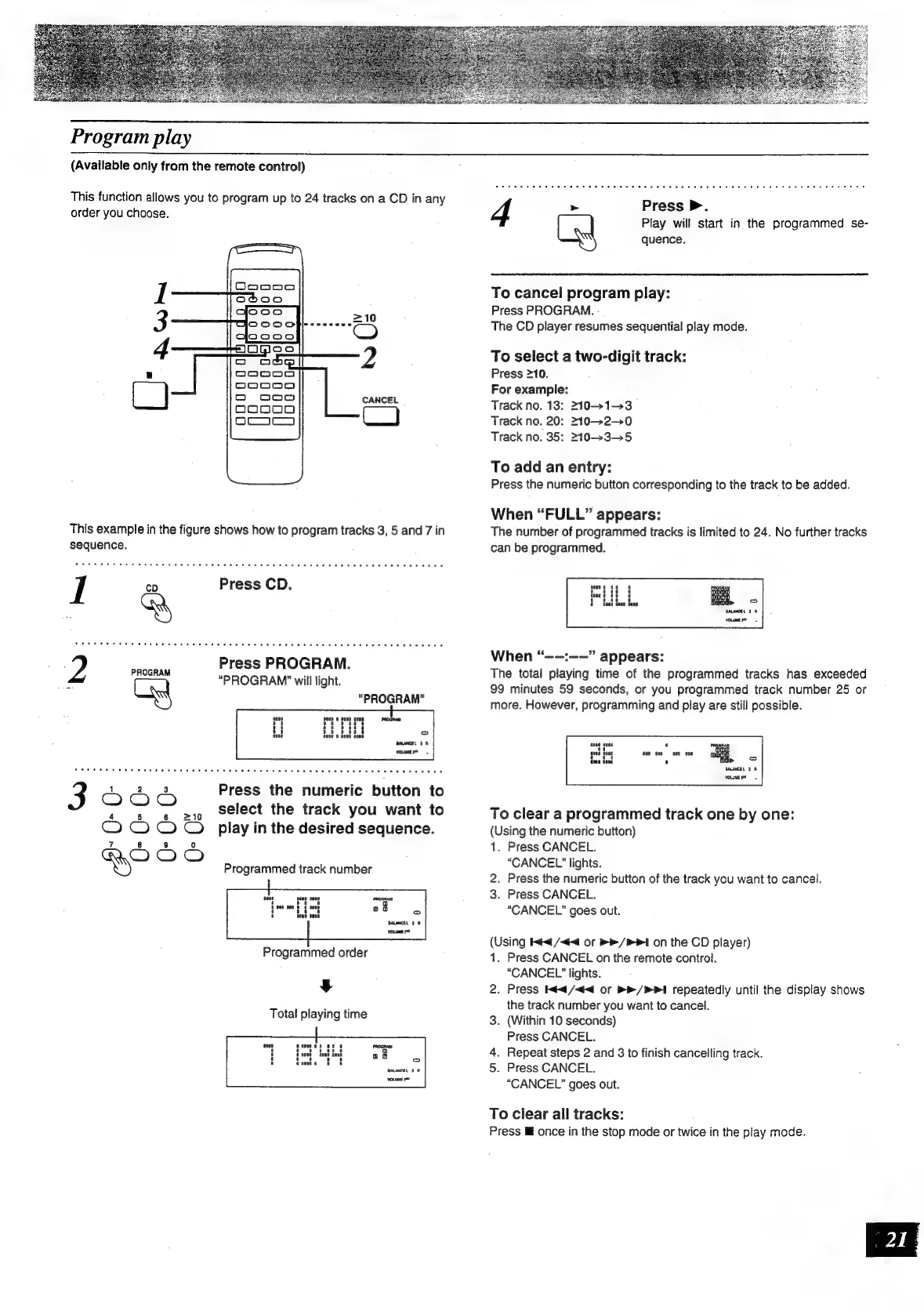
This
function
allows
you
to
program
up
to
24
tracks
on
a
CD
in
any
order
you
choose.
This
example
in
the
figure
shows
how
to
program
tracks
3,
5
and
7
in
sequence.
2
pe
Press
PROGRAM.
“PROGRAM’
will
light.
"PROGRAM"
1
2 3
Press
the
numeric
button
to
3
=
=
>1
Select
the
track
you
want
to
COO
©
play
in
the
desired
sequence.
7
8
9
i)
OOO
Programmed
track
number
Programmed
order
¥
Total
playing
time
Press
>.
Play
will
start
in
the
programmed
se-
4
\_sal
quence.
To
cancel
program
play:
Press
PROGRAM.
The
CD
player
resumes
sequential
play
mode.
To
select
a
two-digit
track:
Press
210.
For
example:
Track
no.
13:
2101-3
Track
no.
20:
210-20
Track
no.
35:
2103-5
To
add
an
entry:
Press
the
numeric
button
corresponding
to
the
track
to
be
added.
When
“FULL”
appears:
The
number
of
programmed
tracks
is
limited
to
24.
No
further
tracks
can
be
programmed.
wae
8
.
2
bene pens
bene
When
“—-:——”
appears:
The
total
playing
time
of
the
programmed
tracks
has
exceeded
99
minutes
59
seconds,
or
you
programmed
track
number
25
or
more.
However,
programming
and
play
are
still
possible.
a
HL.
yout
To
clear
a
programmed
track
one
by
one:
(Using
the
numeric
button)
1.
Press
CANCEL.
“CANCEL”
lights.
2.
Press
the
numeric
button
of
the
track
you
want
to
cancel.
3.
Press
CANCEL.
“CANCEL”
goes
out.
(Using
<4
/<4<4
or
>>
/>P1
on
the
CD
player)
1.
Press
CANCEL
on
the
remote
control.
“CANCEL’
lights.
2.
Press
Kt
/<<
or
>>
/
PI
repeatedly
until
the
display
shows
the
track
number
you
want
to
cancel.
3.
(Within
10
seconds)
Press
CANCEL.
4.
Repeat
steps
2
and
3
to
finish
cancelling
track.
5.
Press
CANCEL.
“CANCEL”
goes
out.
To
clear
all
tracks:
Press
Mf
once
in
the
stop
mode
or
twice
in
the
play
mode.

Related product manuals