EasyManua.ls Logo

Technics SC-CH730 - Synchro-Recording

Technics SC-CH730
52 pages
Print Icon
To Next Page IconTo Next Page
To Previous Page IconTo Previous Page
Loading...
There
are
2
ways
to
record
from
compact
discs,
synchro-recording
and
one-touch
editing.
Synchro-recording
(see
page
27,
The
system
records
tracks
in
the
original
sequence
without
calculat-
ing
the
tape
length.
You
can
record
as
many
tracks
as
you
like
using
this
mode.
When
you
want
to
record
on
the
remaining
portion
of
the
pre-
recorded
tape,
use
the
synchro-recording.
One-touch
editing
(see
page
28.)
The
system
calculates
the
length
of
the
tape
used,
and
safeguards
against
a
break
in
the
continuity
of
sound
when
the
recording
changes
from
one
side
of
the
tape
to
the
other
side.
M@
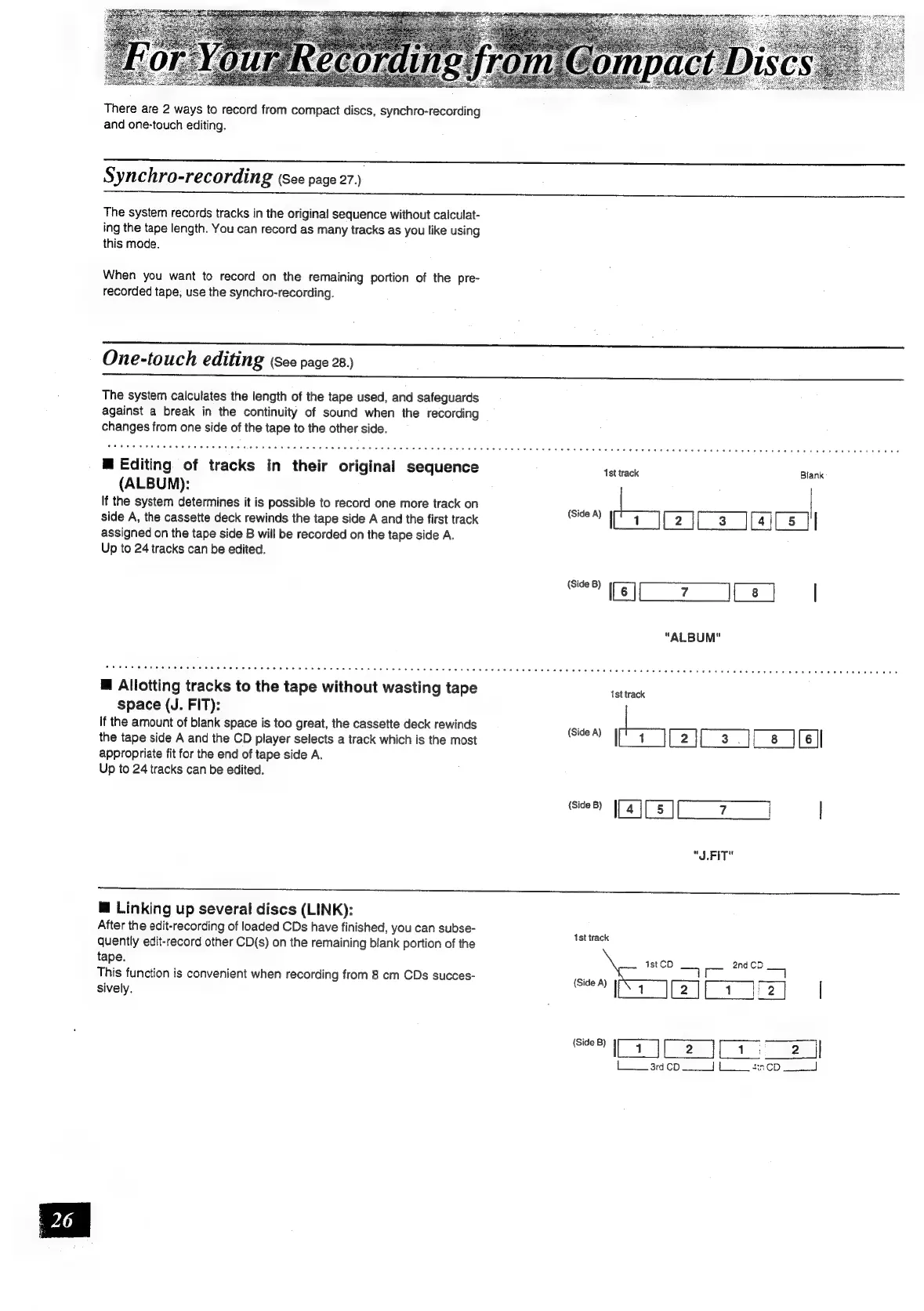
Editing
of
tracks
in
their
original
sequence
(ALBUM):
If
the
system
determines
it
is
possible
to
record
one
more
track
on
side
A,
the
cassette
deck
rewinds
the
tape
side
A
and
the
first
track
assigned
on
the
tape
side
B
will
be
recorded
on
the
tape
side
A.
Up
to
24
tracks
can
be
edited.
@
Allotting
tracks
to
the
tape
without
wasting
tape
space
(J.
FIT):
If
the
amount
of
blank
space
is
too
great,
the
cassette
deck
rewinds
the
tape
side
A
and
the
CD
player
selects
a
track
which
is
the
most
appropriate
fit
for
the
end
of
tape
side
A.
Up
to
24
tracks
can
be
edited.
1st
track
Blank
omc
se?)
([6]
|
"ALBUM"
ist
track
tn
[2j[
3
][
8
jis
er
mibi7
)
|
"J.FIT"
@
Linking
up
several
discs
(LINK):
After
the
edit-recording
of
loaded
CDs
have
finished,
you
can
subse-
quently
edit-record
other
CD(s)
on
the
remaining
blank
portion
of
the
tape.
This
function
is
convenient
when
recording
from
8
cm
CDs
succes-
sively.
1st
track
ist
CD
2nd
CD
—1T
~~
ea
aii)
|
Lard
cod
LL
tencp

Related product manuals