EasyManua.ls Logo

Technics SC-CH730 - Basic Listening Operations; Radio Broadcast Listening

Technics SC-CH730
52 pages
Print Icon
To Next Page IconTo Next Page
To Previous Page IconTo Previous Page
Loading...
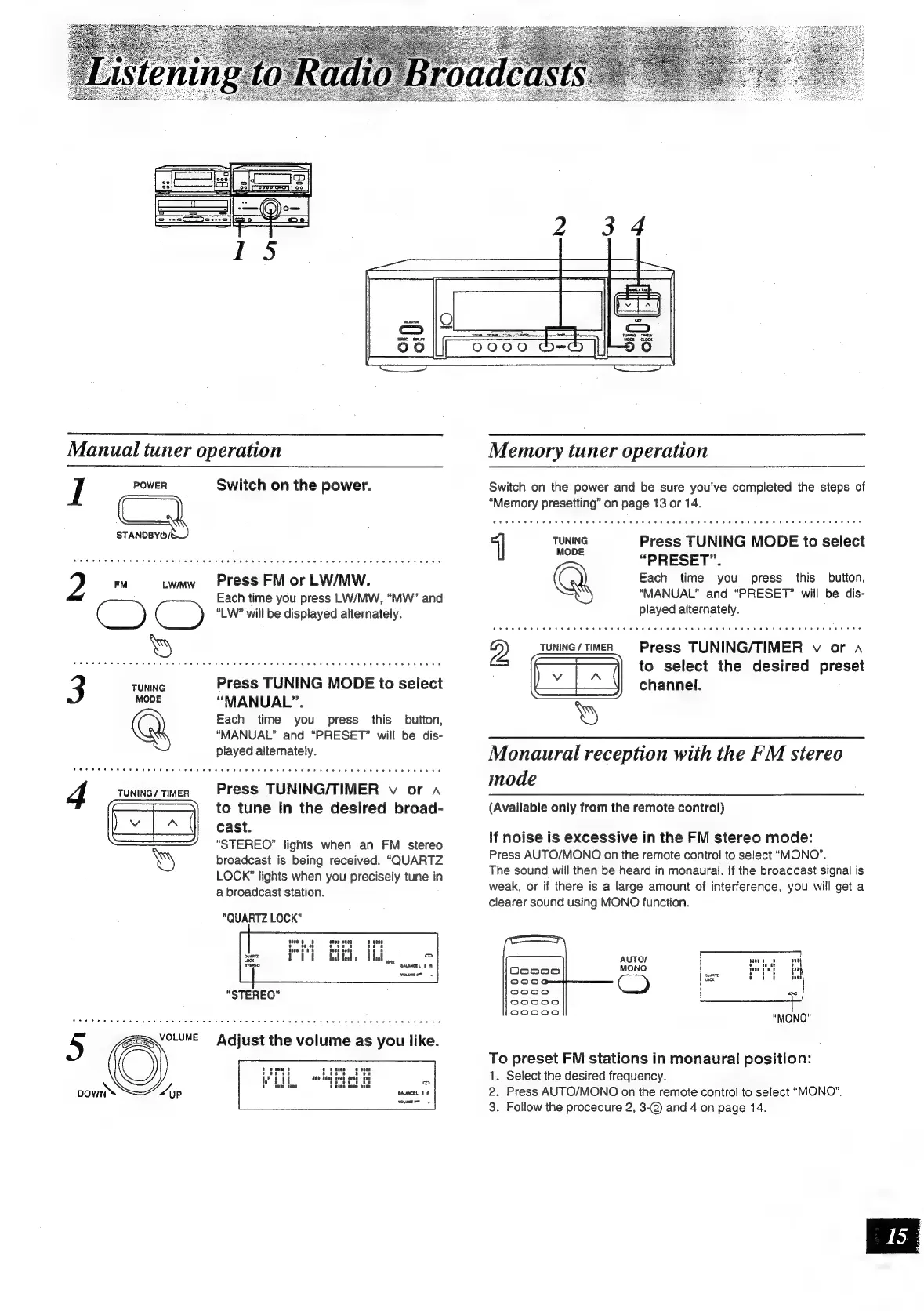
Manual
tuner
operation
I
POWER
s
TANDBYO/!
Switch
on
the
power.
2
EM
Lwaw
Press
FM
or
LW/MW.
Each
time
you
press
LW/MW,
“MW”
and
ceo
C
)
“LW”
will
be
displayed
alternately.
3
eee
Press
TUNING
MODE
to
select
mone
“MANUAL”.
Each
time
you
press
this
button,
“MANUAL”
and
“PRESET”
will
be
dis-
played
alternately.
Press
TUNING/TIMER
v
or
a
to
tune
in
the
desired
broad-
cast.
“STEREO”
lights
when
an
FM
stereo
broadcast
is
being
received.
“QUARTZ
LOCK”
lights
when
you
precisely
tune
in
a
broadcast
station.
"QUARTZ
LOCK"
5
ESNOLUME
Adjust
the
volume
as
you
like.
pown™
“yp
Memory
tuner
operation
Switch
on
the
power
and
be
sure
you've
completed
the
steps
of
“Memory
presetting”
on
page
13
or
14.
||
TUNING
Press
TUNING
MODE
to
select
“PRESET”.
Each
time
you
press
this
button,
“MANUAL”
and
“PRESET”
will
be
dis-
played
alternately.
Press
TUNING/TIMER
v
or
a
to
select
the
desired
preset
channel.
Monaural
reception
with
the
FM
stereo
mode
(Available
only
from
the
remote
control)
If
noise
is
excessive
in
the
FM
stereo
mode:
Press
AUTO/MONO
on
the
remote
control
to
select
“MONO”.
The
sound
will
then
be
heard
in
monaural.
If
the
broadcast
signal
is
weak,
or
if
there
is
a
large
amount
of
interference,
you
will
get
a
clearer
sound
using
MONO
function.
t
ft
</
"MONO"
AUTO/
MONO
|
sie
To
preset
FM
stations
in
monaural
position:
1.
Select
the
desired
frequency.
2.
Press
AUTO/MONO
on
the
remote
control
to
select
“MONO”,
3.
Follow
the
procedure
2,
3-@
and
4
on
page
14.

Related product manuals