EasyManua.ls Logo

Technics SC-CH730 - Adjusting Speaker Output Level; Adjusting the Delay Time

Technics SC-CH730
52 pages
Print Icon
To Next Page IconTo Next Page
To Previous Page IconTo Previous Page
Loading...
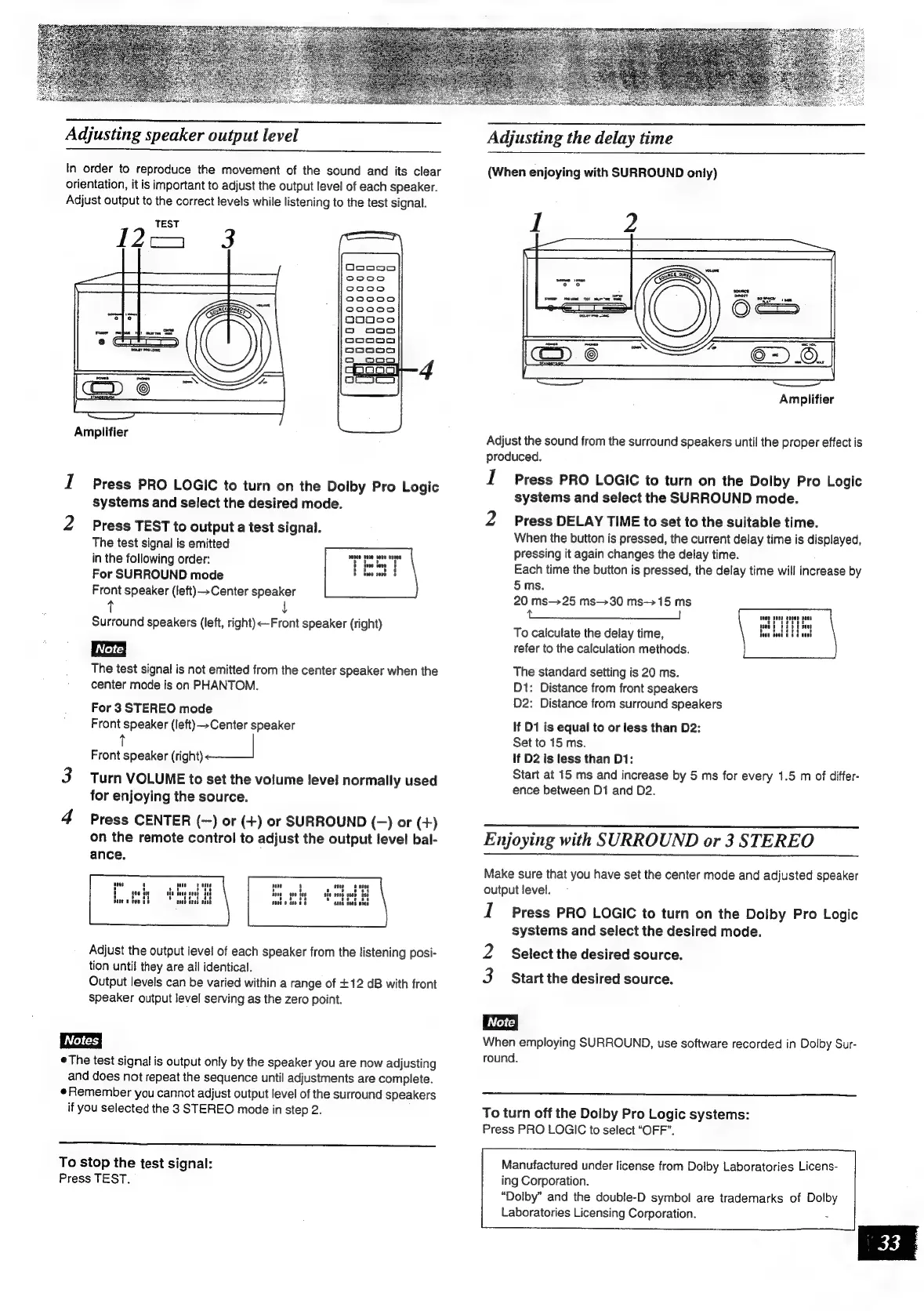
Adjusting
speaker
output
level
In
order
to
reproduce
the
movement
of
the
sound
and
its
clear
orientation,
it
is
important
to
adjust
the
output
level
of
each
speaker.
Adjust
output
to
the
correct
levels
while
listening
to
the
test
signal.
TEST
2a
73
Amplifier
I
Press
PRO
LOGIC
to
turn
on
the
Dolby
Pro
Logic
systems
and
select
the
desired
mode.
2
Press
TEST
to
output
a
test
signal.
The
test
signal
is
emitted
in
the
following
order:
For
SURROUND
mode
Front
speaker
(left)
Center
speaker
Surround
speakers
(left,
right)<—Front
speaker
(right)
The
test
signal
is
not
emitted
from
the
center
speaker
when
the
center
mode
is
on
PHANTOM.
For
3
STEREO
mode
Front
speaker
(left)
Center
speaker
t
Front
speaker
(right)
3
Turn
VOLUME
to
set
the
volume
level
normally
used
for
enjoying
the
source.
4
Press
CENTER
(—)
or
(+)
or
SURROUND
(-—)
or
(+)
on
the
remote
control
to
adjust
the
output
level
bal-
ance.
Adjust
the
output
level
of
each
speaker
from
the
listening
posi-
tion
until
they
are
all
identical.
Output
levels
can
be
varied
within
a
range
of
+12
dB
with
front
speaker
output
level
serving
as
the
zero
point.
The
test
signal
is
output
only
by
the
speaker
you
are
now
adjusting
and
does
not
repeat
the
sequence
until
adjustments
are
complete.
Remember
you
cannot
adjust
output
level
of
the
surround
speakers
if
you
selected
the
3
STEREO
mode
in
step
2.
To
stop
the
test
signal:
Press
TEST.
Adjusting
the
delay
time
(When
enjoying
with
SURROUND
only)
Amplifier
Adjust
the
sound
from
the
surround
speakers
until
the
proper
effect
is
produced.
I
Press
PRO
LOGIC
to
turn
on
the
Dolby
Pro
Logic
systems
and
select
the
SURROUND
mode.
2
Press
DELAY
TIME
to
set
to
the
suitable
time.
When
the
button
is
pressed,
the
current
delay
time
is
displayed,
pressing
it
again
changes
the
delay
time.
Each
time
the
button
is
pressed,
the
delay
time
will
increase
by
5
ms.
20
ms—25
ms—30
ms->15
ms
a
To
calculate
the
delay
time,
refer
to
the
calculation
methods.
The
standard
setting
is
20
ms.
Dt:
Distance
from
front
speakers
D2:
Distance
from
surround
speakers
If
D1
is
equal
to
or
less
than
D2:
Set
to
15
ms.
If
D2
is
less
than
D1:
Start
at
15
ms
and
increase
by
5
ms
for
every
1.5
m
of
differ-
ence
between
D1
and
D2.
Enjoying
with
SURROUND
or
3
STEREO
Make
sure
that
you
have
set
the
center
mode
and
adjusted
speaker
output
level.
I
Press
PRO
LOGIC
to
turn
on
the
Dolby
Pro
Logic
systems
and
select
the
desired
mode.
2
Select
the
desired
source.
3
Start
the
desired
source.
When
employing
SURROUND,
use
software
recorded
in
Dolby
Sur-
round.
To
turn
off
the
Dolby
Pro
Logic
systems:
Press
PRO
LOGIC
to
select
“OFF”.
Manufactured
under
license
from
Dolby
Laboratories
Licens-
ing
Corporation.
“Dolby”
and
the
double-D
symbol
are
trademarks
of
Dolby
Laboratories
Licensing
Corporation.
-

Related product manuals