EasyManua.ls Logo

Technics SC-CH730 - Manual Memory Presetting; Automatic Scanning

Technics SC-CH730
52 pages
Print Icon
To Next Page IconTo Next Page
To Previous Page IconTo Previous Page
Loading...
Manual
memory
presetting
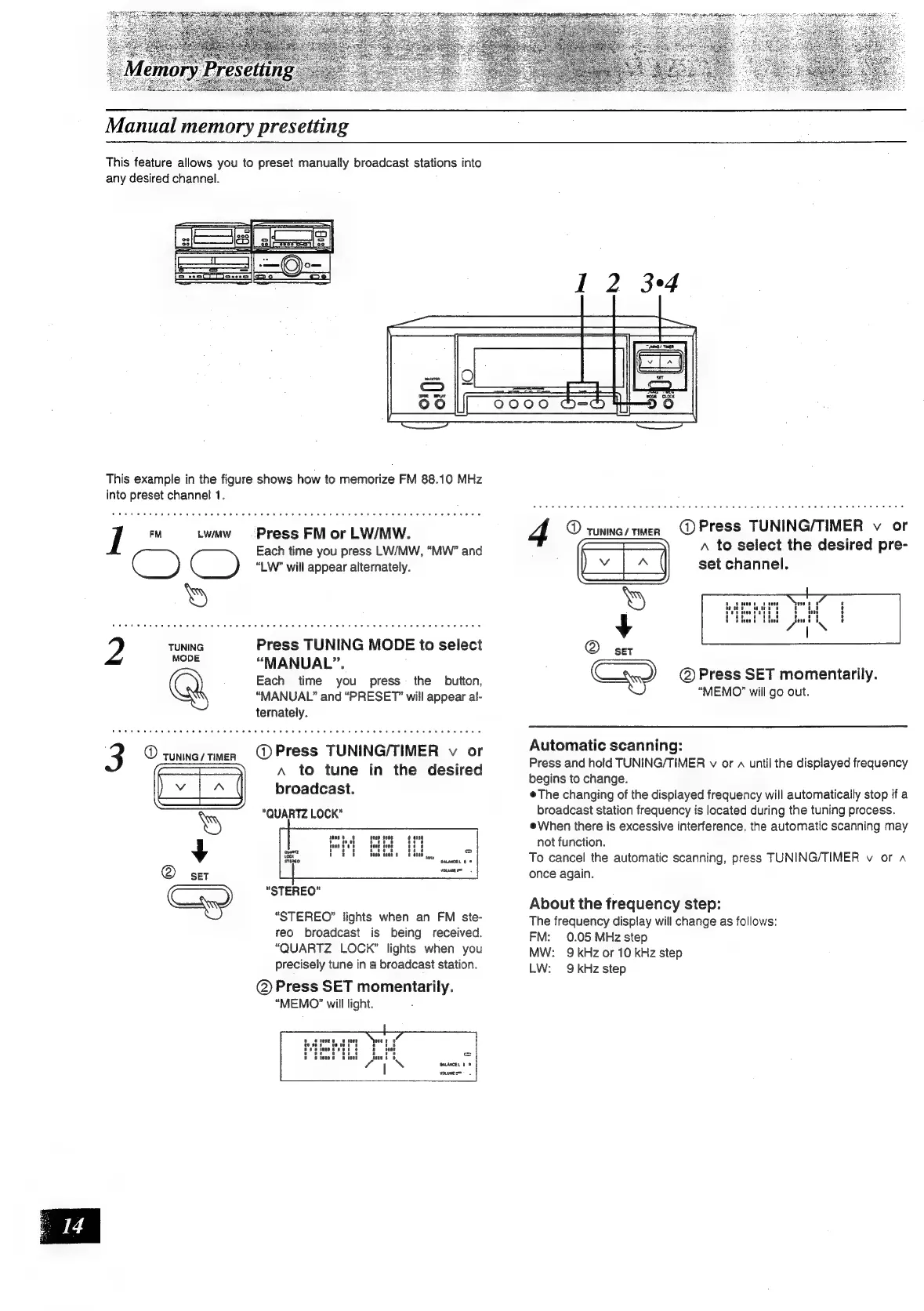
This
feature
allows
you
to
preset
manually
broadcast
stations
into
any
desired
channel.
Js
Jeet
==
This
example
in
the
figure
shows
how
to
memorize
FM
88.10
MHz
into
preset
channel
1.
I
FM
Lwuw
=~=s-
Press
FM
or
LW/MW.
Each
time
you
press
LW/MW,
“MW”
and
C
)
i
9
“LW?”
will
appear
alternately.
Press
TUNING
MODE
to
select
“MANUAL”.
Each
time
you
press
the
button,
“MANUAL”
and
“PRESET”
will
appear
al-
ternately.
3
®
sunincy
ten
Press
TUNING/TIMER
v
or
A
to
tune
in
the
desired
broadcast.
"QUARTZ
LOCK"
"STEREO"
“STEREO”
lights
when
an
FM
ste-
reo
broadcast
is
being
received.
“QUARTZ
LOCK”
lights
when
you
precisely
tune
in
a
broadcast
station.
@)
Press
SET
momentarily.
“MEMO?”
will
light.
@
TUNING
/
TIMER
@
Press
TUNING/TIMER
v
or
A
to
select
the
desired
pre-
set
channel.
@
Press
SET
momentarily.
“MEMO?”
will
go
out.
Automatic
scanning:
Press
and
hold
TUNING/TIMER
v
or
a
until
the
displayed
frequency
begins
to
change.
The
changing
of
the
displayed
frequency
will
automatically
stop
if
a
broadcast
station
frequency
is
located
during
the
tuning
process.
When
there
is
excessive
interference.
the
automatic
scanning
may
not
function.
To
cancel
the
automatic
scanning,
press
TUNING/TIMER
v
or
a
once
again.
About
the
frequency
step:
The
frequency
display
will
change
as
follows:
FM:
0.05
MHz
step
MW:
9
kHz
or
10
kHz
step
LW:
9kHz
step

Related product manuals