EasyManua.ls Logo

Technics SU-A900DM2 - A Vidteoussswiwondetohiaostiaateeats

Technics SU-A900DM2
31 pages
Print Icon
To Next Page IconTo Next Page
To Previous Page IconTo Previous Page
Loading...
SE-A9S00SM2
|
m@
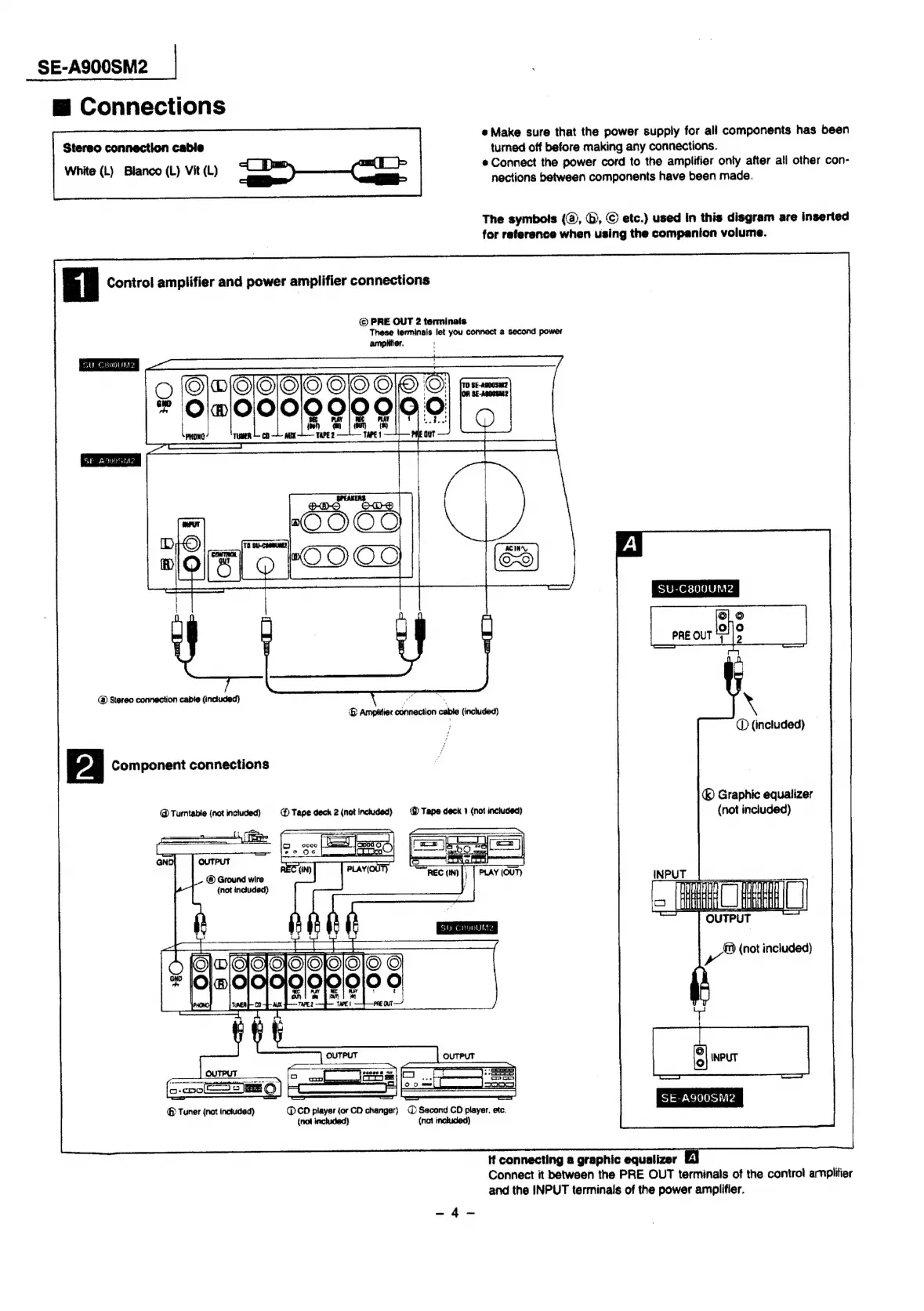
Connections
Stereo
connection
cable
White
(L)
Blanco
(L)
Vit
(L)
po
et
ee
Oe
turned
off
before
making
any
connections.
nections
between
components
have
been
made.
*
Make
sure
that
the
power
supply
for
all
components
has
been
e
Connect
the
power
cord
to
the
amplifier
only
after
ali
other
con-
The
symbois
(@,
©,
©
ete.)
used
in
this
disgram
are
inserted
for
reference
when
using
the
companion
volume.
Control
amplifier
and
power
amplifier
connections
©
PRE
OUT
2
terminate
These
terminals
let
you
connect
a
second
power
ampiitier.
SY
CRopDUM2
SF
AOS
TD
SU-C800UMe2
@
Stereo
connection
cable
(included)
ae
®
Amptitier
connection
cable
(included)
CD
(included)
Component
connections
@
Turmtabie
(not
inchuded)
@
Tape
deck
2
(not
inctuded)
@
Tape
deck
1
(not
included)
GND
OUTPUT
@)
Ground
wire
;
|
Iaiau
{not
included)
y
»
OUTPUT
)
Graphic
equalizer
(not
included)
Sly
Ceuevulnte
(not
included)
ss
@
Tuner
(not
included)
@
CD
player
{or
CO
changer)
@
Second
CD
player,
etc.
(not
included)
(not
inckuded)
SE-A900SMe2
Hf
connecting
a
graphic
equalizer
Connect
it
between
the
PRE
OUT
terminals
of
the
control
arnplitier
and
the
INPUT
terminals
of
the
power
amplifier.
ot
Ave

Related product manuals