EasyManua.ls Logo

Technics SU-A900DM2 - Ans Rauaseerrwssaneas Eaeas

Technics SU-A900DM2
31 pages
Print Icon
To Next Page IconTo Next Page
To Previous Page IconTo Previous Page
Loading...
SE-A900SM2
|
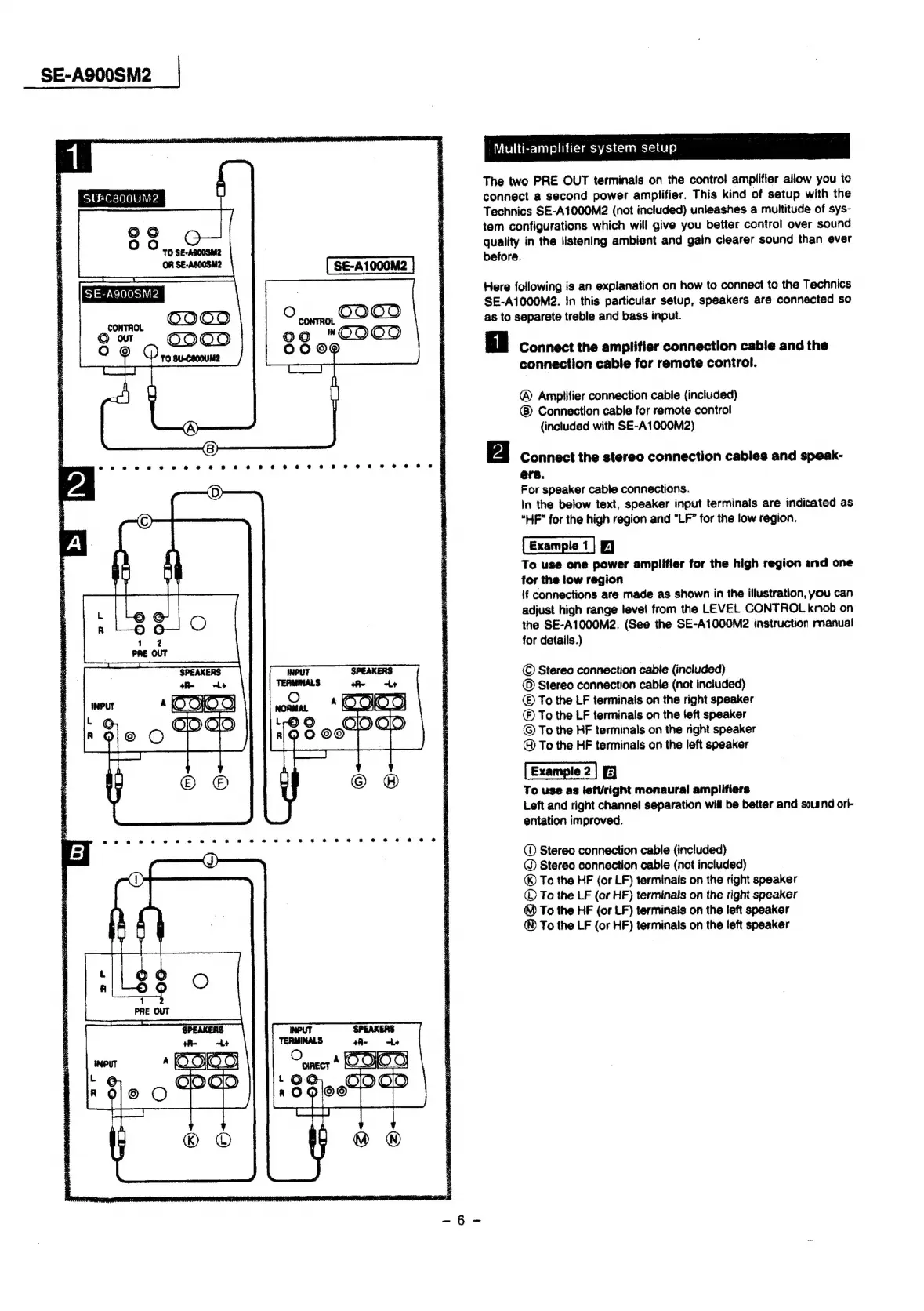
Multi-amplifier
system
setup
The
two
PRE
OUT
terminals
on
the
control
amplifier
allow
you
to
connect
a
second
power
amplifier.
This
kind
of
setup
with
the
Technics
SE-A1000M2
(not
included)
unieashes
a
multitude
of
sys-
tem
configurations
which
will
give
you
better
control
over
sound
quality
in
the
listening
ambient
and
gain
clearer
sound
than
ever
before.
1
SU&C800UM2
SE-A1000M2
Here
following
is
an
explanation
on
how
to
connect
to
the
Technics
SE-A1000M2.
In
this
particular
setup,
speakers
are
connected
so
ba
SE-A9D0SM2
CONTROL
©OO9
as
to
separete
treble
and
bass
input.
Our
O99
Oo
@
Connect
the
amplifier
connection
cable
and
the
connection
cable
for
remote
control.
TO
SU-COODUM2
®
Amplifier
connection
cable
(included)
®
Connection
cable
for
remote
contro!
(included
with
SE-A1000M2)
Bais
ste
th
Big,
he
acces
caved
e.chical
fate
asian
esate
Connect
the
stereo
connection
cables
and
speak-
ere.
For
speaker
cable
connections.
In
the
below
text,
speaker
input
terminals
are
indicated
as
“HF”
for
the
high
region
and
“LF”
for
the
low
region.
(Eampet]
o
Ta
use
one
power
amplifier
for
the
high
region
and
one
for
the
low
region
If
connections
are
made
as
shown
in
the
illustration,
you
can
adjust
high
range
level
from
the
LEVEL
CONTROL
knob
on
the
SE-A1000M2.
(See
the
SE-A1000M2
instruction
manual
for
details.)
©
Stereo
connection
cable
(included)
©
Stereo
connection
cable
(not
included)
©
To
the
LF
terminals
on
the
right
speaker
)
To
the
LF
terminals
on
the
left
speaker
©
To
the
HF
terminals
on
the
right
speaker
®
To
the
HF
terminals
on
the
left
speaker
G
To
use
as
left/right
monaural
amplifiers
Left
and
right
channel
separation
will
be
better
and
soisnd
ori-
entation
improved.
@
Stereo
connection
cable
(included)
@
Stereo
connection
cable
(not
included)
®©
To
the
HF
(or
LF)
terminals
on
the
right
speaker
©
To
the
LF
(or
HF)
terminals
on
the
right
speaker
@
To
the
HF
(or
LF)
terminals
on
the
left
speaker
®
To
the
LF
(or
HF)
terminalis
on
the
left
speaker

Related product manuals