The TechniSat DIGITRADIO 360 CD IR is a versatile CD micro system offering a wide range of audio functionalities, including DAB+/FM/Internet radio. Designed for home use, it provides multiple ways to enjoy music and radio content, from traditional physical media to modern streaming and networked audio.
Function Description
The DIGITRADIO 360 CD IR serves as a comprehensive audio hub. Its core functions include:
- CD Playback: The device features a front-loading disc tray for playing various CD types, including CD-R, CD-RW, and AUDIO-CDs. It supports MP3 and WMA file formats from USB devices. Playback controls include pause, skip tracks, fast rewind/forward, repeat (current track, current folder for data CDs, or all tracks), and random playback. Users can also program up to 20 tracks in a desired order.
- DAB+ Radio: It allows access to digital radio stations, offering improved sound quality and a wider selection of channels compared to traditional FM. The unit can perform auto-scans to find available DAB+ stations and allows manual tuning for specific multiplexes. Various display modes provide information such as DLS (Dynamic Label Segment), Programme Type, Ensemble/Frequency, Signal error/Strength, Bit rate/Codec/Channels, and Date. Dynamic Range Compression (DRC) can be applied to adjust the audio dynamic range, and invalid stations can be pruned from the list. Station listing order can also be customized (Alphanumeric/Ensemble/Valid).
- FM Radio: For traditional radio listening, the device includes an FM tuner with auto-scan and manual tuning capabilities. It supports toggling between Stereo and Mono reception and allows users to set scan preferences (Strong stations only).
- Internet Radio: This feature connects to thousands of radio stations and podcasts worldwide via a broadband internet connection. The device accesses the Frontier Silicon Internet radio portal to download station lists. Users can access "Last listened" stations, browse a "Station list" by location, genre, popular stations, new stations, or keywords, and listen to podcasts. It also supports "My Favourites" (stations stored on the internet radio portal) and "My added stations" (user-defined stations via the portal). An access code is provided to register the radio with the portal.
- Music Player (Networked Audio): The built-in Music Player allows playback of unprotected audio files (AAC, MP3, WMA, FLAC) stored on a networked computer. This requires setting up shared media folders or libraries on the computer. The device scans for available shared media and allows users to select and play desired tracks. Playback options include pause, skip, fast rewind/forward, repeat, and shuffle. It also includes a "Prune servers" function to remove unavailable servers.
- USB Playback: A USB port is available for playing MP3 and WMA files directly from USB disk devices (up to 32GB, USB 1.1 and 2.0 compatible). The unit displays "USB disk attached – Open folder?" when a device is connected.
- Spotify Connect: This feature enables users with a Spotify Premium account to control music playback on the DIGITRADIO 360 CD IR directly from their Spotify app on a smartphone, tablet, or PC. The device needs to be on the same Wi-Fi network as the controlling device.
- AUX Input: An "AUDIO IN" socket on the front allows connection of external audio devices via an AUX cable, enabling the unit to act as a speaker for other sound sources.
- Headphone Output: A 3.5mm stereo headphone jack is provided for private listening, automatically disconnecting the internal speakers when headphones are in use.
Usage Features
The DIGITRADIO 360 CD IR is designed for user-friendly operation, primarily through its front panel controls and a comprehensive remote control.
- Powering On/Off: The unit enters standby mode upon initial connection. It can be switched on or back to standby using the STANDBY button on the unit or remote. An automatic standby feature activates after 15 minutes of inactivity.
- Mode Selection: Different audio modes (Music player, DAB radio, FM radio, AUX In, CD, Internet radio, Spotify Connect) can be selected by repeatedly pressing the MODE button on the unit or dedicated buttons on the remote control.
- Volume Control: Volume can be adjusted using the VOLUME +/– dial on the unit or the corresponding buttons on the remote. A MUTE button on the remote allows for temporary silencing.
- Menu Navigation: A MENU button on the unit and remote provides access to various settings. Navigation is done using the VOLUME +/– dial or PRESET buttons, with selections confirmed by the SELECT button on the unit or ENTER button on the remote.
- System Settings: A dedicated "System Settings" menu allows configuration of various aspects:
- Equaliser: Offers different sound profiles (FLAT, CLASSIC, ROCK, POP, JAZZ) to customize audio output.
- Network: Supports both wired and wireless network connections. For wireless, it includes a "Network wizard" for easy setup (SSID selection, rescan, manual config with DHCP), PBC Wlan setup, and options to view settings, select WLAN region, define a PIN for NetRemote, view network profile, clear network settings, and keep connected in standby/Network radio mode for remote operation and audio streaming.
- Time/Date: Can be set automatically via Internet, DAB+, or FM, or manually. Options include auto update source, 12/24 hour format, timezone, and daylight savings.
- Inactive Standby: Allows setting a timer (2, 4, 5, or 6 hours) for the unit to automatically switch to standby after a period of play.
- Language: Users can select their preferred display language.
- Factory Reset: Resets the unit to factory settings, erasing tuned stations and presets.
- Software Update: Supports automatic or manual software updates. A warning is provided to ensure a stable power connection during updates to prevent damage.
- Setup Wizard: Guides users through initial date/time and network configurations.
- Info: Displays software version and Radio ID.
- Backlight: Adjusts display brightness for operation and standby modes (High/Medium/Low for operation; Time out and Standby Level for standby).
- Presets: Users can store and recall up to 10 preset stations for Internet Radio, DAB, and FM modes, allowing quick access to favorite channels.
- Alarm Function: The device includes an alarm clock with two independent alarms. Settings include enable (Off/Daily/Once/Weekends/Weekdays), time, mode (Buzzer/Internet radio/DAB/FM/CD), preset station, and volume.
- Sleep Timer: A sleep function allows users to program the unit to turn off after a set period (15, 30, 45, or 60 minutes).
- NetRemote: The device can be controlled via a smartphone or tablet using the UNDOK app (iOS/Android). This app allows selection of various modes (Internet radio, Spotify, Music player, DAB, FM, AUX in, CD) and provides remote control functionality. A default PIN (1234) is used for initial connection.
Maintenance Features
Proper care ensures the longevity and optimal performance of the DIGITRADIO 360 CD IR.
- Disc Handling:
- Avoid touching the playback side of discs.
- Do not attach paper or tape to discs.
- Clean discs by wiping from the center outwards with a soft, dry cloth. For stubborn dust, a slightly moistened cloth followed by a dry cloth can be used.
- Do not use solvents, thinners, benzine, commercial cleaners, or antistatic sprays, as these can damage discs.
- Disc Storage:
- Store discs away from direct sunlight or heat sources.
- Avoid storing discs in humid or dusty environments.
- Store discs vertically in their cases to prevent warping; avoid stacking discs or placing objects on them.
- General Cleaning:
- Unplug the unit from the mains socket before cleaning.
- Do not use abrasive pads or cleaning solutions that could damage the unit's surface.
- Do not use liquids to clean the unit.
- Battery Replacement (Remote Control):
- The remote control uses R6/AA/UM3, 1.5V batteries.
- Ensure correct polarity (+/-) when inserting new batteries.
- Dispose of used batteries according to local regulations, not as domestic waste.
- Remove batteries if the remote will not be used for an extended period to prevent corrosion or leakage.
- Ventilation:
- Ensure ventilation vents are not obstructed by curtains or other materials to prevent overheating.
- Maintain a minimum of 10cm clearance around the apparatus if placed in a bookcase or confined space.
- Professional Servicing:
- The unit contains no user-serviceable parts. Do not remove screws or open fixed covers.
- All maintenance work should be performed by qualified personnel.

 Need help?
 General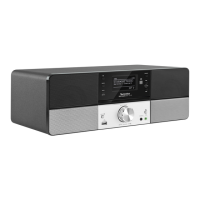

 To Next Page