25
DE
EN
2 Remote control
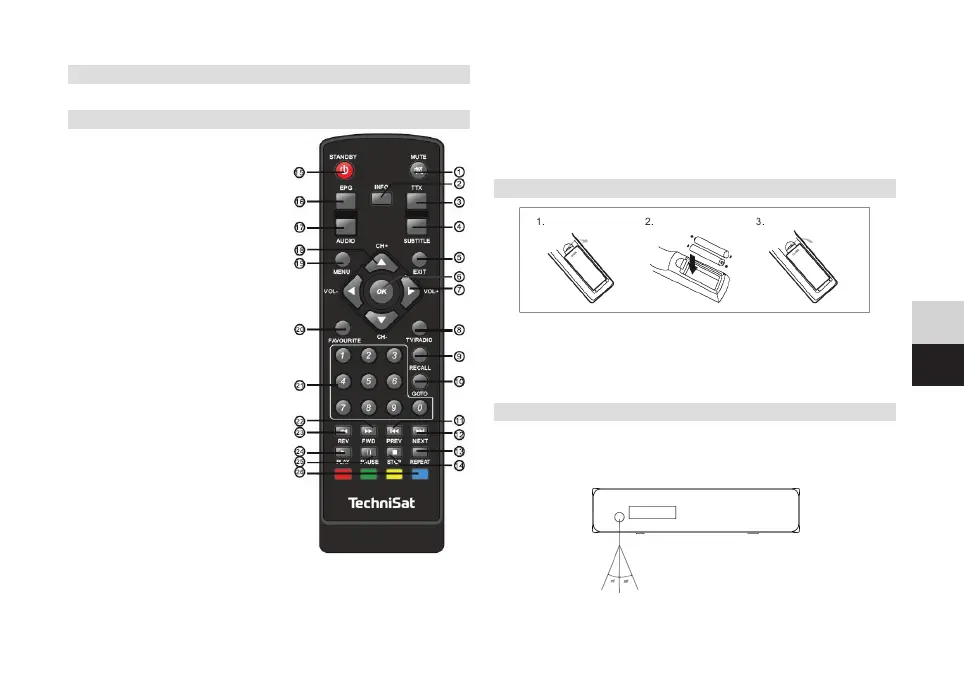
2.1 Buons on the remote control
1) MUTE: Mutes the sound.
2) INFO: Extended channel display.
3) TTX: Calls up the teletext.
4) SUBTITLE: Subtitle selection.
5) EXIT: Exit the menu or
return to the previous menu.
6) OK: Confirm a function or
call up the channel list.
7) RIGHT/LEFT: Navigating in
menus, changing the volume.
8) TV/RADIO: Switching between TV
and radio mode.
9) RECALL:: Switching between the
last channels viewed.
10) GOTO: Selection of
playback time for media files.
11) PREV: Previous track
(media playback).
12) NEXT: Next track
(media playback).
13) REPEAT: Repeat
(media playback).
14) STOP: Stops the
(media playback).
15) STANDBY: Switching the
receiver on/o.
16) EPG: Electronic
Programme Guide
17) AUDIO: Selection of the sound
mode or audio language.
18) Up/Down: Navigating in menus, next/previous channel.
19) MENU: Calls up the main menu.
20) FAVOURITE: Favourites list.
21) 0-9 (number keys): Selection of a channel.
22) FWD: Fast forward (media playback).
23) REV: Rewind (media playback).
24) PLAY: Start playback (media playback).
25) PAUSE: Pause playback (media playback).
26) Colour keys: Calls up the function that is displayed
on the screen. In normal mode: Yellow = multi-image display.
2.2 Inserting the baeries
1. Slide open the baery compartment cover on the back of the remote
control.
2. Insert 2 x AAA baeries into the remote control noting the polarity.
The orientation is printed in the baery compartment.
3. Close the baery compartment cover again
2.3 Using the remote control
To get the most out of the infrared remote control, point it at the infrared
sensor on the front of the digital receiver. The maximum reception
distance is about 7 metres and within an angle of 60°. Direct sunlight or
objects within the reception area may interfere with reception.


 To Next Page