26
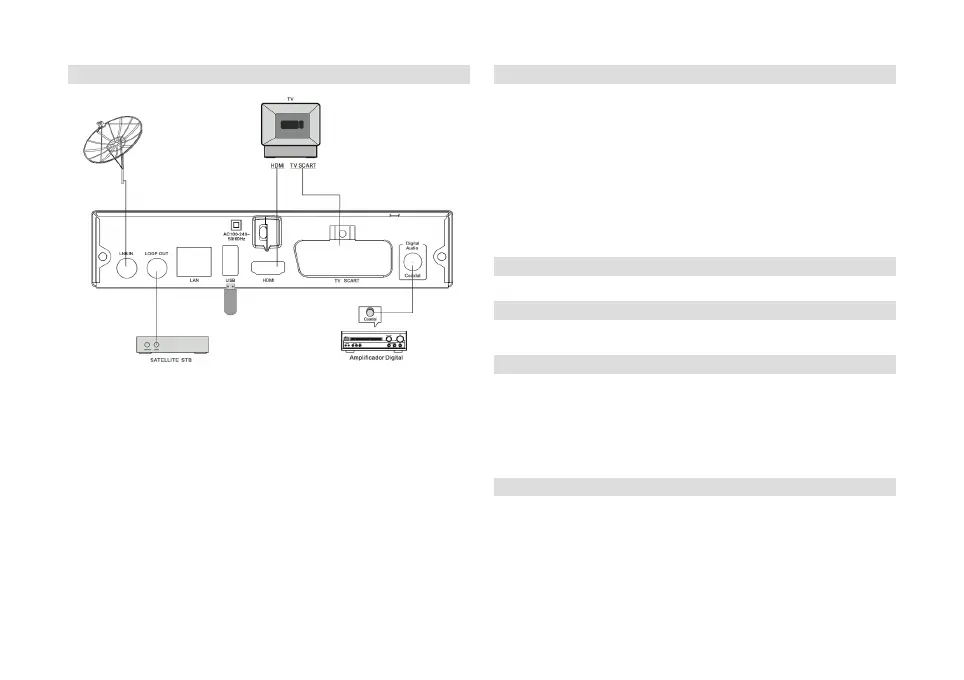
3 Connections
Caution: Only connect the receiver to a power supply that complies with
the receiver's specifications.
The receiver may only be operated at 100 - 240 V, 50/60 Hz.
Do not open the device under any circumstances. Risk of electric shock.
Note: Also observe the information and operating instructions for
external devices such as a TV, VCR or AV amplifier.
Do not connect the receiver to the mains until all other external devices
have been properly connected.
4 First use
Aer you have properly connected the receiver and plugged it in, first
turn on your TV.
To switch on the receiver, press the on/standby buon on the remote
control.
Note: You may still need to select the appropriate input on the TV where
the receiver is located.
Aer switching on for the first time or aer calling up the factory seings,
the receiver starts in the basic seings and a pre-programmed channel
list for reception of ASTRA 19° East.
You can adjust these and other seings as described from section 6.
5 Use
5.1 Turning On/O
Use the STANDBY buon to switch the receiver on and o.
5.2 Selecting a channel
You can switch to the next or previous channel using the up/down arrow
keys.
You can also call up a channel by entering its channel location number
using numeric keys.
Press the RECALL key to switch between the current and the last channel
played.
5.2.1 Channel/Favourites list
Press the OK key to display the channel list or the FAVOURITE key to
display the favourites list.
With the arrow keys right/le you can now switch between the dierent
sortings/lists.
Use the up/down arrow buons to highlight the channel you want.
Confirm with OK to call up the highlighted channel.


 To Next Page