33
DE
EN
6.16 Network seings
Under the menu [Setup] > [Network Seings] > [Network Seings] you
can make seings for the LAN connection of your receiver.
In the network selection line, switch the network connection on
[Ethernet] or o [None].
Via Seings you can switch the DHCP client of the receiver [On] or switch
DHCP [O] for manual configuration of the IP address, subnet mask,
gateway, DNS1 and DNS2.
Apply the seings you have made.
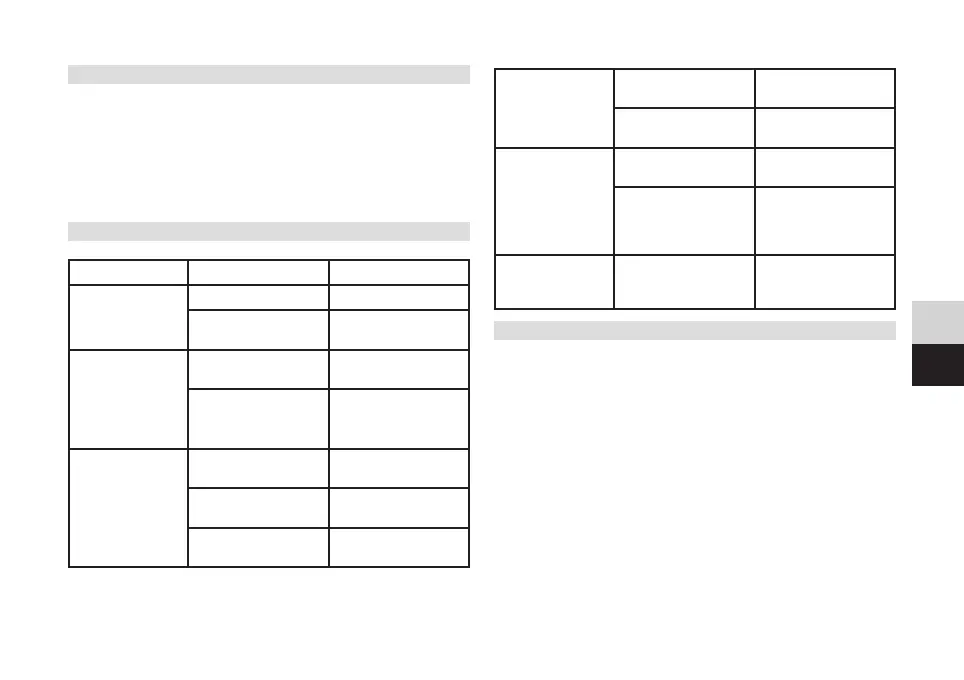
7 Troubleshooting
Problem Possible cause Solution
No picture No power Connect power
Device not switched
on
Switch on the device
“No signal" overlay Satellite cable not
connected
Connect satellite cable
Incorrect reception
seings
Check satellite
configuration and edit
if necessary
No sound
playback
Audio cable not
connected
Connect audio cable
correctly
Sound muted or too
quiet
Adjust volume
Wrong audio title or
audio file
Select another title
or file
Only sound is
played back, but
no picture
SCART cable inserted
incorrectly
Insert SCART cable
correctly
Radio channel
selected
Press the TV/radio
buon
Remote control
does not work
Baeries flat or
incorrectly inserted
Insert new baeries
with correct polarity
Remote control not
correctly aligned
with the front of the
receiver
Align the remote
control correctly with
the front or reduce
the range
Blocks or
distortions appear
in the picture
Satellite signal too
weak
Check satellite system
or amplify signal
8 Technical data
Connections
LNB In/ Loop Out F-socket / F-socket
TV-SCART Composite TV (FBAS), Audio L/R
S/PDIF Cinch socket, audio output digital electrical
HDMI Output type A socket
USB Type A socket for USB mass storage (USB 2.0)
Power supply
Input 100 - 240 V ~ 50/60 Hz
During operation: Max. 18 W
Standby < 1 W
Playable media formats
Pictures JPEG
Video H.264, MPEG-2, MPEG-4, AVI
Music MP3


 To Next Page