Call: 1-631-648-7481 or Visit: support.technocnc.com
15
HD Series Manual
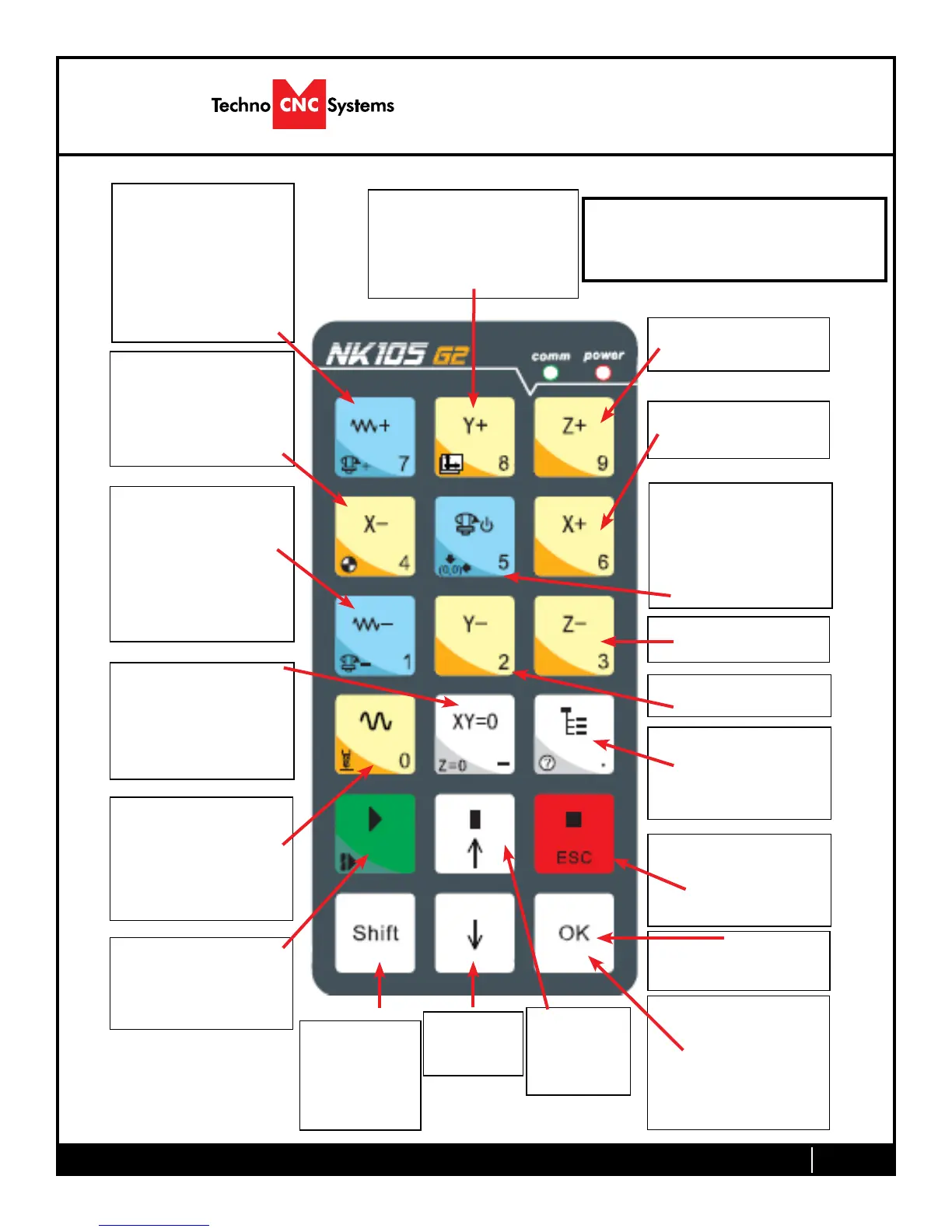
NK105G2
Single Keystroke Functions on the Handheld Pendant
Positive Feedrate
Override
(Input the number 7)
X- Movement
(Input the number 4)
Jog Speed Select
(Input the number 0)
Enter Manual Parameters
Screen
Change high/low speed
and XYZ step increment
Z+ Movement
(Input the number 9)
X+ Movement
(Input the number 6)
Z- Movement
(Input the number 3)
Menu Screen
(Input a decimal point)
Shift Key
Switch between
Jog and Step
modes
Down
Directional
Key
Set XY Zero Position
(Input a minus sign)
Stop
Cancel
Escape
Up Directional
Key
Pause
Start key
Spindle On/Off
(Input the number 5)
Negative Feedrate
Override
(Input the number 1)
Y+ Movement
(Input the number 8)
Y- Movement
(Input the number 2)
OK
Select
Bold Indicates Primary Function
(Parenthesis Indicates Secondary Function)
Yellow Keys represent movement
related keys
Blue Keys represent speed and
feed related keys


 To Next Page