8
SKILLRUN
SKILLRUN UNITY 5000
SKILLRUN UNITY 7000
SKILLRUN TX 500
E
A
F
B
C
D
EG
E
A
F
B
C
D
EG
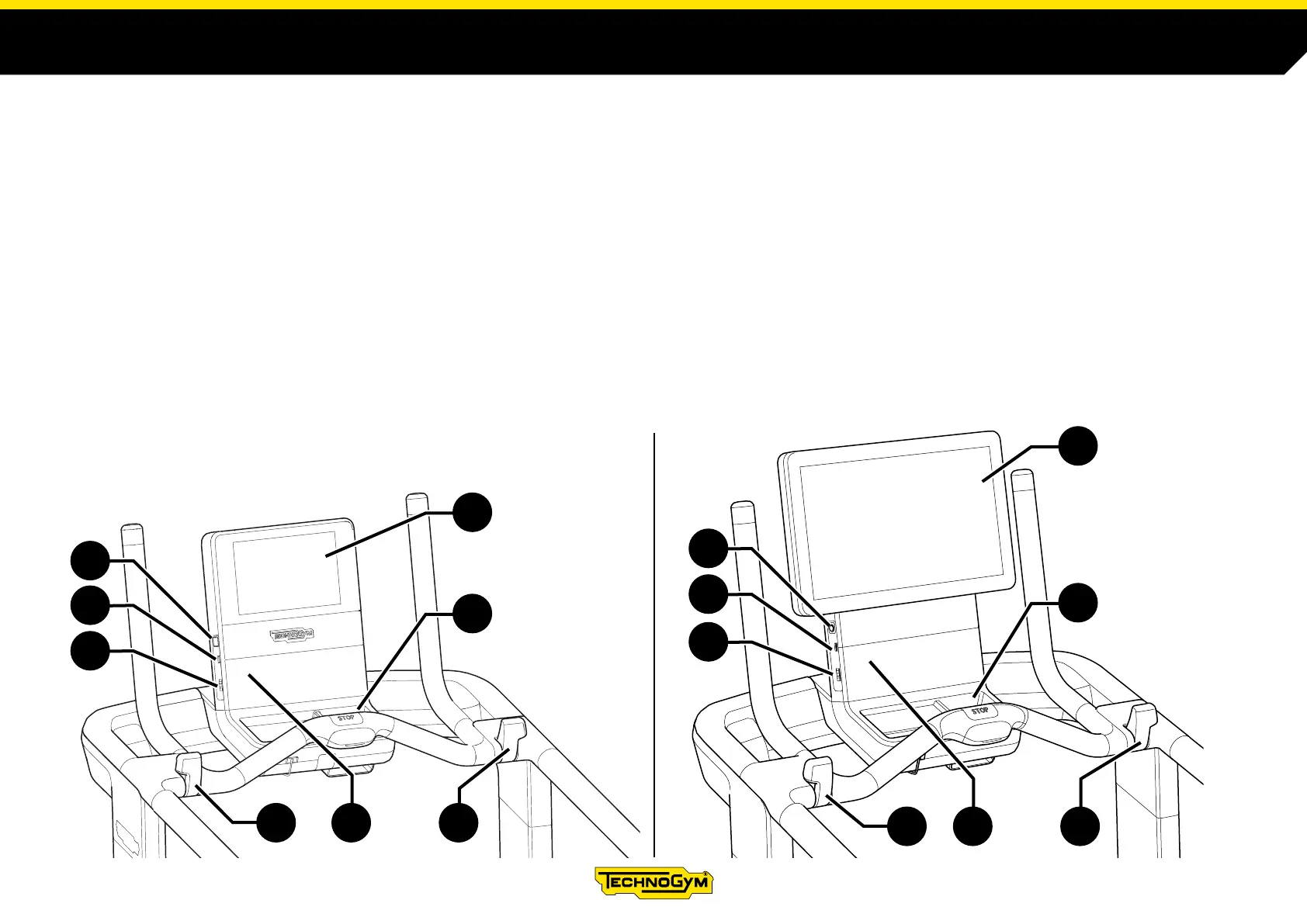
DESCRIPTION OF THE PRODUCT
Control panel (A). Used to display and manage training information, settings and content.
The tablet-style touch screen interface allows you to include the contents oered by the Technogym App Store (in Unity 5000 and Unity 7000 models).
Input for TGS key (B). The device reads the training data on the TGS key and memorises the exercise results.
Headphone connector (C). Enables users to plug in headphones and listen to audio content. Headphones with a microphone function may also be used
(optional in the TX 500 model).
USB port (D). In the TX 500 model, this USB port is only enabled for maintenance operations.
Fast Track Control (E). These enable you to change the speed and gradient of the belt during the exercise.
Object holder (F). For storing a water bottle or other useful items during the workout.
Sensor for NFC / RFID reader (G).












 To Next Page