4.2.1.1.2 Live
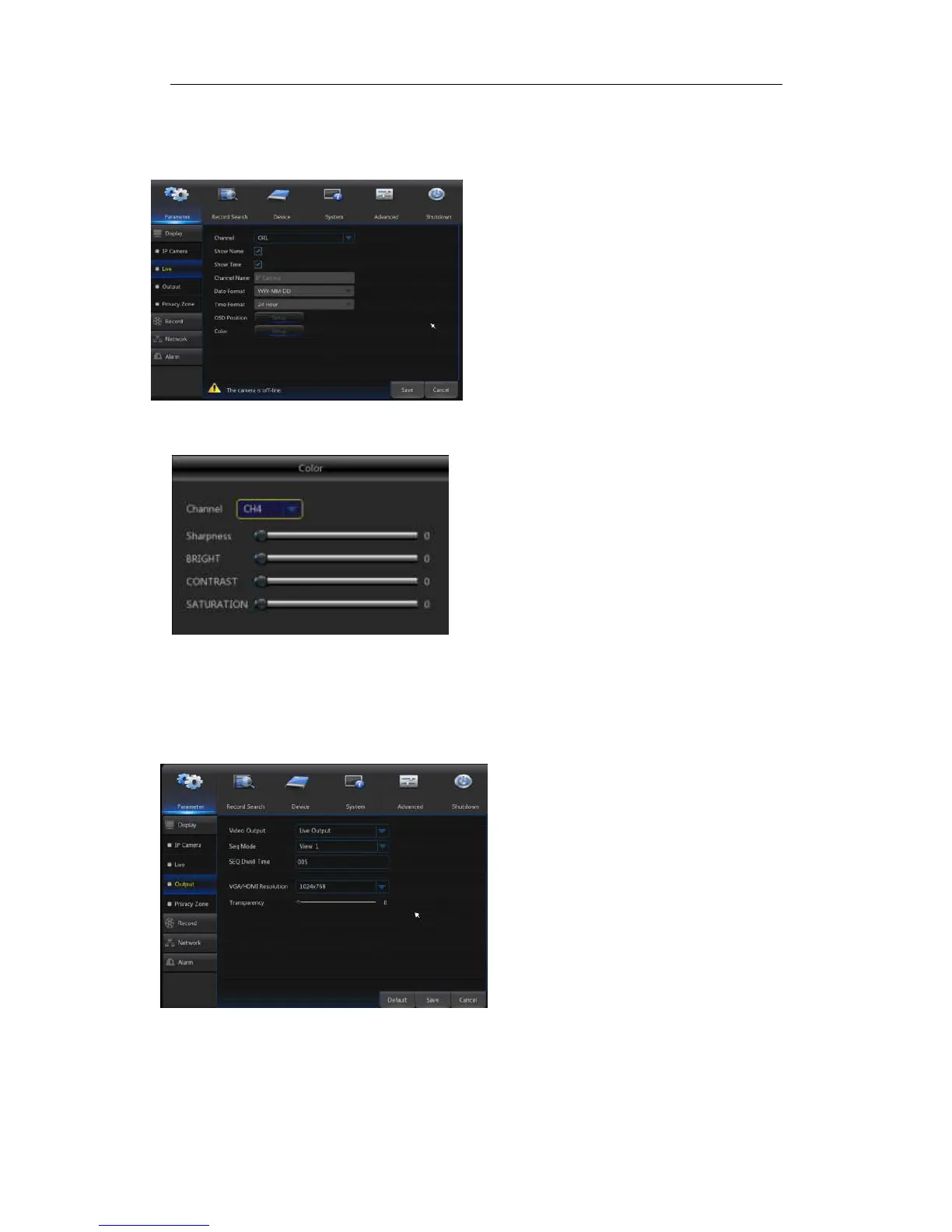
Go to“Main Menu”→“Display”→“Live” to enter into the interface shown as Picture4-5.
Picture4-5
Picture4-6
4.2.1.1.3 Output
Go to“Main Menu”→“Display”→“Output” to enter into the interface shown as
Picture4-7.
Picture4-7
Video Output:
::
:Live Output
Seq Mode:
::
:Set sequence mode
SEQ Dwell Time:
::
:Sequence dwell time
is set 5 seconds by default. User may
set it as required.
VGA/HDMI Resolution:
::
:VGA output or
HDMI output. Including 1024×768 ,
1280×1024 , 1440×900 , 1280×720 ,
1920×1080
Transparency:
::
:Set the transparency of
the menu in the range of 0—128.
Channel:
::
:Select channel number.
Show Time:Tick the checkbox to display time.
Channel Name:Name marked on IPC
Date Format:Set date format such as m/d/y or
y/m/d
Time Format:12 hour or 24 hour
OSD Position:Freely set the position of IPC
name and time
Color:Adjust the chroma, brightness, contrast
and saturation of the IPC of the channel.
(



 To Next Page