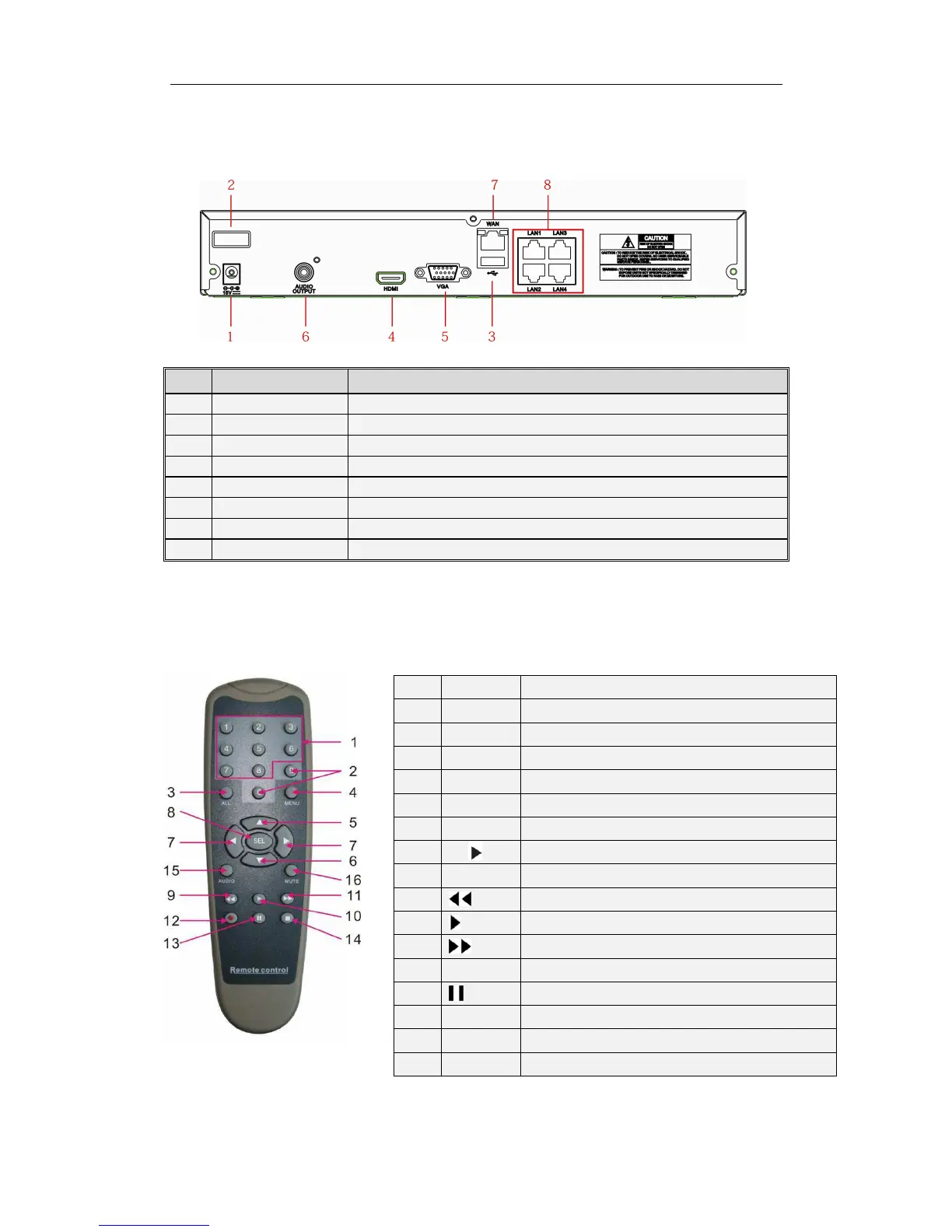
1.2 Rear Panel
NVR Rear Panel(
((
(For reference only)
))
)
Item
Physical Port Connection Method
Connect the attached power supply
Connect USB devices, such as USB mouse and USB flash disk.
HDMI high definition port
Connect to VGA monitor, such as PC monitor
Audio signal output, RCA interface
Network input interface of the router/Connect to web camera.
LAN network interface, support POE, can supply power to the camera.
Table 1-2
1.3 Remote Controller
(For reference only)
Table 2-3 Key functions of the remote controller
Item
Key title Key function
1 1-8 Channel select 1-8; Numeric key
2
9、0
Numeric key
3 ALL Multiple display mode
4 Menu Enter into Main menu/Exit
5 ▲ Up arrow key, Volume adjust
6 ▼ Down arrow key, Volume adjust
7
◄/
Left/Right key; Decrease/increase parameter value of control bar.
8 SEL Select key/Edit key; selected operation.
9
Rewind key
10
Enter into record search menu; Play key
11
Forward key
12 ● Record key
13
Pause/Sequence key
14 ■ Stop manual record; stop playing
15 Audio Go to main menu
16 Mute Mute On/off
Table 1-3



 To Next Page