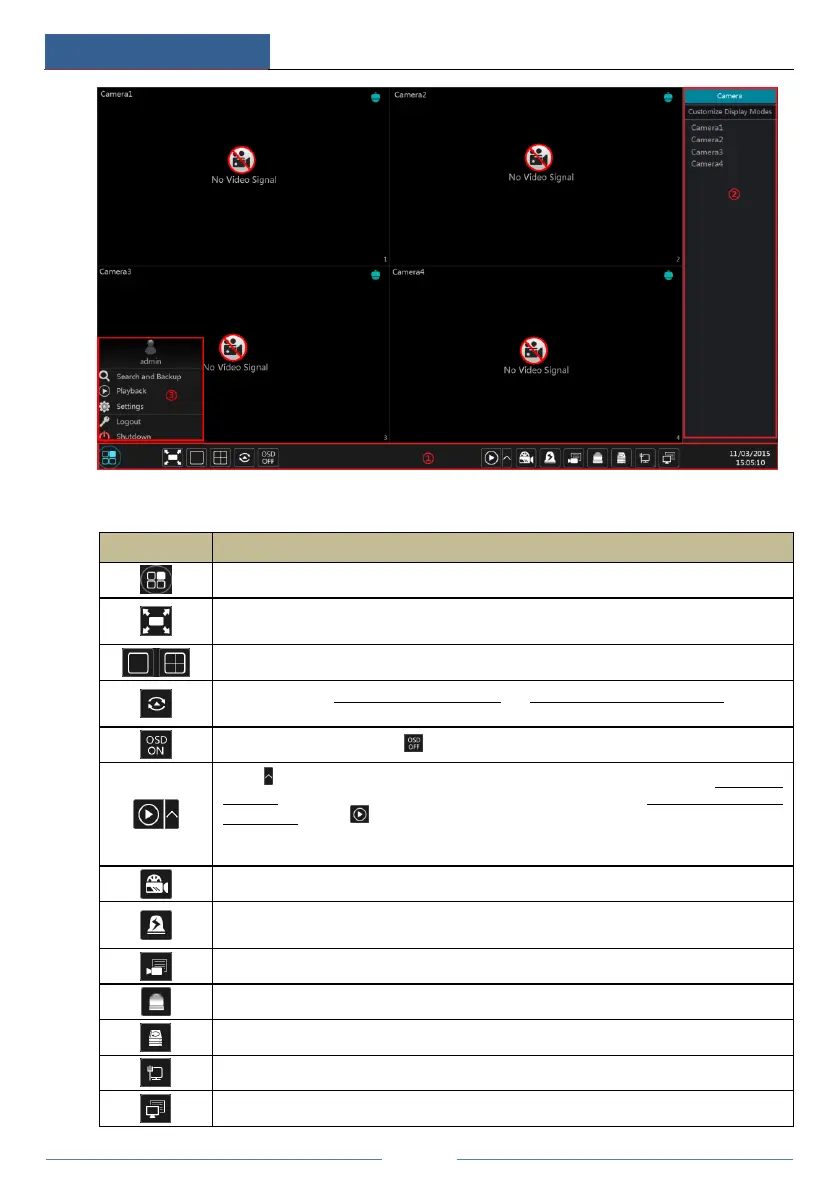
The buttons in area ① are introduced in the table below.
Start button. Click it to pop up area ③.
Full screen button. Click it to show full screen; click it again to exit the full screen.
Dwell button (see 5.2.2 Quick Sequence View and 5.2.3 Scheme View In Sequence for
details).
Click it to enable OSD; click to disable OSD.
Click to set the default playback time before starting instant playback (8.1 Instant
Playback) or going to the playback interface for playback operations (8.2 Playback Interface
Introduction); click to go to the playback interface. For instance, if you choose “5
minutes ago” as the default playback time, you can playback the record from the past five
minutes.
Manual record button. Click it to enable/disable record.
Manual alarm button. Click it to trigger or clear the alarm-out manually in the popup
window.
Record status button. Click it to view the record status.
Alarm status button. Click it to view the alarm status.
Disk status button. Click it to view the disk status and RAID status.
Network status button. Click it to view the network status.
Information button. Click it to view system information.



 To Next Page