Instruction manual ITEM TE550 S.p.A.
1.5 - CONTROL UNIT SWITCH-ON
As soon as the welding control unit is turned on, the display shows the measured mains
frequency and the software version of the program.
SUPPLY FREQUENCY
50 Hz
TECNA TE550 3.31
WELD CONTROL UNIT
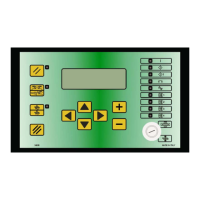
After a few seconds, the TE550 displays the following frame and is set to a waiting condition
until the RESTART key is pressed
PRESS RESTART
KEY [//]
The RESTART command may be activated by pressing the proper key placed on the control
unit (also a non-manual activation is available).
This key enables the control unit's commands and outputs. It must be pressed every time
the control unit is powered.
When the RESTART command is activated, all the devices connected to the VAUX outlet are
powered.
Before activating the RESTART command, it is important to check
that it will not cause damage to people or equipment.
Before starting any welding operations, first program the welding data and set some general
operating parameters of the welder.
For safety reasons, the microprocessor does not activate the
welding cycle if the cycle start signal is already activated at the
moment when the welder is switched on; it is sufficient to remove
the command and activate it again. Micro-interruptions or excessive
voltage drops, instead of affecting the operating mode, do stop the
control unit. In order to restore its operating mode, it is sufficient to
switch off and switch on the welder again.
14/92


 To Next Page