27
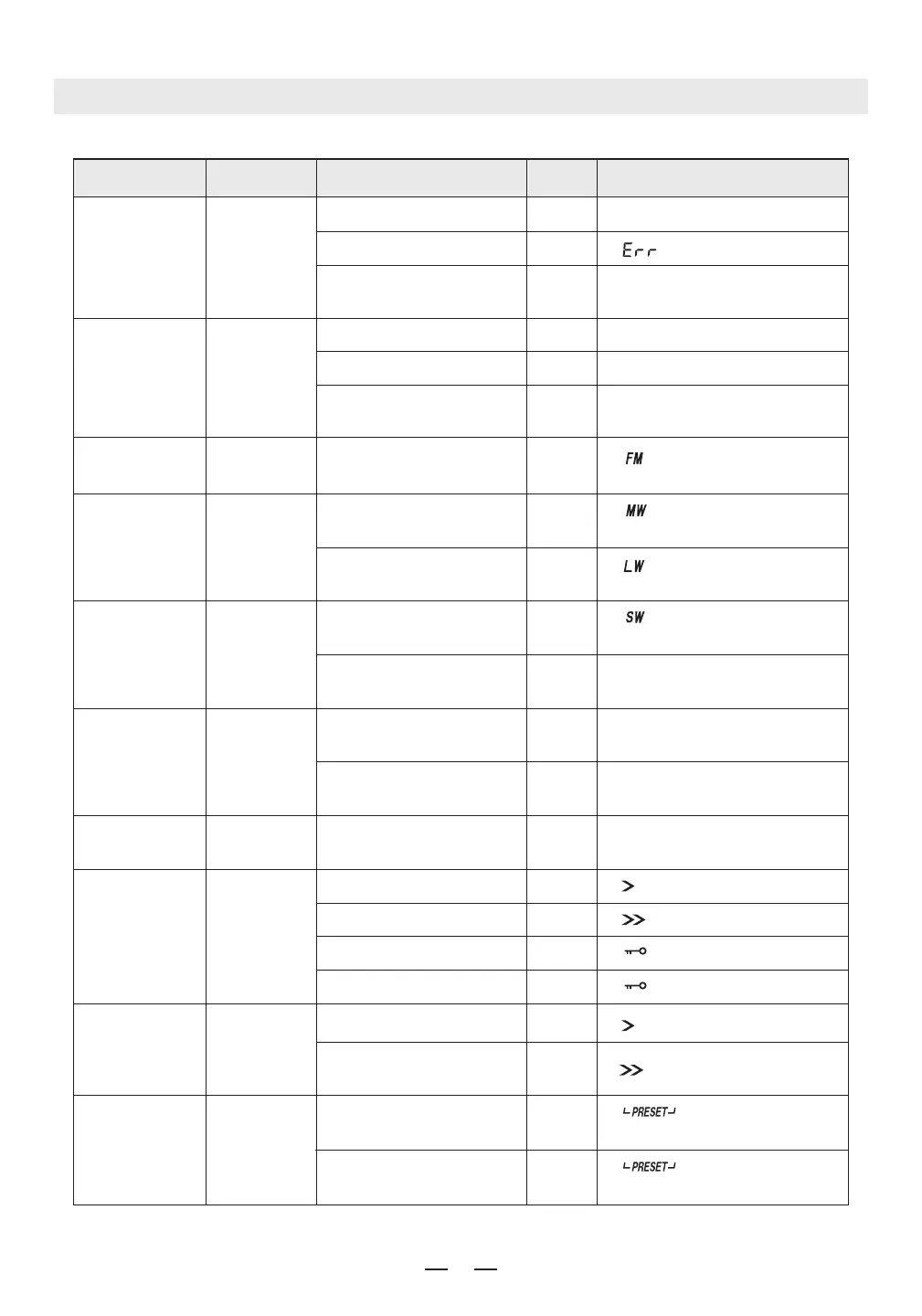
MESSAGE ALERT STATUS
ETEER
B
BB
B
B--
Confirm or system
setting
B
Go in
SW,
TUNING knob,
UP/DOWN
B
B
FUNCTION BUTTON OPERATION TONE
DISPLAY
B--
ATS(Auto tuning
storage)
BB
B
MW/LW band
selection
Go in/out the
range of a meter
band
Time displays in the upper right
corner
AIR band selection
AIR appears and a AIR frequency
displays
Every operation
An error occurred
Complete the system code
setting
B--
Start or finish its operation.
” “ appears
MW/LW
FM
To start
Stop ATS by pressing any key
End of ATS
Frequency and PRESET changed
Frequency stays
P0:01 shows in the upper right
corner and its frequency displays
FM band selection
” “
displays
appears and a FM frequency
FM FM
B
MW/LW
MW
LW
” “ appears and a MW frequency
displays
” “
displays
appears and a LW frequency
B
SW band selection
SW
SW
Select a SW meter band
” “ appears and a MW frequency
displays
A meter band flashes in the upper
right corner
B
Go out
A meter band flashes in the upper
right corner
AIR AIR
Tuning step and
lock
STEP/LOCK
Slow tuning
Fast tuning
Lock the tuning konb
Unlock
B
BB
B--
B
“ “ is on
“ “ is on
Auto scaning
UP/DOWN
Start scaning
Stop scaning by pressing
any key
B
BB
Auto-scan memory
Start auto-scan
Stop scaning by pressing any
key
B
BB
UP/DOWN
“ “ appears
“ “ disappears
“ “ flashes and frequency changed
“ “ and the frequency stay
“ “ flashes and the memory
number changes
“ “ and the memory number
stay


 To Next Page