7
844E Sprayer Crontrol
98-70006 R3
INSTALLING THE SPEED SENSOR ASSEMBLY
Components
Two (2) magnets, Sensor with attached connector cable, and mounting hardware. If
you are installing a radar ground speed sensor, follow the instructions supplied with
that unit.
Speed Step 1 - Location
The speed sensor assembly should be installed on a non-driven wheel to avoid
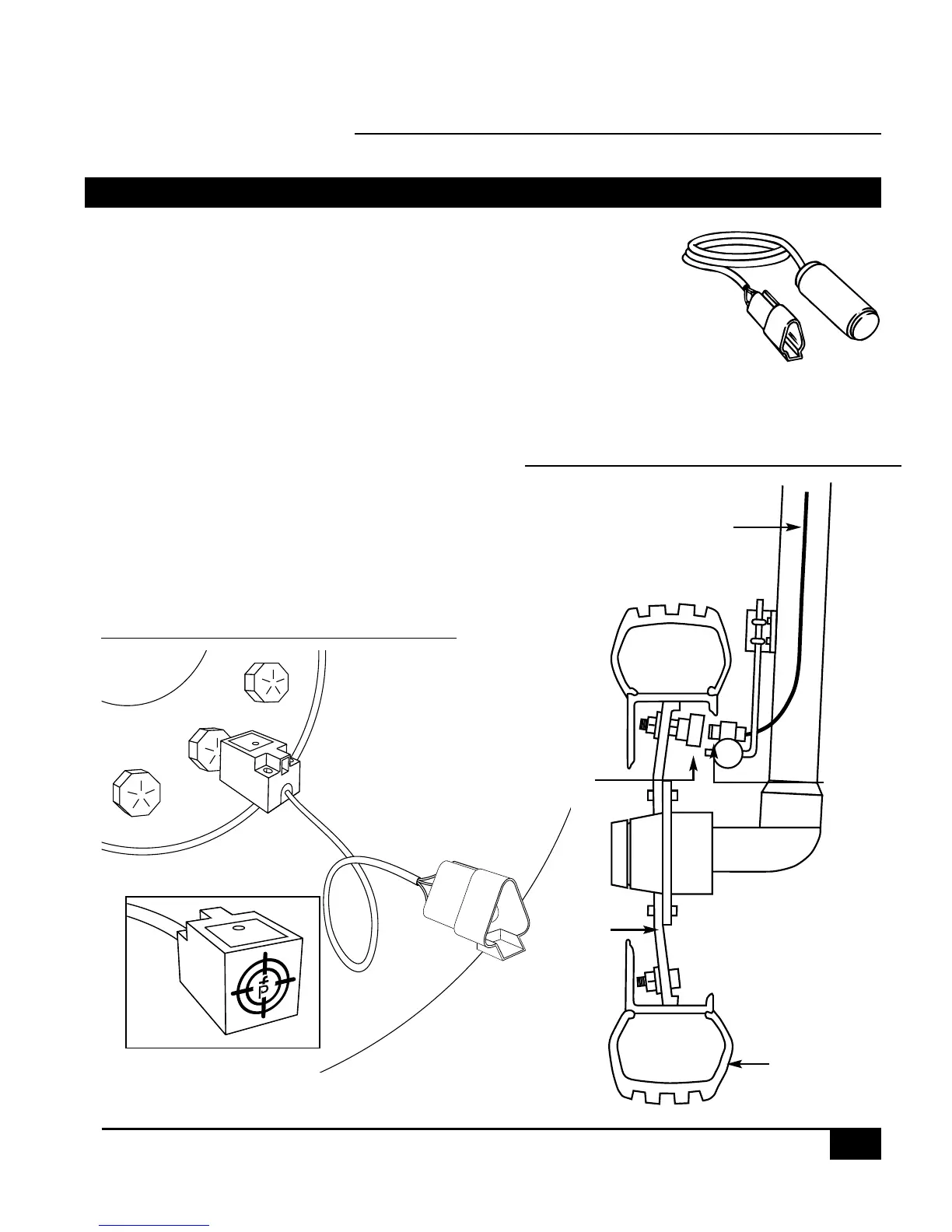
potential errors that are likely to occur from a slipping drive wheel. Refer to Figure 1-6.
Proximity Sensor (optional)
An optional proximity sensor is available to use in cases
where space is limited or for drive shaft mounting.
The proximity sensor will work by sensing any metal object.
The proximity sensor must be mounted so that the sensor face
is within 1/8″ to 3/8″ (3-10 mm) of the metal object being read.
CABLE
MAGNET
RIM
SENSOR
TIRE
NOTE:
TARGET FACES
TIRE LUGS
Figure 1-5: Wheel Mounting of Magnetic Speed Sensor
Figure 1-6: Wheel Mounting of Speed Sensor


 To Next Page