19
844E Sprayer Crontrol
98-70006 R3
PROGRAMMING GUIDELINES
IMPORTANT PRELIMINARY INFORMATION
Before you begin, we recommend that you review the following Programming Guidelines that control the
programming process:
• For your convenience, the programming of the 844 has been divided into two programming categories;
System Setup Mode and Application Setup Mode.
• Pressing the key once will fl ash “ ” in the upper left hand corner of the display window. The word
“USEr” will be displayed in the lower right corner indicating you are about to enter the Application Setup
Mode. Pressing the key a second time will put the Control Console into the Application Setup Mode. If
you inadvertently press the key once, wait for three seconds and the Control Console will return to its
normal operating mode.
• Pressing and holding the and keys while simultaneously pressing the key once will fl ash “ ” in
the upper left hand corner of the display window. The word “PrO” will be displayed at the right of the display
window indicating you are about to enter the System Setup Mode. Pressing the key a second time
will put the Control Console into the System Setup Mode. A delay of three seconds will return the Control
Console to its normal operating mode. The System Setup programming steps will likely only need to be
programmed once to customize the controller to your sprayer.
• For either setup mode, if you press and hold the key for three (3) seconds, your inputs will be saved and
the computer will exit the respective setup mode. This action will not be necessary until the last programming
step has been completed.
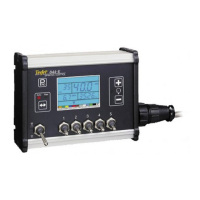
• To increase the value of a programmable digit, press the key. To decrease the value, press the key.
These keys are located directly to the right of the display. For some programming steps, pressing and holding
the or key will change the programmable value rapidly. Pressing the or key once will change
the value by one increment. Pressing the and keys simultaneously in some programming steps will
set the value to “0”.
• For either setup mode, pressing the key will advance you to the next programming step.
Steps to Successful Programming
To begin the programming process:
• Read above for programming tips.
• Be sure the “master” boom switch is “OFF.”
• Turn console “ON” by pressing the key. When the Control Console is turned on, the software version will
be displayed at the top of the display and the serial number will be displayed in the lower half of the display.
This information will be needed when calling for service support.
• To turn the console “off”, press and hold the key while pressing the key once, and then releasing both
keys. The console display will shut down providing no other keys are depressed.


 To Next Page