English
109
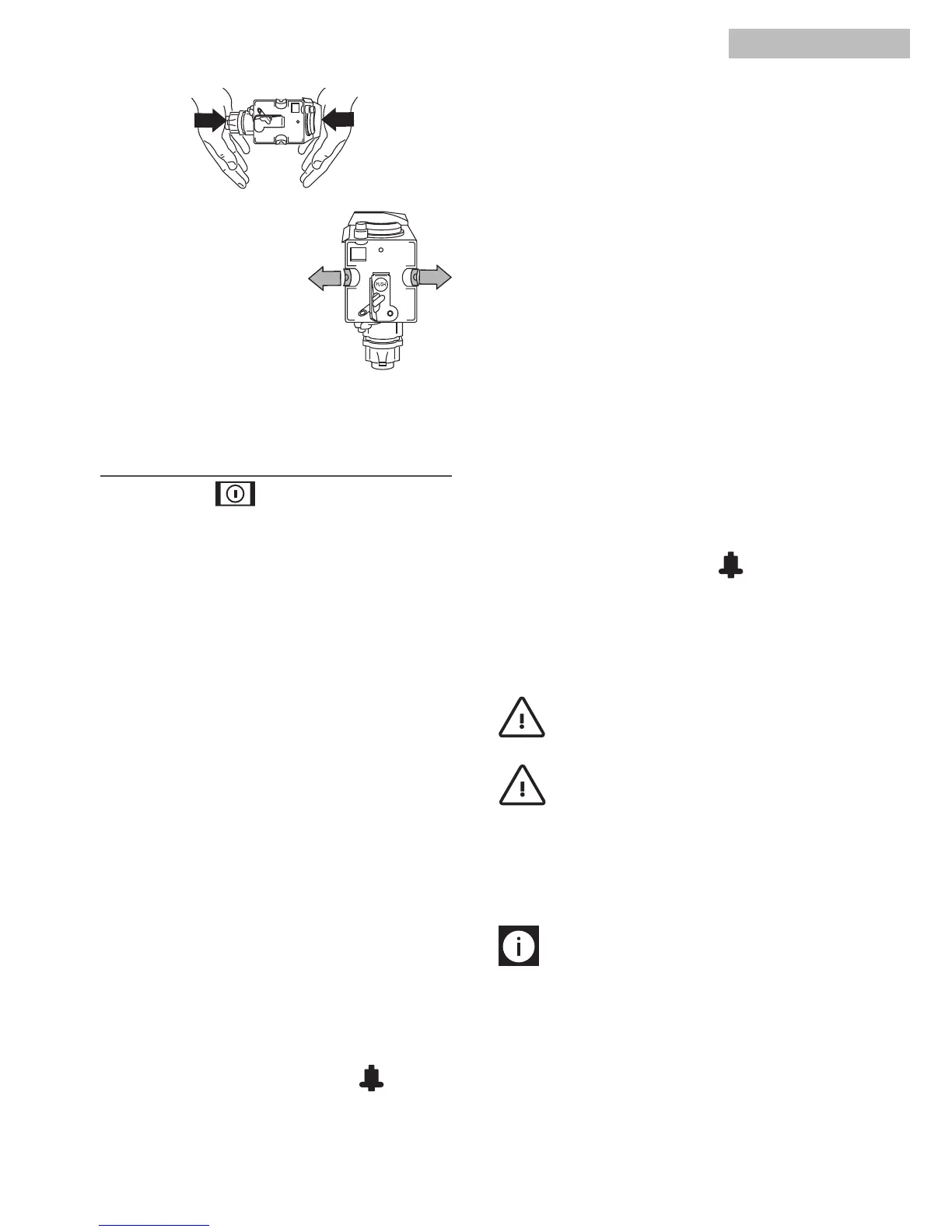
7. Once inserted, make sure
the two red buttons have
snapped out.
8. Replace the drip tray
(A14) and grounds con-
tainer.
9. Close the service door
(A2).
After turning the knob (A7) and waiting for the
appliance to be ready, you can use the internal menu
to modify the following parameters and functions:
• CLOCK
• STARTTIME7:30
• AUTO-STARTNO
• DESCALENO
• TEMPERATUREMEDIUM
• OFFAFTER1HOUR
• WATERHARDNESS4
• DEFAULTVALUESNO
• INSTALL/UNINSTALLFILTER
• FILTERRESETNO
Setting the clock
To set the clock, proceed as follows:
• PresstheMENUbutton(B6)thenpresstheNEXT
button (B7) repeatedly until the appliance dis-
plays: “CLOCK… 00:00”
• PresstheCHANGEbutton(B8)tosettheclock.
(IfyouholdtheCHANGEbuttondown,thetimeis
changed rapidly).
• PresstheOKbutton(B9)toconrm.
• Press the MENU button to exit programming
mode or NEXT to change other parameters.If
auto-start is set, when the appliance is in stand-
by, press any button to display the auto-start
symbol for 5 seconds.
Setting auto-start time
This function programmes the time the machine will
come on automatically to be ready for use.
• Makesuretheclockontheapplianceissetas
described in the previous chapter.
• PresstheMENUbutton(B6)(thelightoverthe
button comeson)then press the NEXT button
(B7) repeatedly until the appliance displays:
“STARTTIME…00:00”.
• PresstheCHANGEbutton(B8)tosettheauto-
start time.
(IfyouholdtheCHANGEbuttondown,thetimeis
changed rapidly).
• PresstheOKbutton(B9)toconrm.
• PressNEXTonceandtheappliancedisplaysthe
message:“AUTO-STARTNO”.
PresstheCHANGEbuttontomodifythefunction
(themachinedisplays“AUTO-STARTYES”).
• PresstheOKbuttontoactivateauto-start;
NOTE: when the machine is off and an auto-
start time has been set, the symbol appears
alongside the time on the unlit display.
• Press the MENU button to exit programming
modeorNEXTtochangeotherparameters.
Descaling
Important!
Before descaling, make sure the
water softener filter has been removed.
Important!
Descaler contains acids which
may irritate the skin and eyes.
It is vital to respect the manufacturer’s safety warn-
ings given on the descaler pack and the warnings
relating to the procedure to follow in the event of
contact with the skin and eyes.
N.B.!
Use the descaler recommended by the
manufacturer only.
Use of other descalers invalidates the guarantee.
Failure to descale the appliance as described also
invalidates the guarantee.
Over time, constant heating up of the water used to
make the coffee leads to limescale building up in
the inner circuits of the appliance.
CHANGING AND SETTING
MENU PARAMETERS



 To Next Page