Display
Setting Range
Default
TEMPERATURE UNITS
Select °F or °C.
°F or °C °F
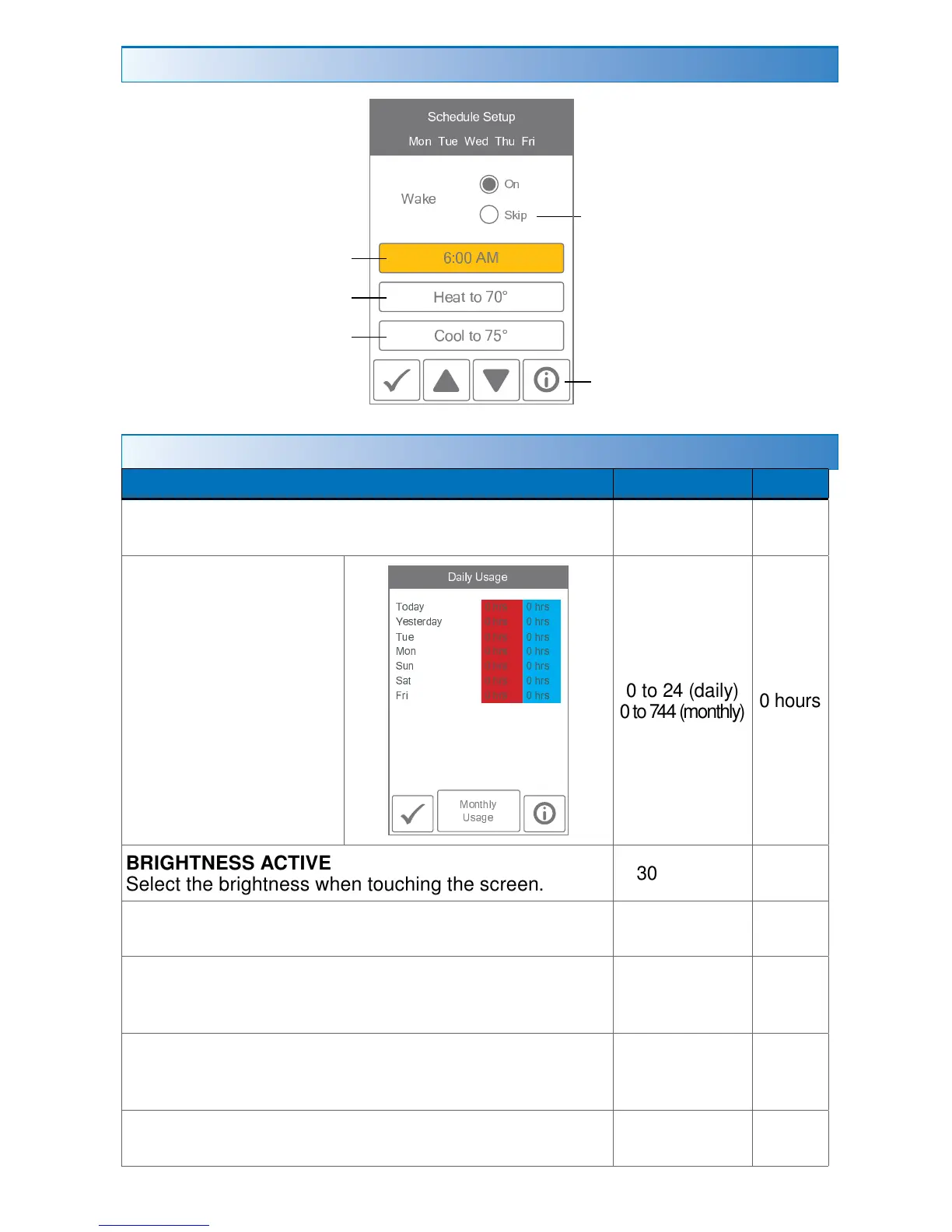
ENERGY USE
View the number of
hours the heating or
cooling has operated
either daily or monthly.
0 to 24 (daily)
0 to 744 (monthly)
0 hours
BRIGHTNESS ACTIVE
Select the brightness when touching the screen.
30 to 100%
100%
BRIGHTNESS INACTIVE
Select the brightness when not in use.
Off, 30 to 100% 50%
BACKGROUND
Select the background color.
White, Blue,
Black, Latte,
Espresso
Blue
LANGUAGE
Select the language.
English,
Español,
Français
English
SCREEN CLEAN
Locks screen for 10 seconds to allow cleaning.
N/A N/A
Schedule
Set heating temperature
Set cooling temperature
Select skip if you don't want
a temperature change.
Set schedule start time
¡ ¢
£ ¤ ¥ ¦
§ ¨ © ª
« ¬ ® ¯ ° ± ® « ® ² ° ³
´ µ ¢ ¶ · ¸ ¹ ¸ º ¶ » · ¼ ½ ¥
¾ ¿ À À Á Â
Ã Ä Ä Å Æ Ä Ç È É
Ê Ë Ì
Æ Æ Ä Ç À É
Info


 To Next Page