tekmar Connect Web and Mobile App
To view and adjust the WiFi Thermostat using a mobile phone or tablet, download the
tekmar Connect mobile app from the Apple
®
iTunes
®
Store or from the Google Play
®
Store.
Alternatively, go to tekmarConnect.com for web browser access.
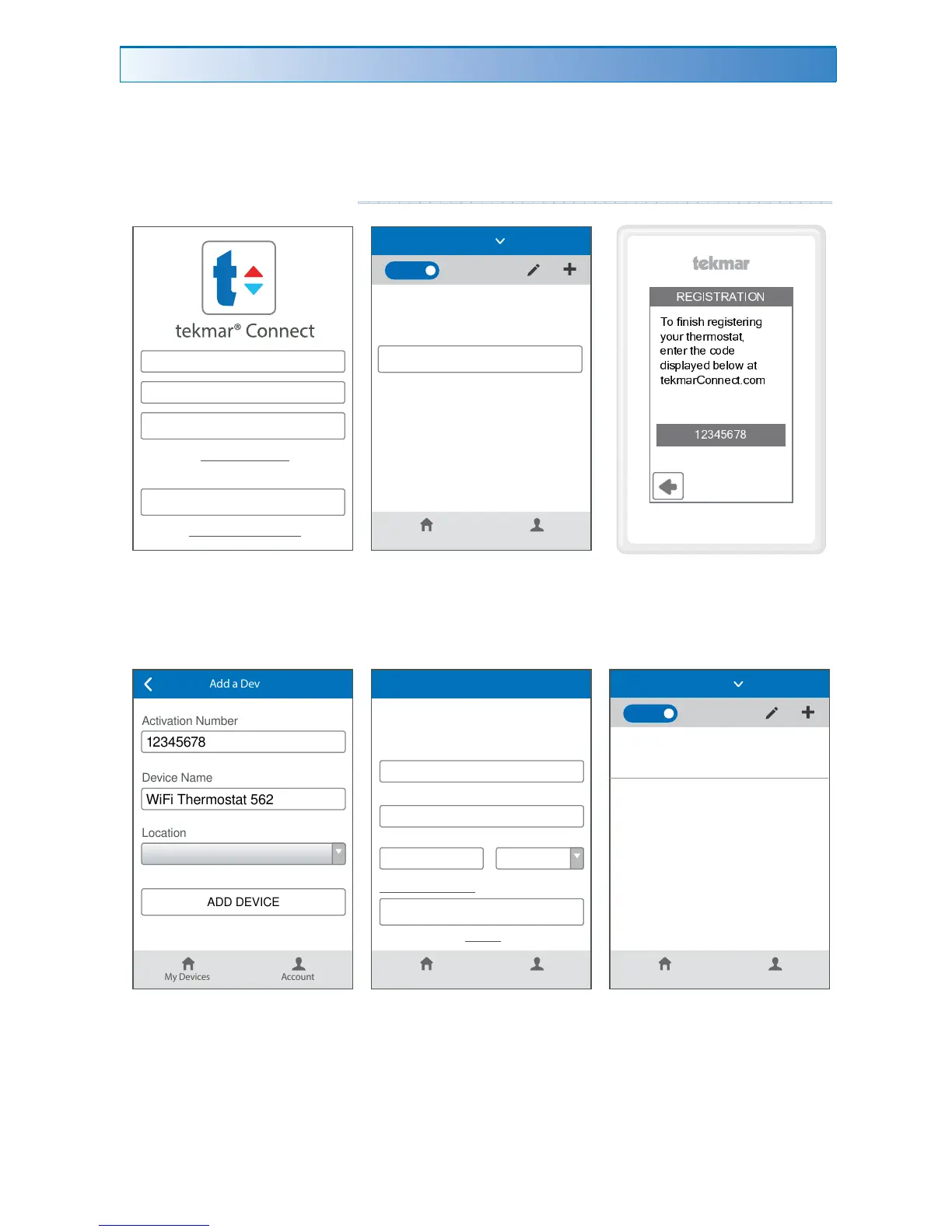
Step 1
Create a new account. Then
login using your username and
password.
Step 2
Add a Device
Step 3
On the thermostat, go
to WiFi menu and press
Register Device.
Step 4
Enter the 8 digit number
from the thermostat into the
mobile app. Then enter the
thermostat's room name. The
app supports multiple site
locations. Enter the location
for the thermostat.
Step 5
Edit your account and save.
The thermostat is
now listed on the My
Devices page.
Add Thermostat to App
----------------------------------------------
Email
Password
SIGN IN
SIGN UP AND GET STARTED
Forgot Password
Terms and conditions
Don't have an account?
My Devices Account
ADD A DEVICE
You don't have any devices associated with this location.
HOME
Home
É Ê Ë Ì Í Î É Ï Î Ì Ð Ñ
Î Ò Ó Ô Õ Ô Ö × Ø Ù Ú Ô Ö Û Ù Ø Ô Õ Ú
Ü
Ò Ý Ø Û × Ù Ø Þ Ò Ö Û ß Û à
Ù Õ Û Ù Ø Û × Ù á Ò â Ù
â Ô Ö ã ä ß
Ü
Ù â å Ù ä Ò æ ß Û
Û Ù ç Þ ß Ø è Ò Õ Õ Ù á Û é á Ò Þ
ê ë ì í î ï ð ñ
My Devices Account
12345678
WiFi Thermostat 562
ADD DEVICE
Activation Number
Device Name
Location
Add a Device
Home
My Devices Account
SAVE
First & Last Name
Username
name@domain.com
Email Address
Edit Your Account
(###)###-####
Phone
F
Logout
Change Password
Units
My Devices Account
WiFi Thermostat 562
78 °F
Auto
HOME
Home


 To Next Page