EasyManua.ls Logo

Tektronix T912 - How to Store; Display

Tektronix T912
101 pages
Print Icon
To Next Page IconTo Next Page
To Previous Page IconTo Previous Page
Loading...
Operating
Instructions—
T912
—
I—
“
>
SIG
AMPl
NAL
.ITUD
,
1
MEASURE
^ riMF FROM
t
j
A TO B
r
u
—
;
—
-
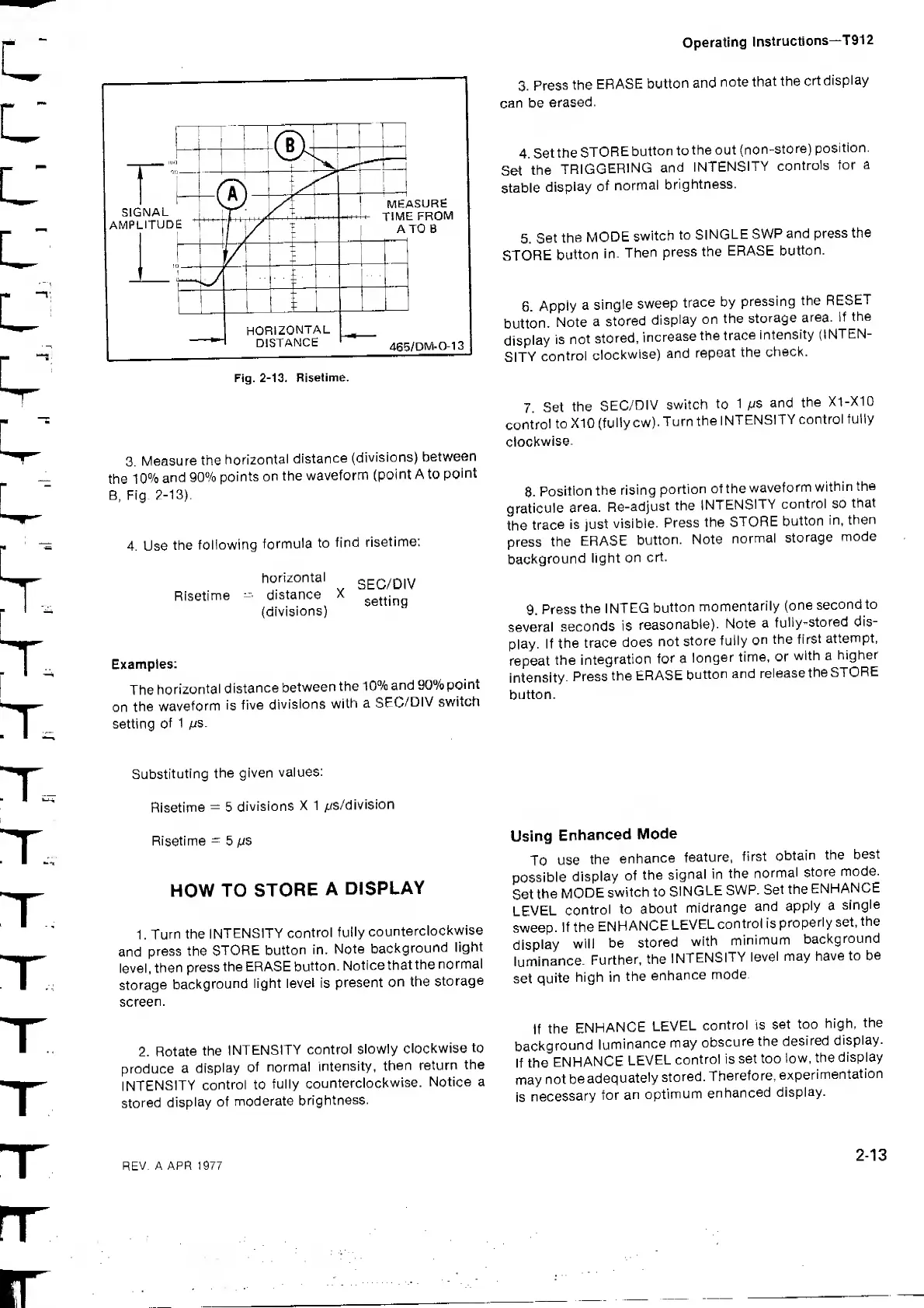
HORIZONTAL
DISTANCE
465/DWI-0-13
Fig.
2-13. Bisetime.
3.
Press
the
ERASE
button
and
note
that
the
crt
display
can be
erased.
4.
Set
the
STORE
button
to
the out
(non-store)
position.
Set
the
TRIGGERING
and
INTENSITY
controls
for
a
stable
display
of
normal
brightness.
5.
Set
the
MODE
switch
to
SINGLE
SWP
and
press the
STORE
button
in.
Then
press the
ERASE
button.
6.
Apply
a
single
sweep
trace
by
pressing
the
RESET
button.
Note
a
stored
display
on
the
storage
area.
If
the
display
is
not
stored,
increase
the
trace
intensity
(INTEN-
SITY
control
clockwise)
and
repeat
the
check.
3.
Measure the
horizontal
distance
(divisions)
between
the
10%
and 90%
points on
the
waveform
(point
A to
point
B, Fig.
2-13).
4. Use
the
following
formula
to
find
risetime:
Risetime
horizontal
distance
X
(divisions)
SEC/DIV
setting
Examples:
The
horizontal
distance
between
the 1
0%
and
90%
point
on
the
waveform
is
five
divisions
with
a
SEC/DIV
switch
setting
of
1 ijs.
7
Set
the
SEC/DIV
switch
to
1
IJS
and
the
X1-X10
control
to
X10
(fully
cw).
Turn
the
INTENSITY
control
fully
clockwise.
8.
Position
the rising
portion
ofthe
waveform
within
the
graticule
area.
Re-adjust
the
INTENSITY
control so
that
the
trace
is just
visible.
Press
the
STORE
button
in,
then
press
the
ERASE
button.
Note
normal
storage
mode
background
light
on
crt.
9.
Press
the
INTEG
button
momentarily
(one
second
to
several
seconds
is
reasonable).
Note
a
fully-stored
dis-
play.
If
the
trace
does
not
store
fully
on
the
first
attempt,
repeat
the
integration
for
a
longer
time, or
with a
higher
intensity.
Press
the
ERASE
button
and
release
the
STORE
button.
Substituting
the given
values:
Risetime
=
5
divisions
X
1
/:<s/division
Risetime
-
5
its
HOW TO
STORE
A
DISPLAY
1 .
Turn
the
INTENSITY
control
fully
counterclockwise
and
press the
STORE
button
in.
Note
background
light
level,
then
press
the ERASE
button.
Notice
that
the
normal
storage
background
light
level
is
present
on
the
storage
screen.
2.
Rotate
the
INTENSITY
control
slowly
clockwise
to
produce
a
display
of
normal
intensity,
then
return
the
INTENSITY
control to
fully
counterclockwise.
Notice a
stored
display
of
moderate
brightness.
Using
Enhanced
Mode
To
use
the
enhance
feature,
first
obtain
the
best
possible
display
of
the
signal in
the
normal
store
mode.
Set
the
MODE
switch to
SINGLE
SWP.
Set
the
ENHANCE
LEVEL
control
to
about
midrange
and
apply
a
single
sweep.
If the
ENHANCE
LEVEL
control is
properly
set.
the
display
will
be
stored
with
minimum
background
luminance.
Further,
the
INTENSITY
level
may
have
to
be
set
quite
high in
the
enhance
mode.
If
the
ENHANCE
LEVEL
control is
set too
high,
the
background
luminance
may
obscure
the
desired
display.
If the
ENHANCE
LEVEL
control is
set too
low, the
display
may
not
be
adequately
stored.
Therefore,
experimentation
is
necessary
for
an
optimum
enhanced
display.
REV.
A APR 1977
2-13

Related product manuals