EasyManua.ls Logo

Tektronix T912 - And Storage

Tektronix T912
101 pages
Print Icon
To Next Page IconTo Next Page
To Previous Page IconTo Previous Page
Loading...
Adjustments—
T912
A.
DISPLAY,
POWER
SUPPLY,
AND
STORAGE
Equipment
Required
1.
Digital
Voltmeter
5. 50 Q
Termination
2.
Time-Mark
Generator
6.
Screwdriver
3.
Sine-Wave
Generator
7. Low-Capacitance
Alignment
Tool
4. 50 n
BNC
Cable
1.
Preliminary
Control Settings
NOTE
Do not
preset
internal
controls.
STORE
nonstore
(button
out)
ENHANCE
LEVEL
fully
ccw
INTENSITY
midrange
Vertical
Mode
CH
1
CH 1
VOLTS/DIV
1 V
(1X)‘
VOLTS/DIV
VAR
(both)
detent
(cw)
AC-GND-DC
(both) GND
SEC/DIV
.1
ms
X1-X10
XI
(fully
ccw)
SOURCE
INT
MODE
AUTO
SLOPE
-FOUT
LEVEL
midrange
CH 1
POSITION
midrange
Horizontal
POSITION
midrange
Set all
other
controls
as
desired.
The
oscilloscope
should
produce
a
baseline
trace
with
the
controls
set as
above. Adjust the
INTENSITY
and
FOCUS
controls (on
front
panel), and
ASTIG
control
(left
side of
cabinet)
as
needed
to maintain a
well-defined
display.
2.
-8
V
Power
Supply
NOTE
Do
not
change
the
setting
of the
—8
V
adjustment
unless
you intend to
re-adjust
the
entire
instrument.
a. Connect
digital
voltmeter between
the
-8
V side
of
R775
and ground
(see Fig.
4-1).
If
meter
does not
read
between
-7.96
V and
-8.04
V, proceed
to
part b.
b.
ADJUST—
R773,
—8
V Adj (see
Fig.
4-1) for
—8.00
V
dc.
c. Disconnect
digital
voltmeter.
3.
Trace
Rotation
a.
Position
trace vertically
to
center horizontal
graticule
line.
b.
ADJUST—
TR ROT, R472,
to align
trace
with center
horizontal
graticule line.
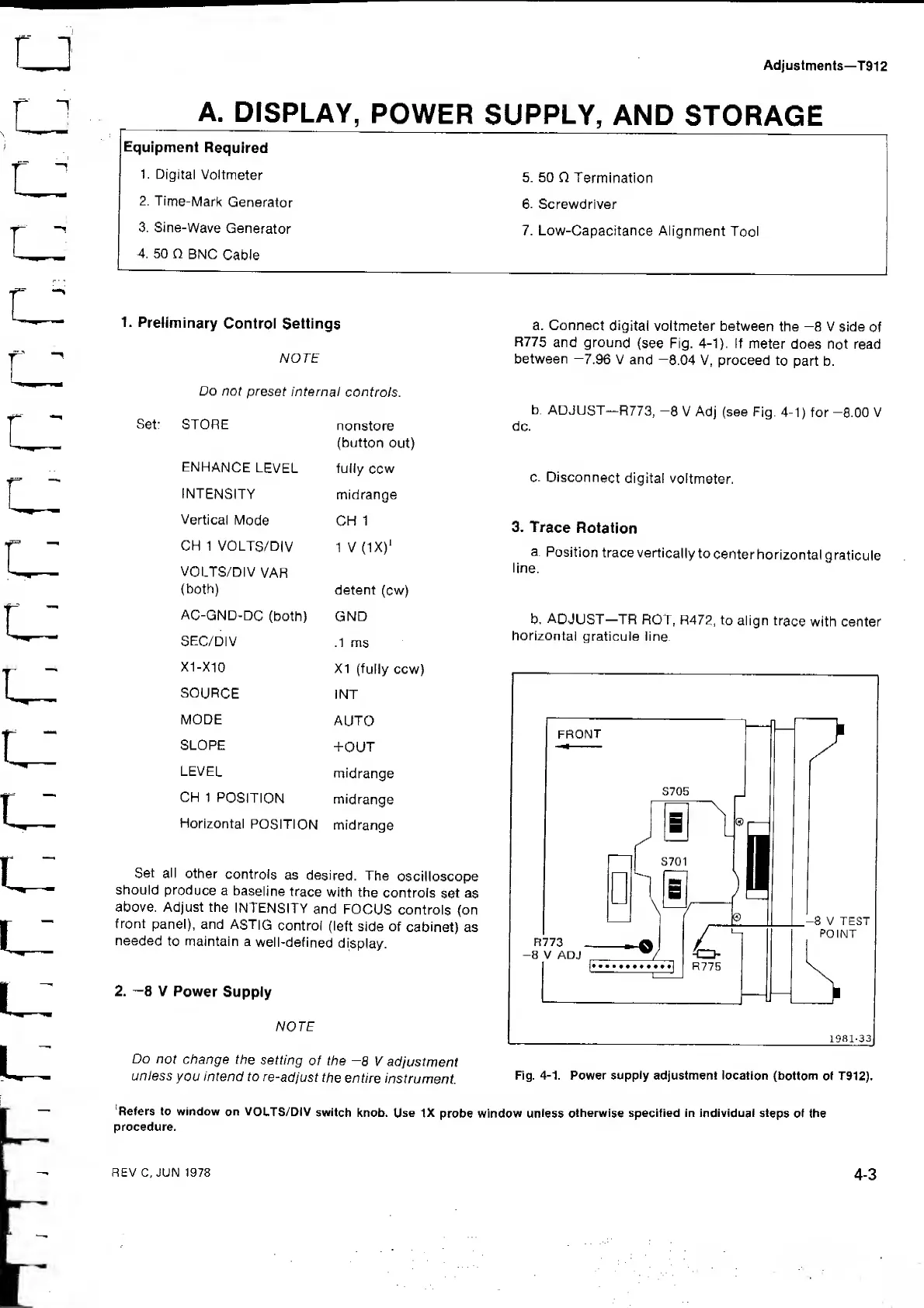
Fig.
4-1.
Power
supply
adjustment location
(bottom
of T912),
'Refers to window
on VOLTS/DIV
switch
knob. Use
IX
probe window
unless
otherwise specified in individuai
steps
of the
procedure.
REV C, JUN 1978
4-3

Related product manuals