EasyManua.ls Logo

Tektronix T912 - Page 39

Tektronix T912
101 pages
Print Icon
To Next Page IconTo Next Page
To Previous Page IconTo Previous Page
Loading...
Adjustments—
T91
2
4. Geometry
a. Set
CH
1
AC-GND-DC
to DC;
INTENSITY
and
FOCUS
as
required.
b.
Connect
.1
ms markers
from
time-mark
generatorto
CH
1
input via
50 Q bnc cable
and
50
O
bnc
termination.
c.
Set CH 1
VOLTS/DIV
and
VAR
to
Obtain slightly
more
than
eight
divisions
of
vertical
deflection
and
position
display
baseline
below
bottom
graticule
line
(off
screen).
d. Set
SEC/DIV
to
obtain
about
one
marker/division
and
rotate
horizontal
POSITION
to align
a marker
with
center graticule
line.
5A. STORAGE
(Below
SN B010300)
Vertical Mode
CH
1
(button
in)
CH 1
AC-GND-DC
DC
CH
1
VOLTS/DIV
.1 V
SEC/DIV
0.5
ms
STORE
store
(button
in)
SOURCE
INT
MODE
AUTO
enhance
level
fully
ccw
Channel
1
POSITION
fully
ccw
b. Rotate
the
Channel 1
POSITION
control
clockwise
until
entire
screen
is
written.
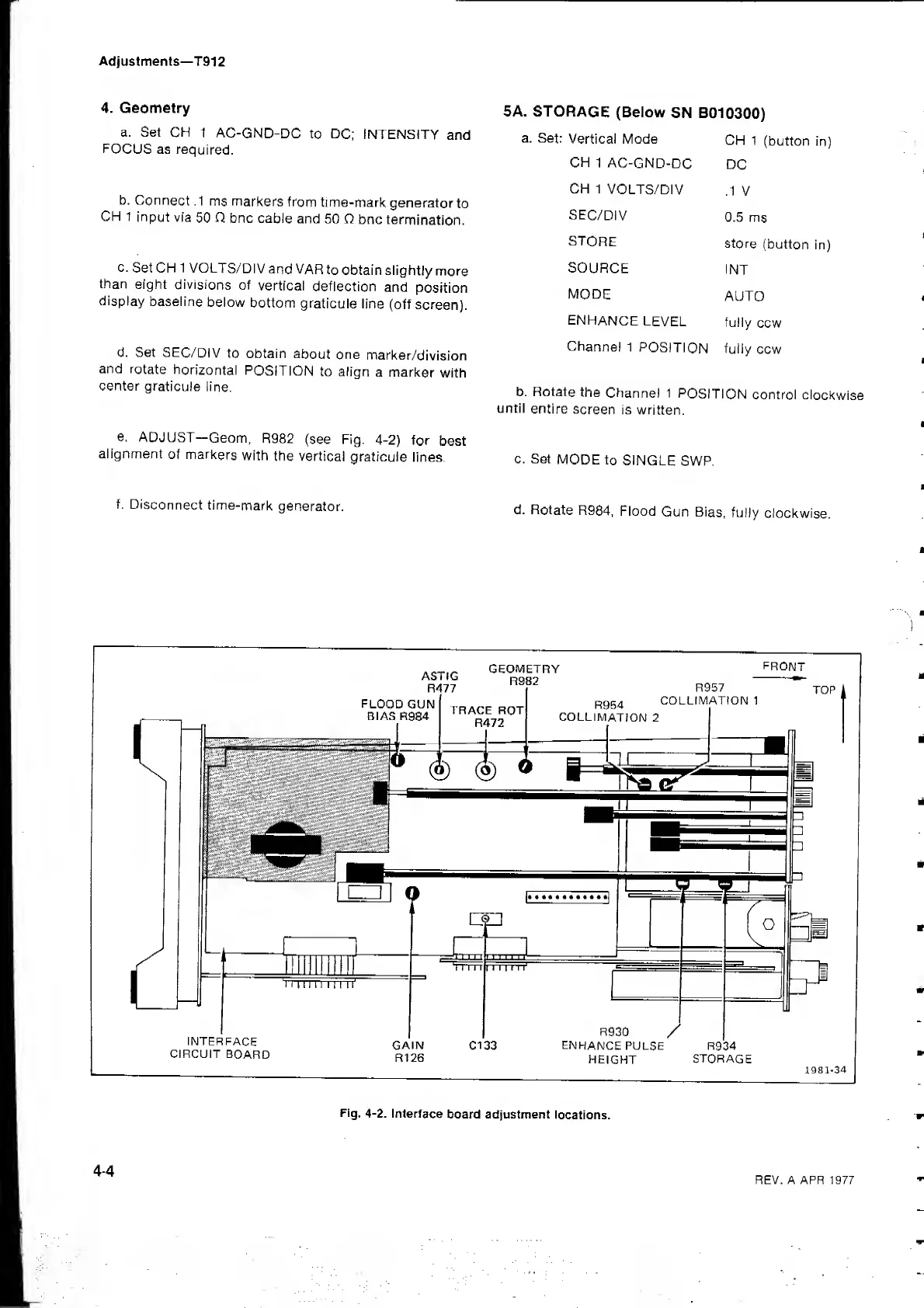
e.
ADJUST
Geom,
R982
(see Fig.
4-2)
for
best
alignment
of
markers
with
the vertical
graticule
lines.
c. Set
MODE
to
SINGLE
SWP.
f.
Disconnect
time-mark
generator.
d.
Rotate
R984,
Flood
Gun
Bias,
fully
clockwise.

Related product manuals