EasyManua.ls Logo

Tektronix T912 - Page 30

Tektronix T912
101 pages
Print Icon
To Next Page IconTo Next Page
To Previous Page IconTo Previous Page
Loading...
Performance
Check—T912
d.
CHECK—Display
amplitude
reduces from
five
d. Set
generator
frequency
to
10
MHz.
divisions
to less
than
2 divisions
with CH 1
VAR
control
turned
fully
counterclockwise.
e.
CHECK—
Display
amplitude
is at
least
3.5
divisions.
e. Return
both VAR
controls
to
detent
position.
f.
Disconnect
test
equipment.
3. CH 1
Bandwidth
a.
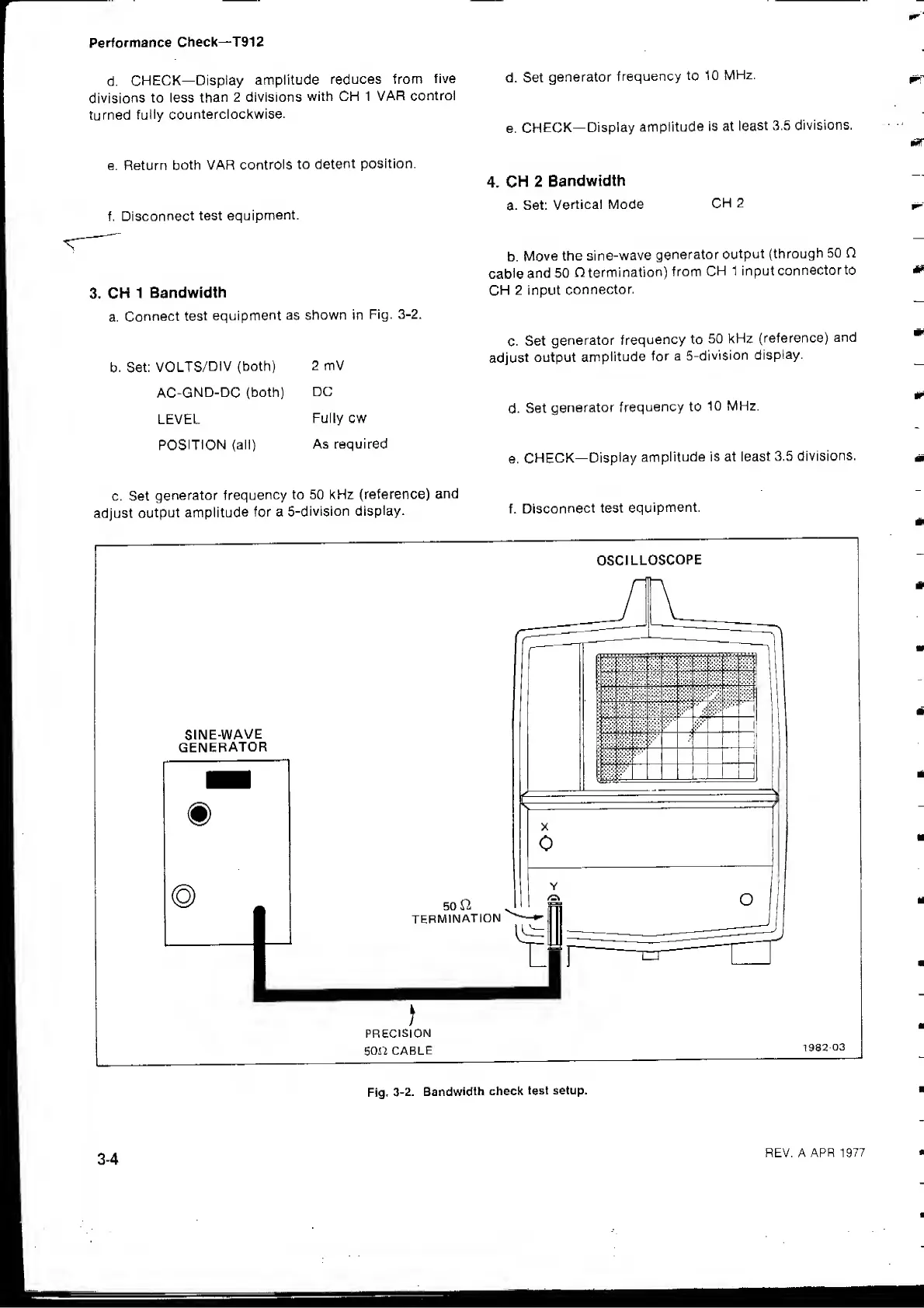
Connect
test
equipment as
shown in
Fig.
3-2.
b.
Set:
VOLTS/DIV
(both)
AC-GND-DC
(both)
LEVEL
POSITION
(all)
2 mV
DC
Fully cw
As required
4.
CH
2
Bandwidth
a.
Set;
Vertical Mode
CH
2
b.
Move
the
sine-wave
generator
output
(through
50 Q
cable
and
50
O termination)
from
CH
1 input
connectorto
CH
2 input
connector.
c.
Set
generator
frequency to
50 kHz
(reference)
and
adjust
output
amplitude
for a
5-division
display.
d.
Set
generator
frequency to
10 MHz.
e.
CHECK—
Display
amplitude is at
least
3.5
divisions.
c. Set
generator
frequency
to 50 kHz
(reference)
and
adjust
output
amplitude
for a
5-division
display.
f.
Disconnect
test
equipment.
OSCILLOSCOPE
PRECISION
son
CABLE
m
m
Fig.
3-2. Bandwidth
check
test setup.
3-4
REV. A APR
1977

Related product manuals