EasyManua.ls Logo

Tektronix T912 - Page 82

Tektronix T912
101 pages
Print Icon
To Next Page IconTo Next Page
To Previous Page IconTo Previous Page
Loading...
Options—
T91
2
T912
OPTION 1
DIFFERENTIAL
MODE
NOTE
This
description
includes
the
operation
and
maintenance
of the
added features
of
Option 1. For
all
other
Information
concerning
the T912,
refer
to
the
appropriate
section
of this manual.
Schematic
Diagrams
for
Option 1 are included
at the end
of the
Diagrams
section in
this
manual.
OPERATING
INFORMATION
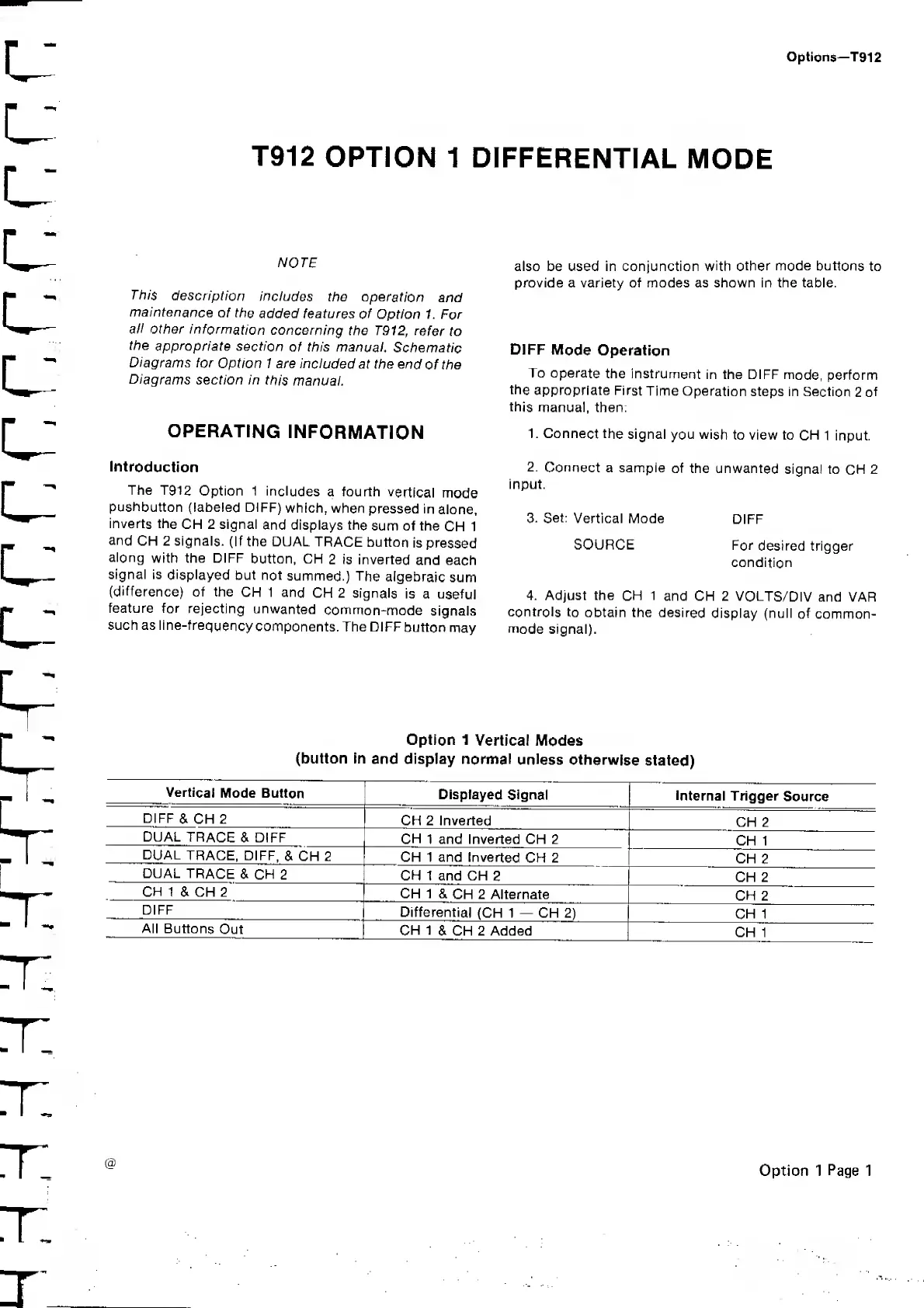
Introduction
The T912
Option 1
includes
a fourth
vertical
mode
pushbutton
(labeled
DIFF)
which,
when
pressed
in
alone,
inverts the
CH 2 signal
and displays the
sum of the
CH 1
and
CH 2 signals.
(If the DUAL
TRACE
button
is
pressed
along
with the DIFF
button, CH
2 is inverted
and each
signal is
displayed
but not
summed.)
The
algebraic
sum
(difference)
of the
CH 1 and
CH 2 signals
is a
useful
feature for
rejecting
unwanted
common-mode
signals
such as
line-frequency
components.
The DIFF
button
may
also be used in conjunction
with other
mode
buttons
to
provide a variety of modes as shown in the table.
DIFF
Mode
Operation
To operate
the instrument
in the DIFF
mode,
perform
the
appropriate First
Time
Operation
steps in Section
2
of
this
manual, then:
1. Connect
the
signal
you wish
to view to
CH
1 input.
2.
Connect
a sampie
of the unwanted
signal to
CH
2
input.
3.
Set:
Vertical Mode
DIFF
SOURCE
For
desired trigger
condition
4. Adjust the
CH 1
and CH 2
VOLTS/DIV
and VAR
controls
to obtain the desired
display (null
of
common-
mode
signal).
Option
1
Vertical Modes
(button in
and display normal
unless
otherwise
stated)
Vertical
Mode Button
Displayed
Signal
Internal
Trigger
Source
DIFF
& CH 2
CH 2 Inverted
CH 2
DUAL
TRACE
& DIFF
CH
1 and Inverted CH 2
CH 1
DUAL
TRACE, DIFF,
& CH 2
CH 1 and Inverted
CH 2
CH
2
DUAL
TRACE
& CH
2
CH 1 and CH
2
CH 2
CH
1 & CH 2
CH 1
&
CH 2 Alternate
CH 2
DIFF
Differential
(CH 1
CH
2)
CH
1
All Buttons
Out
CH 1
& CH 2 Added
CH 1
@
Option 1
Page
1

Related product manuals