Telemark Cryogenics Microprocessor Based Cryochillers
Revision 1.0.7 October 2018
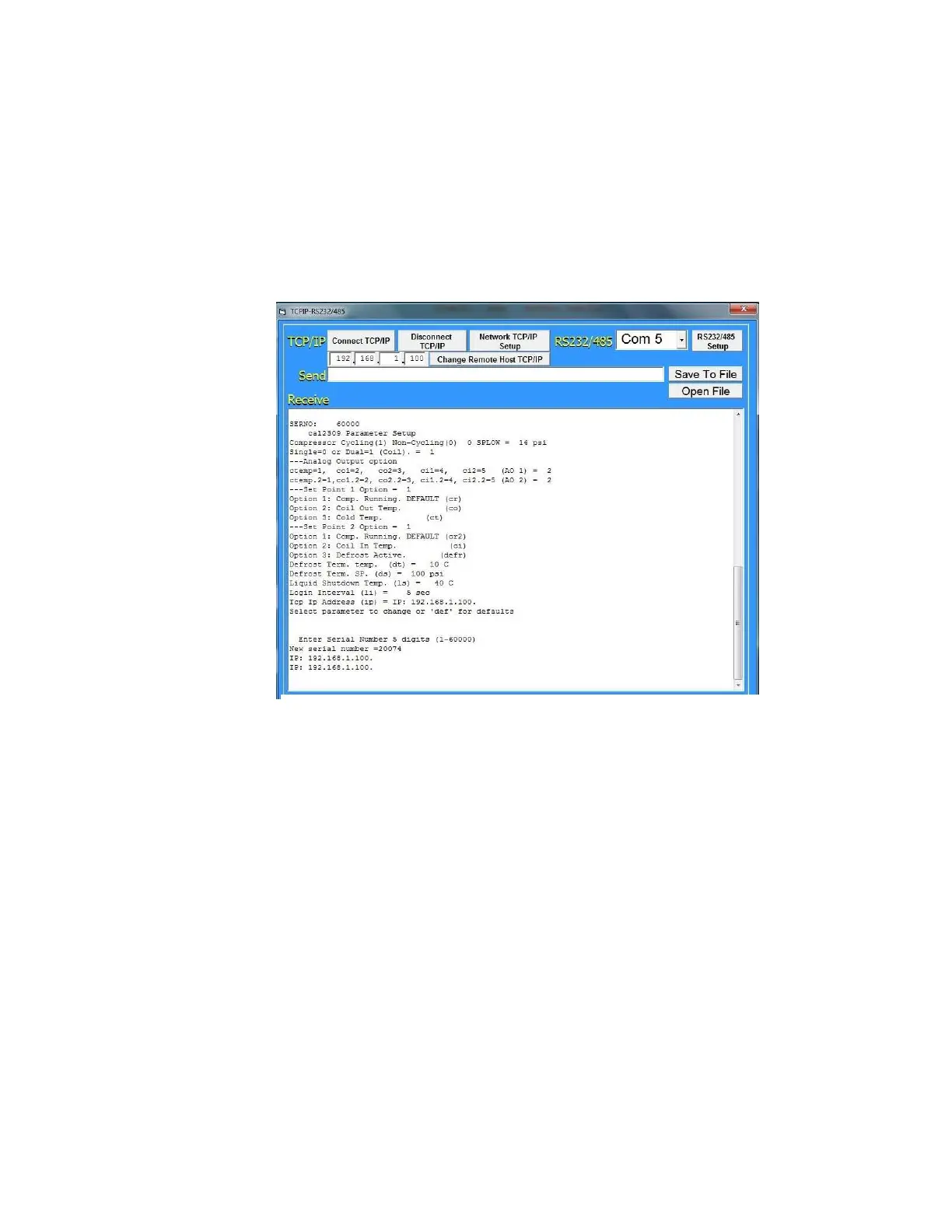
2.9.3 Using TCPIP-RS232/485/Ethernet GUI
During installation it is possible through a computer running the
TCPIP™ software (supplied on USB thumb drive) to adjust a number
of system parameters to match your application requirements. This
software must be installed in a PC/laptop prior to communication with
the Cryochiller. The connection is made using a standard Ethernet
CAT5/6 crossed patch cable (see section 2.8.2 above) checking to
ensure that the TCP/IP properties are set up as described in sections
2.8.2.1 above.
2.9.3.1GUI Button/Screen Functions
Connect TCP/IP
- establishes the connection to the Cryochiller.
Disconnect TCP/IP
– breaks the connection to the Cryochiller.
Network TCP/IP Setup
– displays help screen in setting up the
TCP/IP Ethernet connection protocol.
RS232/485 Setup
– displays help screen in setting up RS232 and
RS485 connection information and protocols.
Change Remote Host TCP/IP
(only on units with software versions
TVP_2018_02_08 or later only)– allows the user to change the host IP
address of the Cryochiller. To change the IP address, enter the IP
address required and then press the “Change Remote Host TCP/IP”
button.
Fig 19 TCP/IP GUI



 To Next Page