iRIS8 - Addressable Fire Alarm Panel – Installer Programming
41
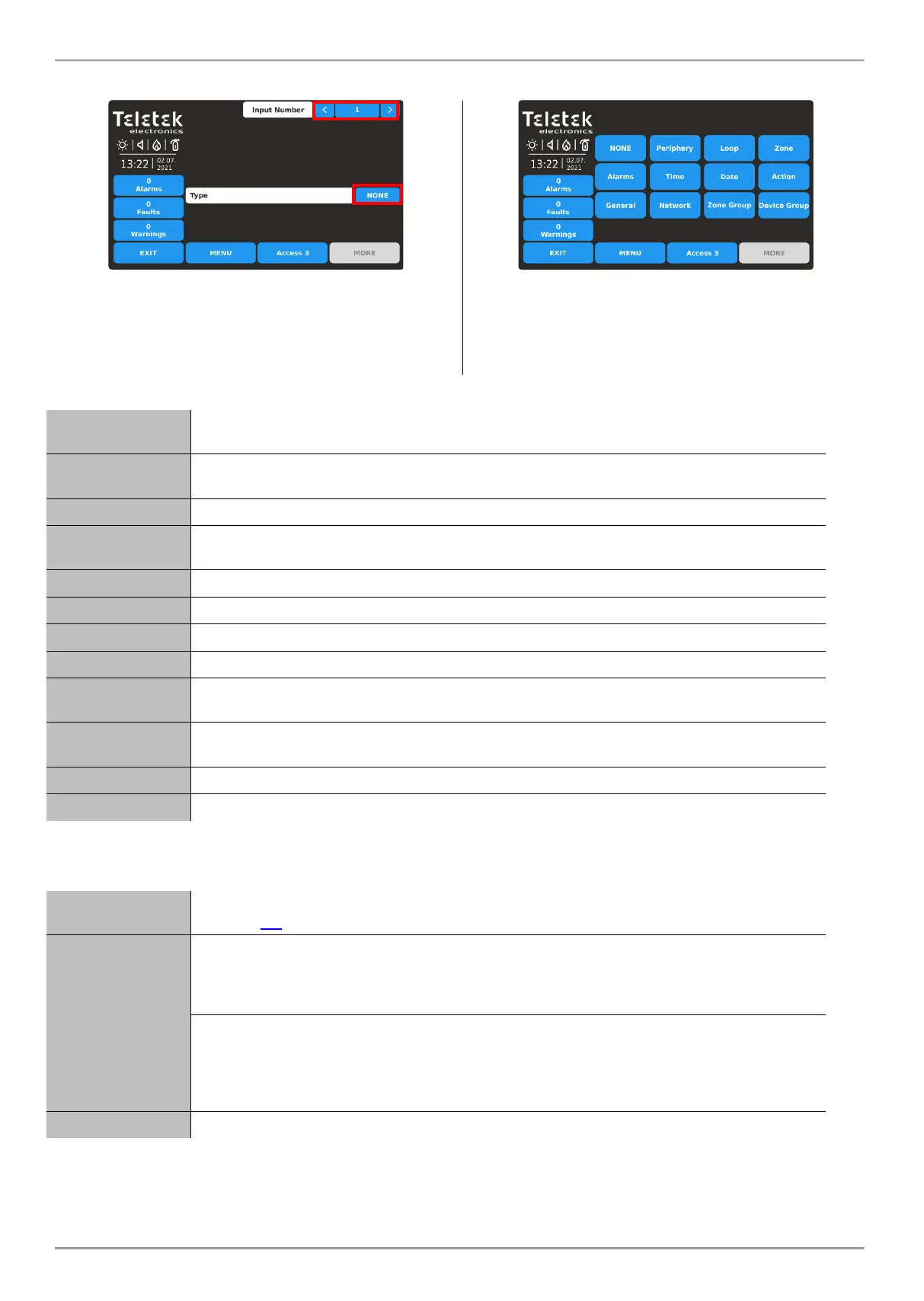
Enter INPUTS submenu.
By default, all Inputs are set as NONE Type.
Use the arrow buttons, or enter an input number from 1 to
250. Press the active button for selection the input type
(NONE). Note: The screen content may change according
the settings for Input Type.
The different input types are available for section in a list.
The type, as the other specific settings must be confirmed
in the main screen with APPLY button. Select the input
type to load the specific parameters for setting.
This type is selected, when the input is an input terminal of the main input-output module of
the panel.
This type is selected, when the input is an input terminal of a loop device, as MIO-22,
MIO-22M, MIO-40, MINP M, etc.
This option is selected, when the input will be activated from a zone event.
This option is selected, when the input will be activated from an encountered number of
alarms.
This option is selected, when the input will be activated on a time schedule.
This option is selected, when the input will be activated at a time period.
This option is selected, when the input will be activated from an action event.
This option is selected, when the input will be activated from a general event.
This option is selected, when the input will be activated from a network device
(panel/repeater number).
This option is selected, when the input will be activated from a zone in fire alarm or fault,
included in a group.
This option is selected, when the input will be activated from a device included into a group.
All Input types have some common settings available in the main settings screen. The settings are described in the
following table:
This is an active text field for description for the input up to 40 symbols. For text entering
see item 2.3.
This setting is for behaviour of the input in case of activation. Every pressing of the button
changes the setting.
LATCHED - Once activated, the input stays active until RESET.
UNLATCHED - Monitors the status.
This setting is for the input active status. Every pressing of the button changes the setting.
- NORMAL - The input is ON when receiving of activation signal (event) and will is OFF
(normal status) when the signal is lost.
- INVERTED - The input is ON when the signal is lost, and is OFF (normal status) when
receiving of activation signal (event).
Set a time delay for activation of the input within the interval 0–600 sec.
The common setting for all Input Types is selecting a Group number. The inputs can be organized to groups
according their operation.
Note: By default, the Input 1 is set to Group 1, Input 2 is set to Group 2, etc. The installer can reorganize the Group
numbers according the system requirement and configuration.














 To Next Page