iRIS8 - Addressable Fire Alarm Panel – Installer Programming
62
3.5.6. Language Selection
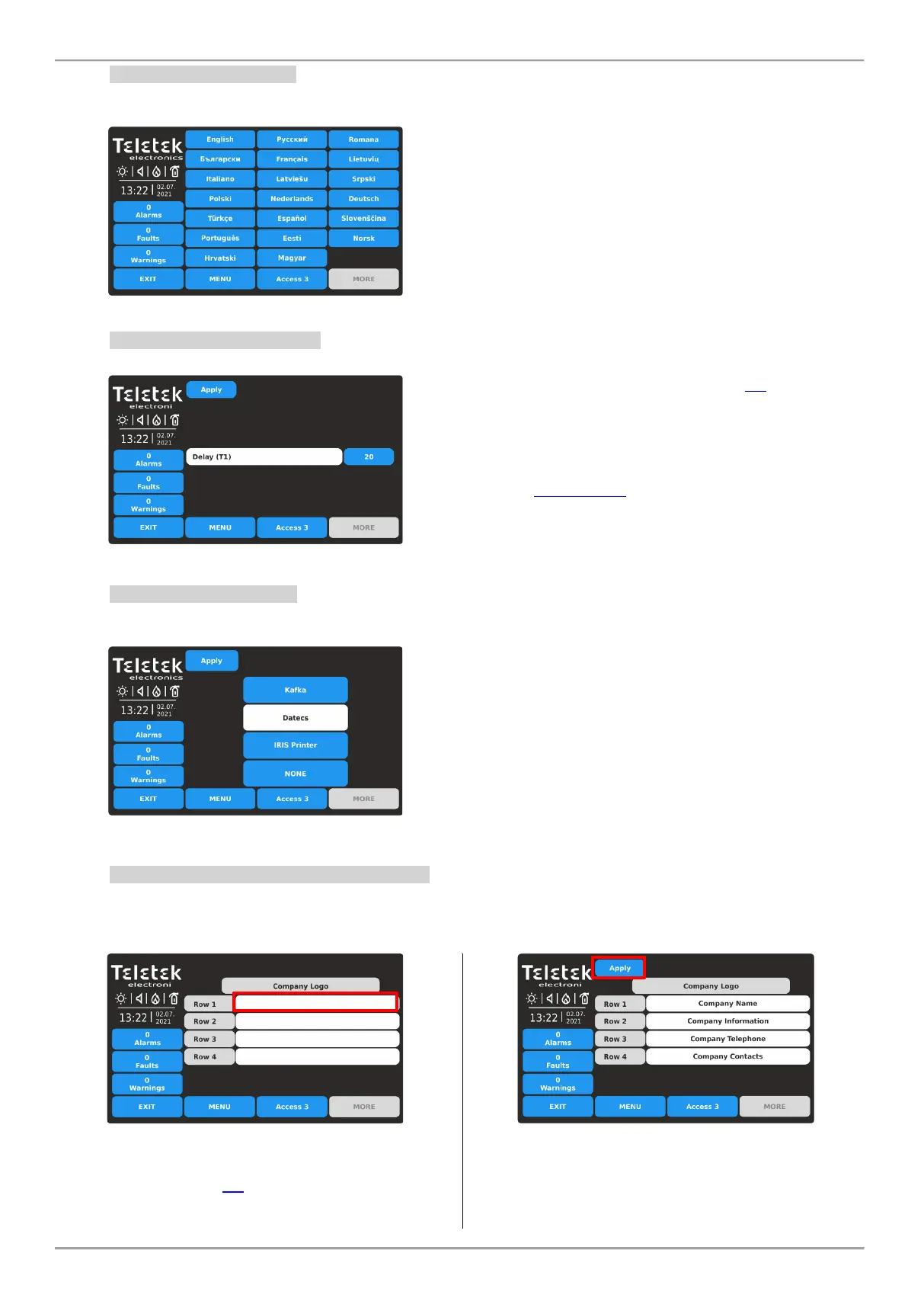
The iRIS8 panel supports operation in different languages. By default, it is set English language for the menus.
Changing the language is quick without need of confirmation. Enter PANEL – LANGUAGE.
Find your language in the list and just press its button.
The language of the panel menus will change
immediately and the iRIS8 will return in Main screen
automatically.
Note: The Language setting is made just for the concrete
iRIS8 panel. It is possible operation of panels in network
set in different languages of the menus.
3.5.7. Delay Time (T1) Setting
Enter PANEL – DELAY (T1). Here the Installer can set a common time delay for activation for all outputs (0 - 60 sec.).
Note: If a T2 delay time for a zone (item 3.1) is set to 0,
the T1 common delay time is ignored.
When T1 delay time is set to 0, then the individually set
T2 delay times for separate zones are activated in case of
alarm condition.
See also APPENDIX D - “Two steps of alarming” working
algorithm.
Press APPLY button to save the introduced change.
3.5.8. Setting Printer Type
Enter PANEL – PRINTER. This is a menu for choosing the type of the printer connected to “Printer” terminal on the
interface board of iRIS8 configuration.
The iRIS8 fire alarm control panel can operate with the
following types of thermal printers:
Cannon type: Kafka and Datecs - These are compact
stand-alone model thermal printers.
IRIS Printer - The printer is situated in a durable metal
box suitable for building of modular structure.
To select the printer type, press the corresponding button
and then confirm the change with the APPLY button.
Only one type of printer can be selected.
No further programming for the thermal printer is needed.
3.5.9. Company Logo Setting (Screen Saver)
This is an option for turning off the Main Screen and displaying some company information while the panel is in normal
operation mode. In case of missing active messages for events and there is no pressed button, the panel will switch on
to “Screen saver” with company information after 60 seconds. Enter – PANEL – COMPANY LOGO menu.
Four rows for introducing information are available.
Press the active text field to enter text using the virtual
keyboard – refer to item 2.3 for details about text
introducing.
Confirm the settings pressing the APPLY button on the
top of the screen.
Note: You must enter information into at least one row to
enable the “Screen Saver” with Company logo option.
To return to Panel Menus, press EXIT button.














 To Next Page