iRIS8 - Addressable Fire Alarm Panel – Installer Programming
56
3.5.2.2. Panels
After Enabling the Network, every panel starts looking for other panels in the network. If a new panel is found in the
system it is added to the panels list with the number set into its Network Settings. The panels are displayed also with
unique name (if set), IP address and current status in the network. All new found panels must be added to panel
configuration.
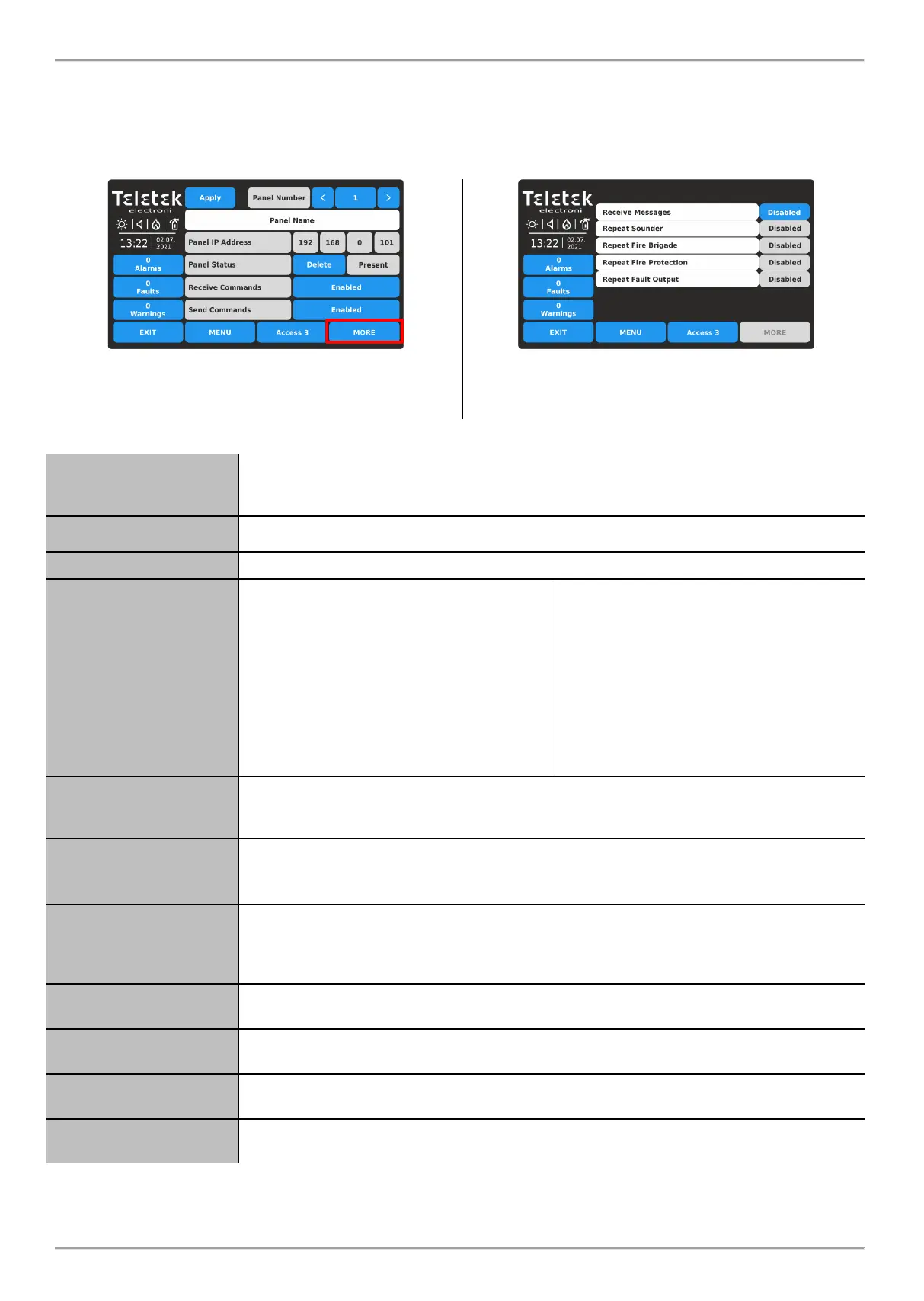
Enter PANELS submenu. The settings are distributed in two separate screens.
Press MORE button to move to the next screen for
receiving messages and repeating status of the outputs.
Press APPLY button to save all introduced changes.
These are the settings for receiving messages from other
panels and repeating their current status in the network.
Press EXIT button to move back to previous screen.
Fields description and available settings at Panels submenu:
Use the left/right arrow buttons to scroll the numbers of available panels connected to the
network. You can also enter the number directly pressing the active digit button and use
the virtual digit’s keyboard. Up to 64 panels can be connected in a common network.
In the field is displayed the set name for the panel.
Review of the IP address of the panel.
Active button for operation with functionality
according the current status:
ADD – New panel is found. Press the
button to add it to the configuration.
DELETE – Remove present or fault panel
from the configuration.
FIX – Active, when a change in the network
settings for the current panel is applied.
Press the button for quick correction and
fixing the new settings.
Current status field:
NEW PANEL – The panel is new for the
configuration. Press ADD button to confirm.
PRESENT – The panel is in normal
operation mode.
FAULT – Fault mode, problem with
connection in the network.
THIS – This is the current panel from which
the other panels are reviewed.
NONE – No found/set panel at this number.
Option for enabling receiving of control commands (Evacuate, Reset, Silence Alarm and
Silence Buzzer) from other panels in the network. Every pressing of the button changes
the status Enabled/Disabled. By default, the option is Disabled.
Option for enabling sending of control commands (Evacuate, Reset, Silence Alarm and
Silence Buzzer) to other panels in the network. Every pressing of the button changes the
status Enabled/Disabled. By default, the option is Disabled.
Option for enabling receiving messages for events from other panels in the network. Every
pressing of the button changes the status Enabled/Disabled. The button is used for global
enabling the settings for Repeating the operation of the outputs of connected fire panels.
By default, the option is Disabled.
Option for enabling the repeating Sounder output status of the remote panels including the
delays. By default, the option is Disabled.
Option for enabling the repeating Fire Brigade output status of the remote panels including
the delays. By default, the option is Disabled.
Option for enabling the repeating Fire Protection output status of the remote panels
including the delays. By default, the option is Disabled.
Option for enabling the repeating Fault output status of the remote panels including the
delays. By default, the option is Disabled.
* Note: The options are available for setting only when the Receiving Messages option is Enabled. In case of alarm,
fault or disable type event, the panel will display on its screen the current status of the outputs of connected fire alarm
panel(s).














 To Next Page